Group 8 Job editor Page 192
Release R1.03e LEIBINGER JET3
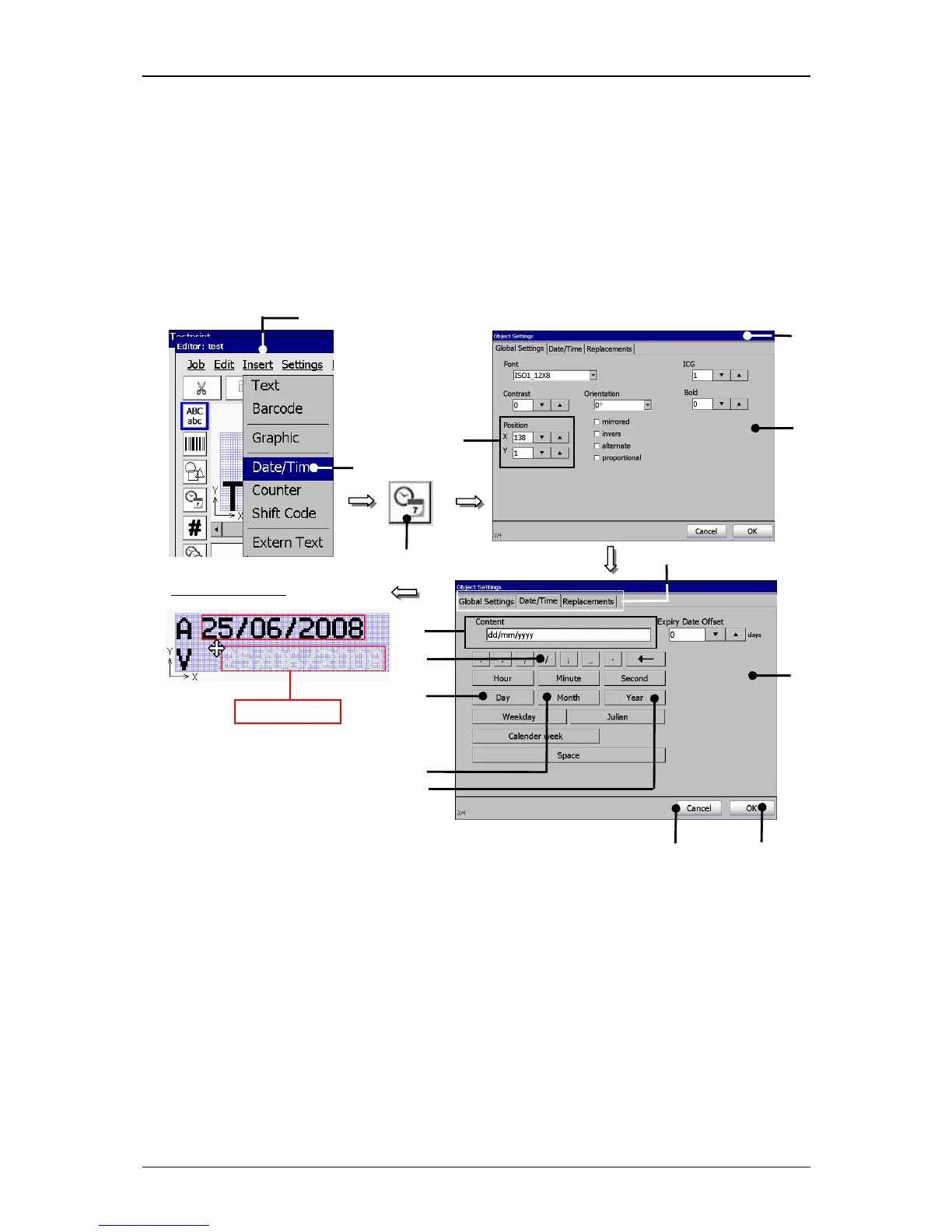
The applied date input is displayed in the menu <Job editor>.
Now click on the date element to mark it. It is now displayed with a red object
frame.
Position the element with the direction buttons of the job editor or use the Drag-
function to shift the element.
Figure 118
Print elements (Date/time input (Step 1))
1 – Button <Insert> 9 – Button </>
2 – Option <Date/Time> 10 – Button <Month>
3 – Direct button (Icon) 11 – Button <Year>
4 – Menu <Object settings (Date/Timet)> 12 – Display field <Content>
5 – Functional area <Global Settings> 13 – Button <OK>
6 – Setting fields <Position X/Y> 14 – Button <Cancel>
7 – Functional area <Date/Time> 15 – Register cards
8 – Button <Day>
1



 To Next Page