Group 8 Job editor Page 205
Release R1.03e LEIBINGER JET3
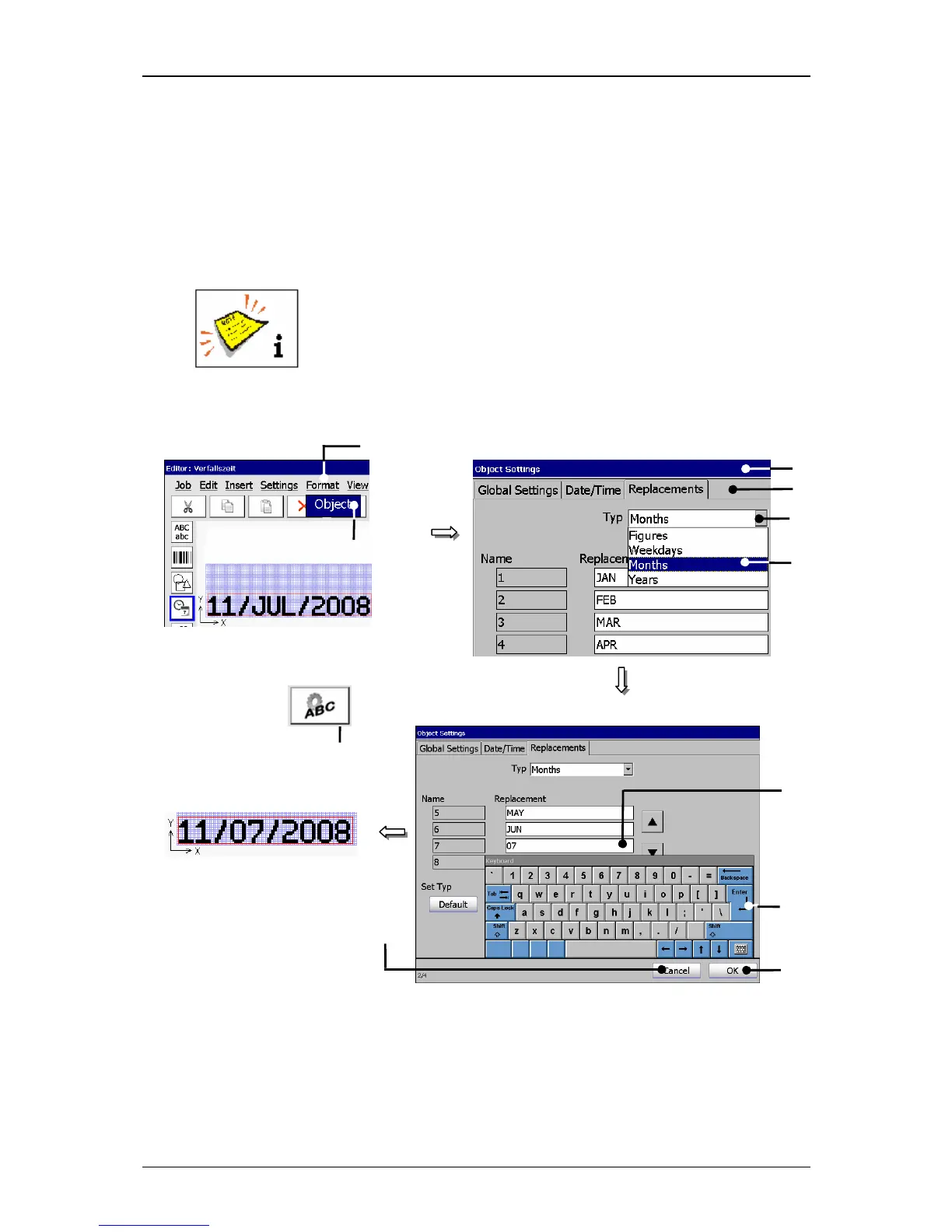
Press the button <Enter>
(9) of the keyboard field to take over the
replacements to the setting field.
Press the button <OK> (10) to take over the inputs and to close the menu or
press the button <Cancel> (11) to leave the menu without saving the inputs.
In the menu <Job editor>
the date specifications with replacements are
displayed.
You will find further information regarding the working with
keyboard fields in the chapter Keyboard fields!
Figure 126
Carry out replacements
1 – Button <Format> 7 – Element type “Months”
2 – Option <Object> 8 – Setting fields <Replacement>
3 – Direct button (Icon) 9 – Button <Enter>
4 – Menu <Object Settings (Date/Time)> 10 – Button <OK>
5 – Register cards <Replacements> 11 – Button <Cancel>
6 – Pop-up window <Type>
11
Example: Change of replacing „JUL“
9



 To Next Page