Operation
4
Operation
Operation
Switching the truck on and off
Switching on the truck
1
2
3
4
5
6
e3871541
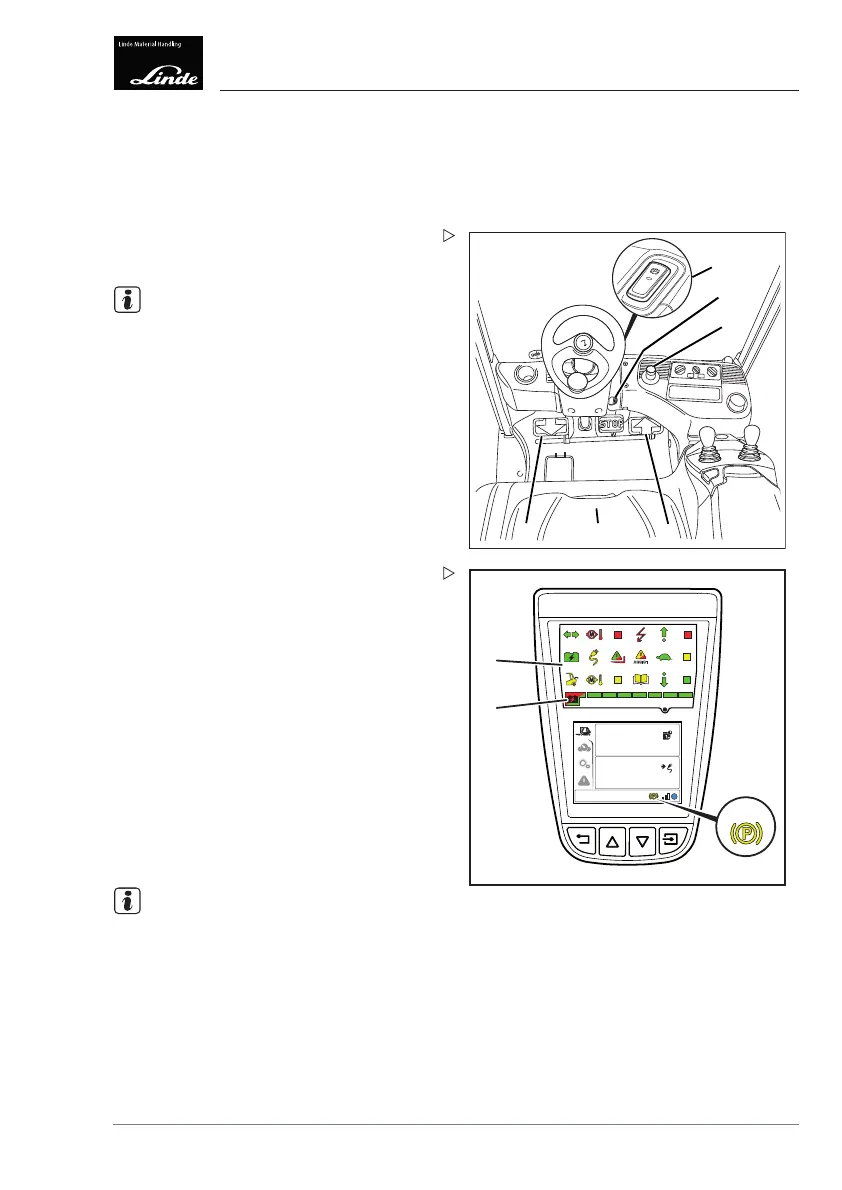
Sit on the driver's seat (5).
Fasten the seat belt.
NOTE
Accelerator pedals and joysticks must be in
the neutral position.
Pull the emergency off switch (3) if neces-
sary.
Insert the key (2) into the key switch. Turn
the key clockwise from the zero position to
switch setting "I".
The electrical system is switched on and the
truck is ready for operation.
EFF
10:30
03.03.2015
4
20
h
min
7
9
8
Display_e0064b
Observe the display unit (7).
After the electrical system is switched on, the
display unit (7) performs the following actions:
• Self-test of the lights as described in the
"system start-up" section of the chapter on
the "display unit".
• Display of the remaining operating time
until the next service, as described in the
"system start-up" section of the chapter on
the "display unit".
The following displays remain visible after
self-testing has been performed:
• "Battery discharge indicator" (8)
• "Parking brake applied" (9)
NOTE
The accelerator pedals and joysticks must
not be actuated until all indicator lights apart
from "Parking brake applied" (9) have gone
out. Otherwise, the truck will not function. To
recommission, switch off the truck. Switch the
truck on again.
Operating Instructions – 3888011701 EN – 12/2017 105



 To Next Page