Operation
4
Driver's compartment
Lighting
NOTE
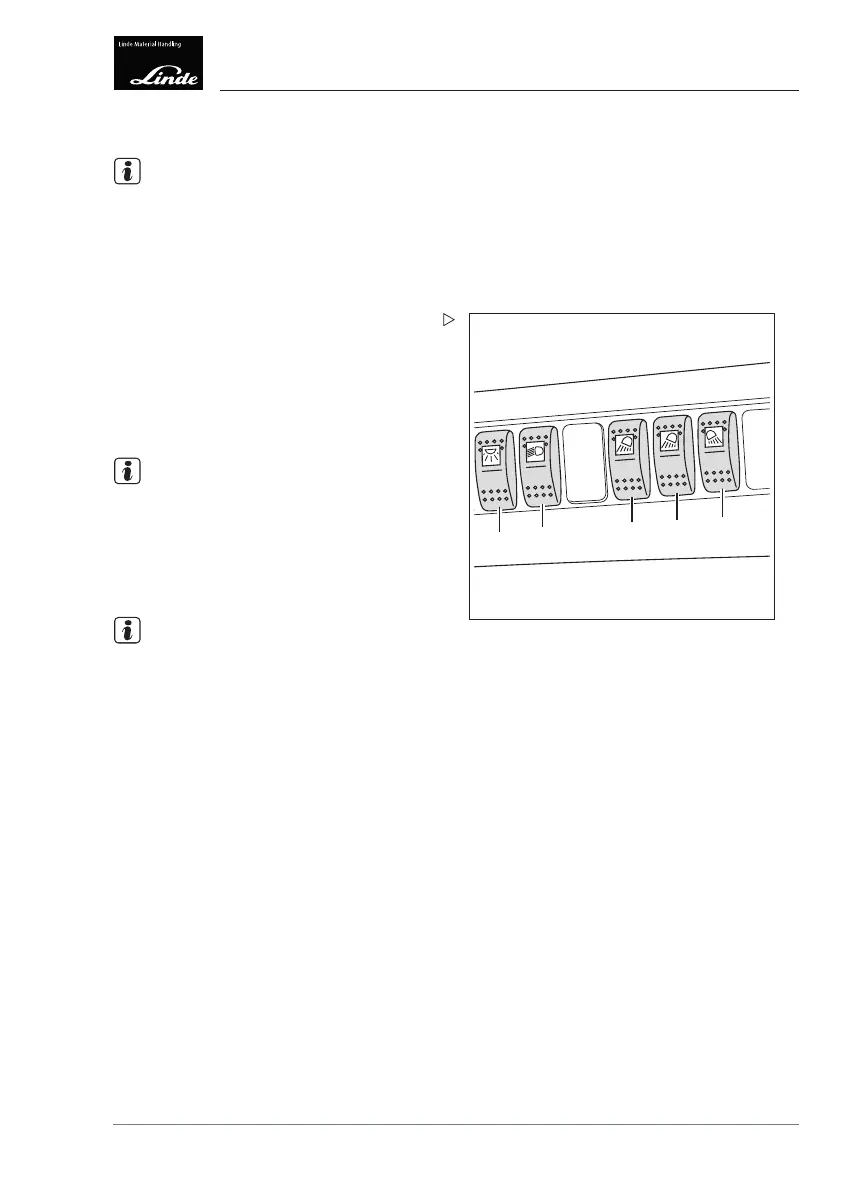
The arrangement of the individual switches on
the overhead console may vary depending on
the version. Observe the switch symbols.
Switchingontheclipboardlight
e12790047
1
2
3
4
5
Move the toggle switch (1) to the centre
position (setting 1).
Switching on the interior lighting
Press the toggle switch (1) into the end
position (setting 2).
NOTE
The clipboard light remains in switch setting 2
and is also switched on.
Switching on the sidelights, dipped
beams and licence plate lamp
NOTE
The sidelights,
dipped beams and the direc-
tion indicator a
re incorporated in the front
headlights.
Move the toggle switch (2) to the centre
position (setting 1).
The sidelights and licence plate lamp are
switched on.
Press the toggle swi
tch (2) into the end
position (setting 2
).
The dipped beams, sidelights and licence
plate lamp are switched on.
Switching on the front working spotlights
Activate the toggle switch (3).
The lower front work
ing spotlights are
switched on.
Activate the toggle switch (4).
Operating Instructions – 3888011701 EN – 12/2017 75



 To Next Page