4
Operation
Operation
1
2
3
4
5
6
e3871541
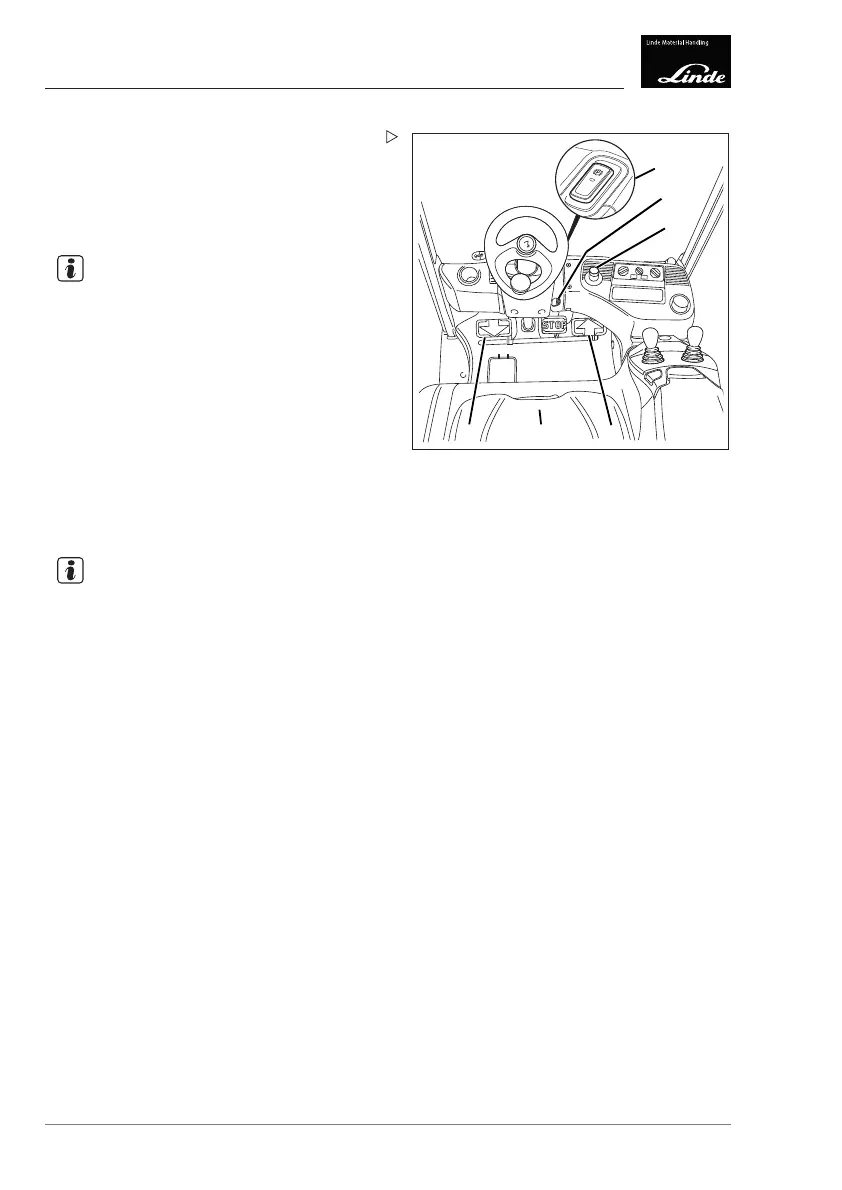
Pull the emergency off switch (3) if neces-
sary.
Switch on the truck.
Lift the fork arms slightly. Tilt the lift mast
backwards.
NOTE
If the red LED in the switch (1) lights up, the
manual parking brake is actuated.
Release the manual parking brake using
the switch (1).
Forward travel
Carefully press the right-hand accelerator
pedal (4).
The automatic brake is released. The driving
speed of the truck increases as the actuation
distance of the pedal increases.
NOTE
There is no advantage in pressing down hard
on the accelerator pedal, as the maximum
acceleration rate is controlled automatically.
Reverse travel
Carefully operate
the left accelerator pedal
(6).
The automatic brake is released. The driving
speed of the truck increases as the actuation
distance of the pedal increases.
Changing the drive direction
Release the actuated accelerator pedal.
Operate the accelerat
or pedal for the
opposite drive direct
ion.
The truck is electrically braked until it comes
to a standstill and then accelerated in the drive
direction specified.
To ensure that the truck can be easily
controlled in both directions, both feet must
be placed on the accelerator pedals.
118 Operating Instructions – 3888011701 EN – 12/2017



 To Next Page