184 MI-42-0001 Rev. 19
QUALITY TESTING: Quality Check Reporting
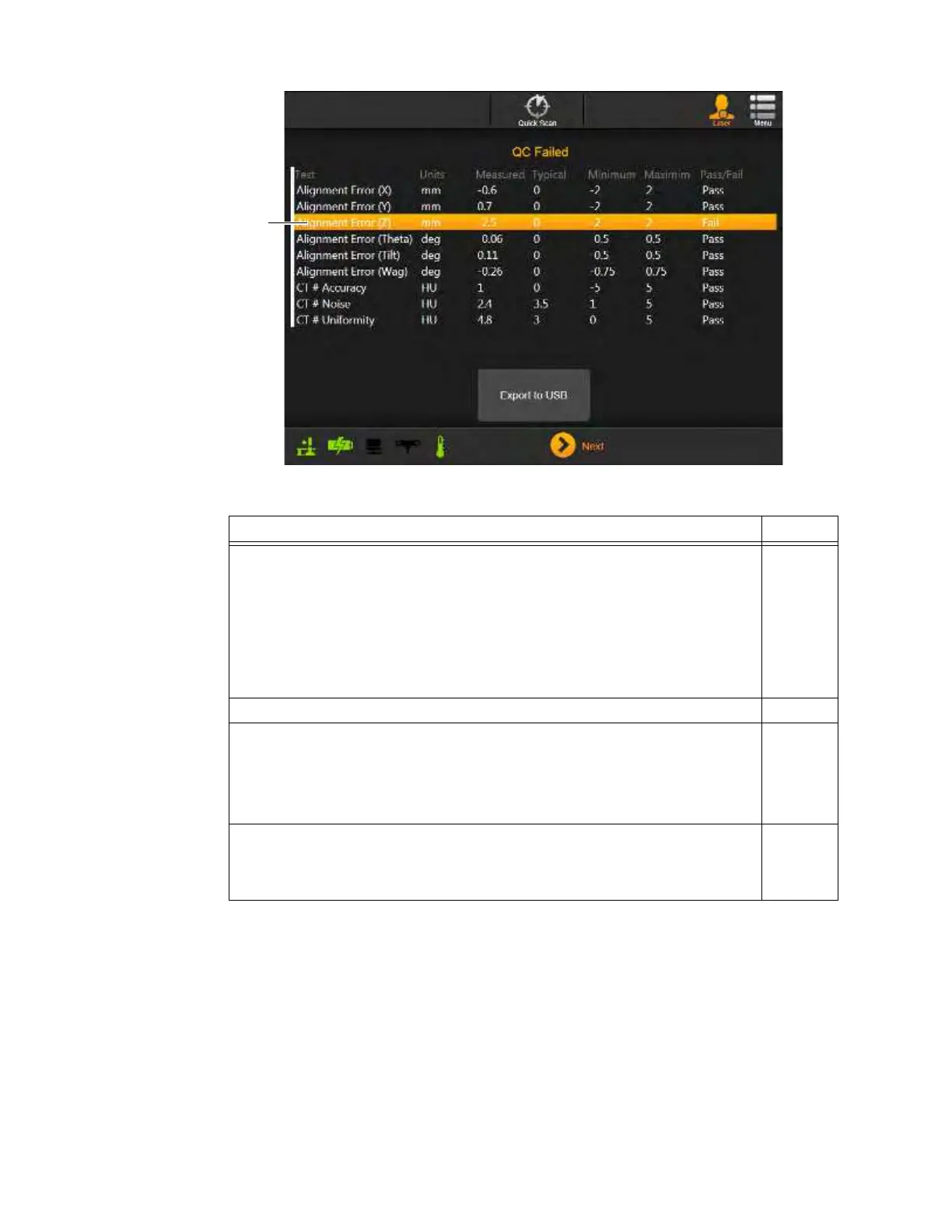
Figure 149
NOTES:
• For multi-kV QC cycles, the baseline 120 kV parameters are configured for compliance with
the ACR 2017 Computed Tomography Quality Control Manual. 100 kV and 80 kV portions of
QC cycles examine a subset of the 120 kV metrics. 100kV and 80kV HU values are only
accurate for water. Other materials are not evaluated.
• Quality Checks may fail. Ensure the Phantom is correctly aligned against the lasers. If the
problem persists contact Service.
• The image review software on the AIRO scanner does not provide the ability to calculate
mean and standard deviation of CT numbers for user-selectable ROIs. However, the software
automatically calculates mean and standard deviations of CT numbers for pre-selected ROIs
when performing the daily IQ test. This information is presented in the IQ test report and can
be viewed using a standard Internet browser (Internet Explorer, Chrome, Safari, etc.) via
Steps See
1. Review the Daily Quality Check Report.
The report displayed on the Pendant screen includes information on:
• Phantom alignment
a — Shows if the test setup matches the baseline.
• Calculated CT numbers
s — Shows where in the valid range the AIRO’s CT
components operate.
If a test fails, the line in the report is highlighted d, providing data about
current results, typical results, and acceptable minimum/maximum values.
2. Insert a USB storage device into the available port on the Pendant Holster.
3.2
3. Choose
Export to USB
to copy the report files to the USB device.
NOTE: In addition to the USB export options available for all scans or series
(see section 6.8.24 Sending Scan to DICOM or USB), exports of QC scans can
include the QC Report when copying results to USB storage devices. See
Figure 145.
4. To view the exported quality report, use a web browser on a facility computer to
open the
Mobius Airo Image Quality Report Helical.html
or
Mobius Airo
Image Quality Report Axial.html
file in the
Airo IQ Report
archive folder on
the USB storage device.



 To Next Page