Appliances --- Section 4
The Executive 2005
177
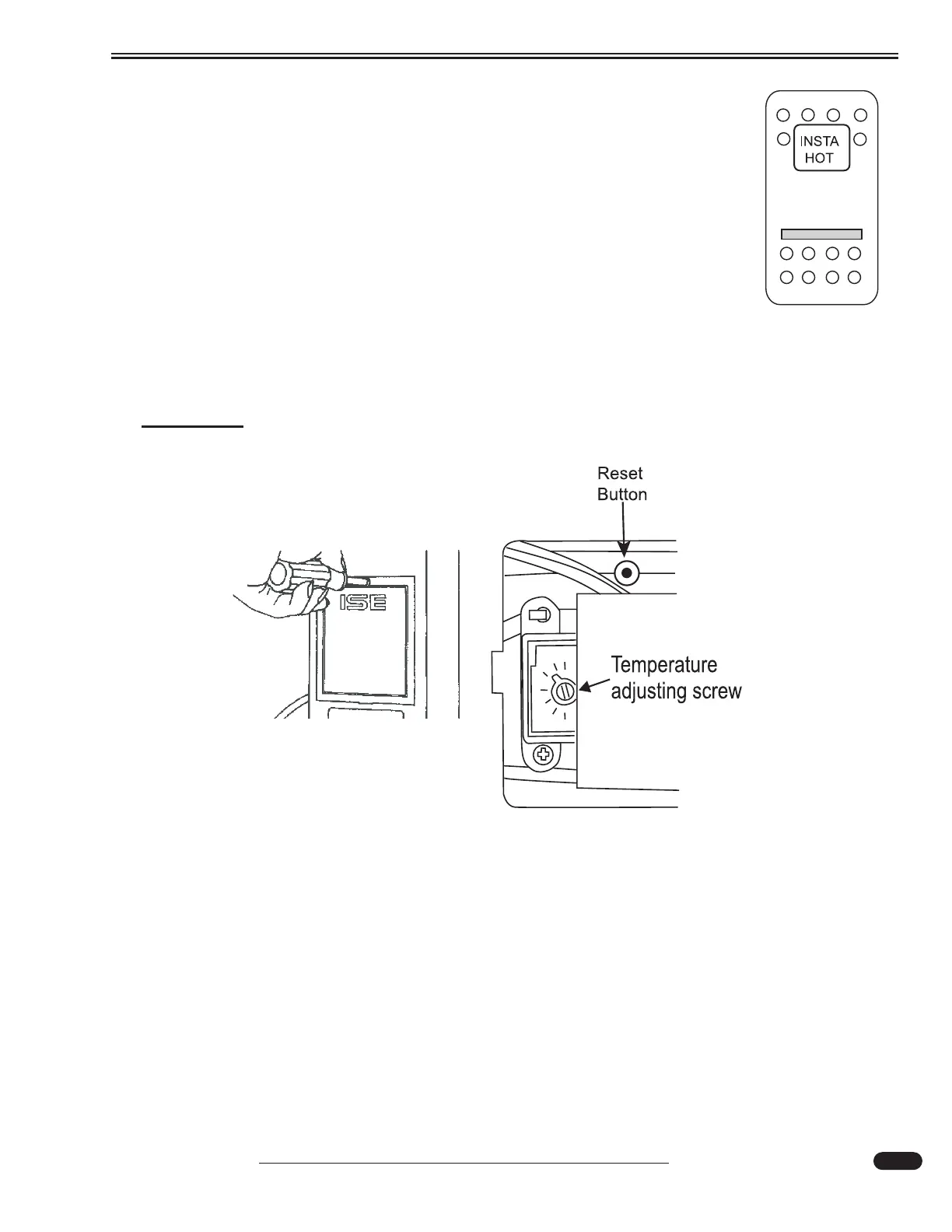
Temperature Adjustment:
If the steam continues or the water boils, adjust the temperature as follows:
• Turn the galley switch labeled Insta-Hot to OFF and unplug the
power cord.
• Remove the screw and access cover.
• Insert a screwdriver in the slot of the thermostat adjusting screw.
Turn the screw clockwise ½ notch to increase the water temperature; coun-
terclockwise ½ notch to decrease the water temperature.
• Reinstall the access cover, reconnect the electric power and turn
on the galley switch.
• Draw three or four cups of water and allow unit to reheat.
• Repeat the procedure until desired temperature is reached.
CAUTION:
Do not allow the water to boil.
Thermal Cut-Out:
Should the Insta-Hot stop or fail to heat water, it may be a result of the thermal cut-out tripping.
Open the access panel to reset the thermal cut out button.
Cleaning Hot Water Dispenser:
Use only mild cleaners to clean the dispenser spout and plastic components. Use of cleaning agents
containing acids, alkalies and organic solvents will result in the deterioration of plastic components.
Draining the Insta-Hot Tank:
Drain the Insta-Hot tank before storage, or if interior temperature drops below freezing.
040368c
Removing the cover
080433c





 To Next Page