Section 5 --- Equipment
The Executive 2005
254
To Watch the Satellite:
• Turn on TV and tuner (on TV with separate tuner).
• Using the Sharp GA037 remote, press the INPUT button until INPUT 1 displays on the
TV.
• Turn on the Satellite Receiver.
• Turn on the Satellite controller.
• Adjust the volume using the Home Theater System remote.
NOTE:
Inclement weather conditions may adversely affect the acquisition of a satellite signal.
Degraded audio and video signals through the receiver will result.
To Play a Music CD:
• Press the DVD button on the Home Theater System remote or press the DVD/VIDEO but-
ton on the Home Theater System until DVD displays. Press the Open/Close button. Place a
CD on the tray with label up.
• Adjust the volume using the Home Theater System remote.
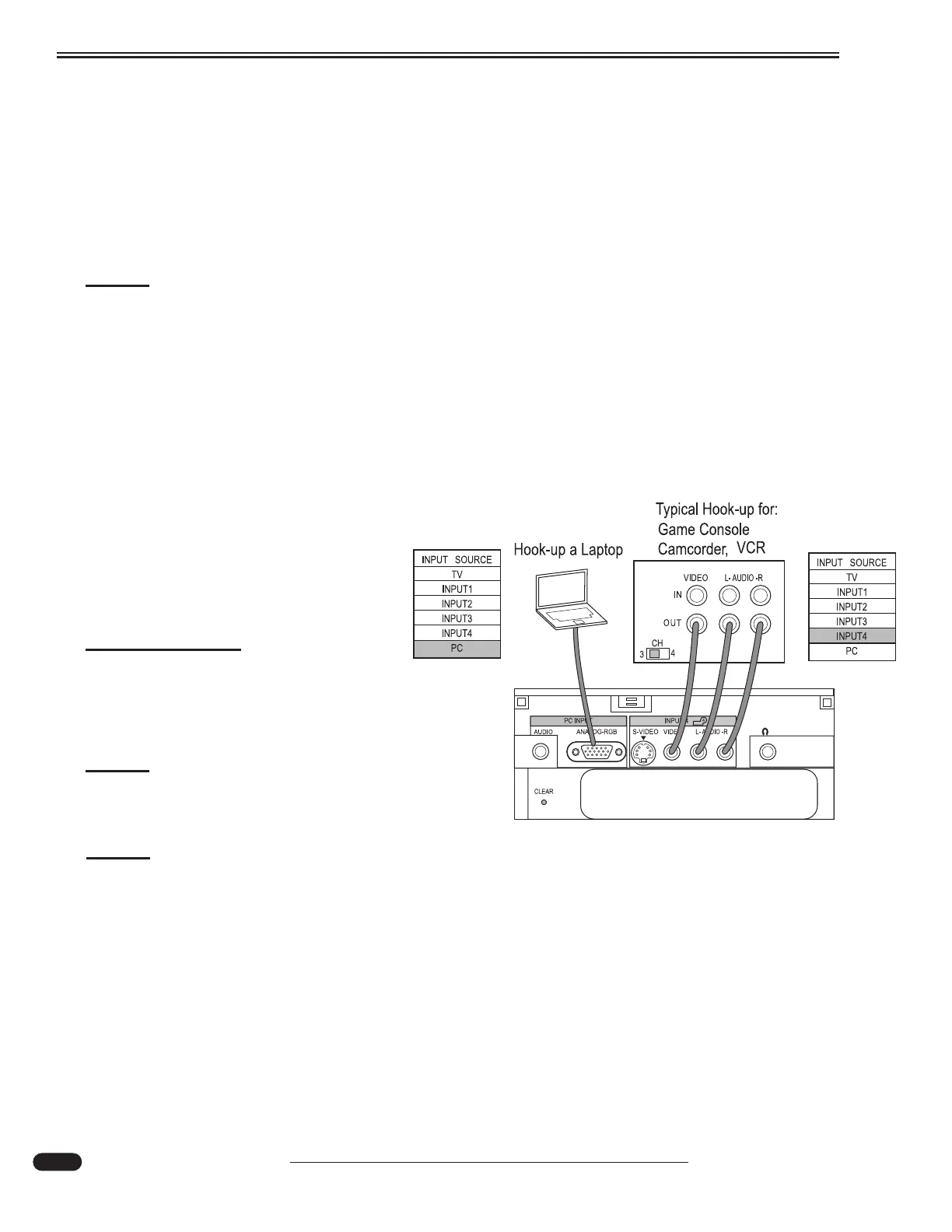
Hooking Up Auxiliary Equipment:
Additional equipment can be hooked up
to the Front LCD tuner. Located behind the
access door are auxiliary RCA jacks and
RGB (PC) port.
INFORMATION:
Before hooking up additional
equipment, refer to the equipment
manufacturer manuals for cautions
and instructions.
NOTE:
Refer to each component manual
for in-depth operating instructions.
NOTE:
The flat screen TV requires adequate signal for proper operation. Audio is through the
home theater system only.
031043d
Behind drop down door on TV tuner in cabinet above co-pilot seat.





 To Next Page