Water Systems --- Section 6
The Executive 2005
269
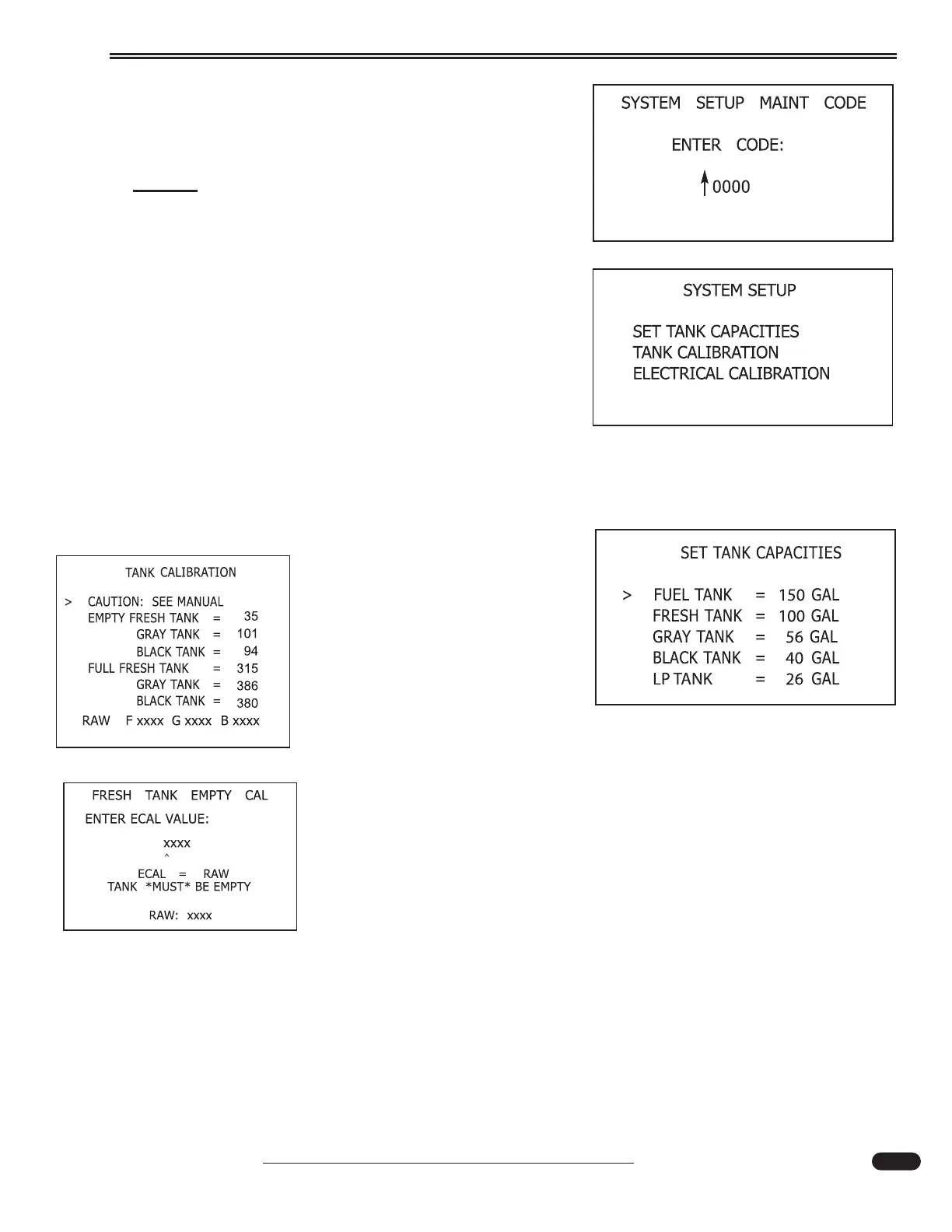
System Setup:
Should only be used by a technician initializing or trou-
bleshooting the system. Requires access code 1218.
NOTE:
Only service personnel should enter the access code.
Move the joystick to the right to enter Set Tank
Capacities. Move the joystick Up or Down to select the tank.
Move the joystick right to enter. Move the joystick Up or
Down to change the Hundreds value. Move the joystick
right from the hundreds digit to set.
Set Tank Capacities Screen:
The purpose of setting tank capacities is to program the Aladdin
TM
system fuel and holding tank
capacities in gallons. The Aladdin system uses the fuel tank capacity information to estimate fuel
remaining calculations.
Tank Calibration Screen:
Displays the current value of
each of the calibration parameters,
and RAW data value from the Tank
Interface Module.
Empty Calibration:
Empty calibration must be done with the tank empty. All that is neces-
sary is to enter the value of the raw data (displayed on the bottom of the
calibration screen).
020195e
020214c
020216c
020218g
020218g





 To Next Page