208 PI-MAX
®
4 System Manual Issue 9
l. Points that comprise the curve can be rearranged/reordered as follows:
• The set of points can be sorted in ascending or descending order by clicking on
the
Phase (°) column header;
• Individual points can be shifted up or down within the table by selecting them
and then clicking the and buttons until they are in the desired location;
Two or more adjacent points may be selected and shifted as a
group. Non-adjacent points must be moved individually.
• All points can be randomized by clicking the Shuffle Phase Order button.
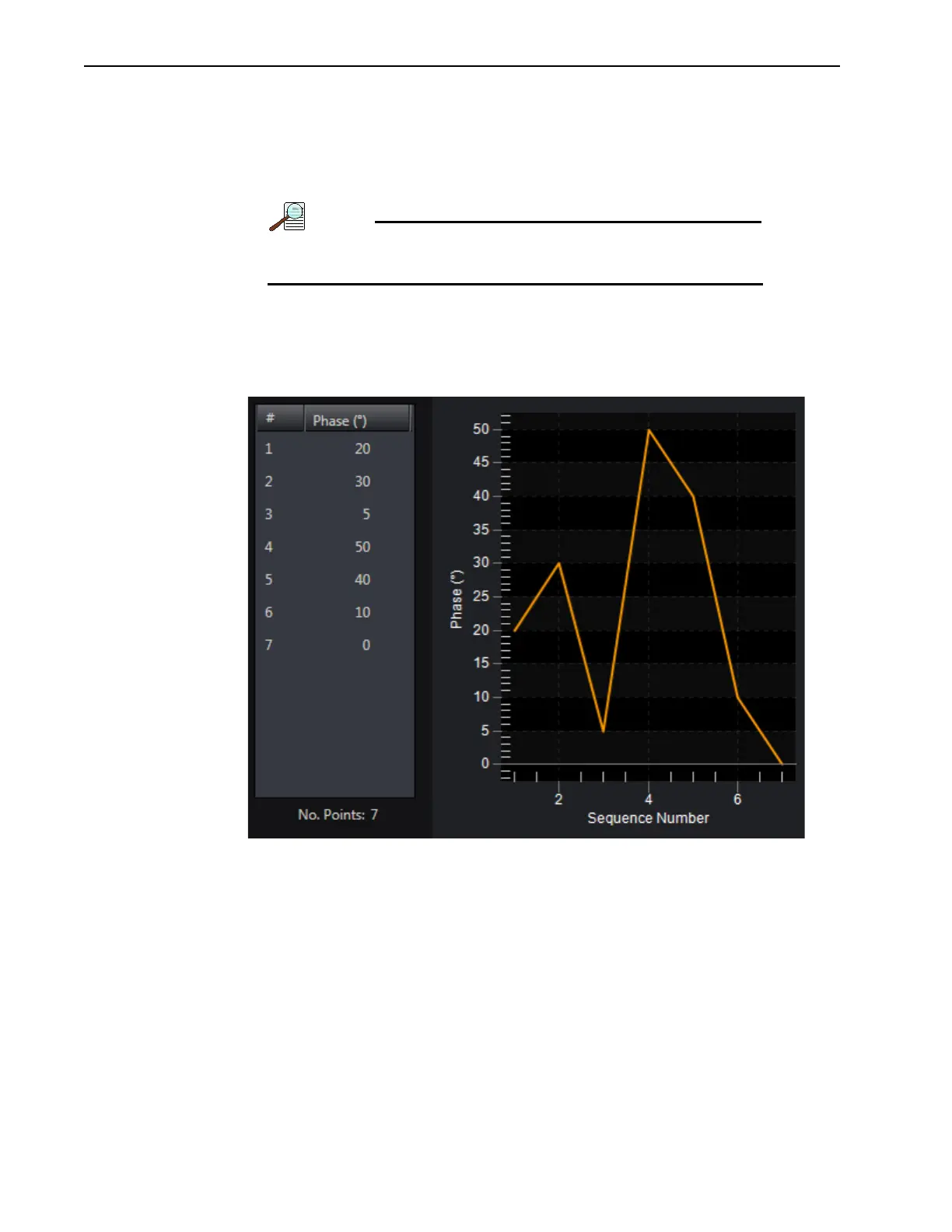
The Phase Curve updates automatically as the order of the points within the table is
modified. Figure 13-7 shows a curve where all seven (7) points have been shuffled.
Figure 13-7: Typical Modulation Phase Curve with Points Shuffled
m.
Points may be deleted from the table by selecting them (either individually or using
CTRL-Click for multiple points) and clicking
Delete. To delete all points, click
Delete All.
n. Once the custom Modulation Table is complete, click Close to save the table and
dismiss the window.
o. Configure the following AUX Output Trigger parameters as required:
• AUX Output Delay;
• AUX Output Width.
4. Verify that the I.I.T. Power switch on the rear of the PI-MAX4: 1024i-RF is turned ON
and that
Enable Intensifier has been checked on the Common Acquisition Settings
expander.
5. When the experiment is ready, click on the Acquire button.



 To Next Page