10 1/1-OCTAVE – 1/12-OCTAVE ANALYSER
The instrument operates as a real time 1/1-octave - 1/12-octave analyser (RTA) in a very similar way to the
level meter. Moreover, 1/1-octave - 1/12-octave analysis is performed in parallel with the level meter
measurements. All 1/1-octave, 1/3-octave, 1/6-octave and 1/12-octave digital pass-band filters are working in
real-time with the weighting filters (HP, Z, A, B or C - for sound measurements; HP - for vibration
measurements) and the RMS/LEQ detector (Linear, Fast or Slow - for sound measurements; Linear - for
vibration measurements). This enables a spectrum pre-weighting with one of the selected broadband frequency
curves if required for the application such as the provision of hearing protectors during the control of high
workplace noise.
Note: TOTAL RMS (LEQ) results are measured with their own weighting filters (A, C, Z or S1, S2,
S3 - for sound measurements; HP, HP3, HP10 or S1, S2, S3 – for vibration measurements)
regardless of settings made in profiles for the Level Meter measurements. Spectra are always
linearly averaged. Thus, the Total values for 1/1-octave - 1/12-octave analysis can be different from
those obtained for profiles (if RMS Integration was set as Exponential).
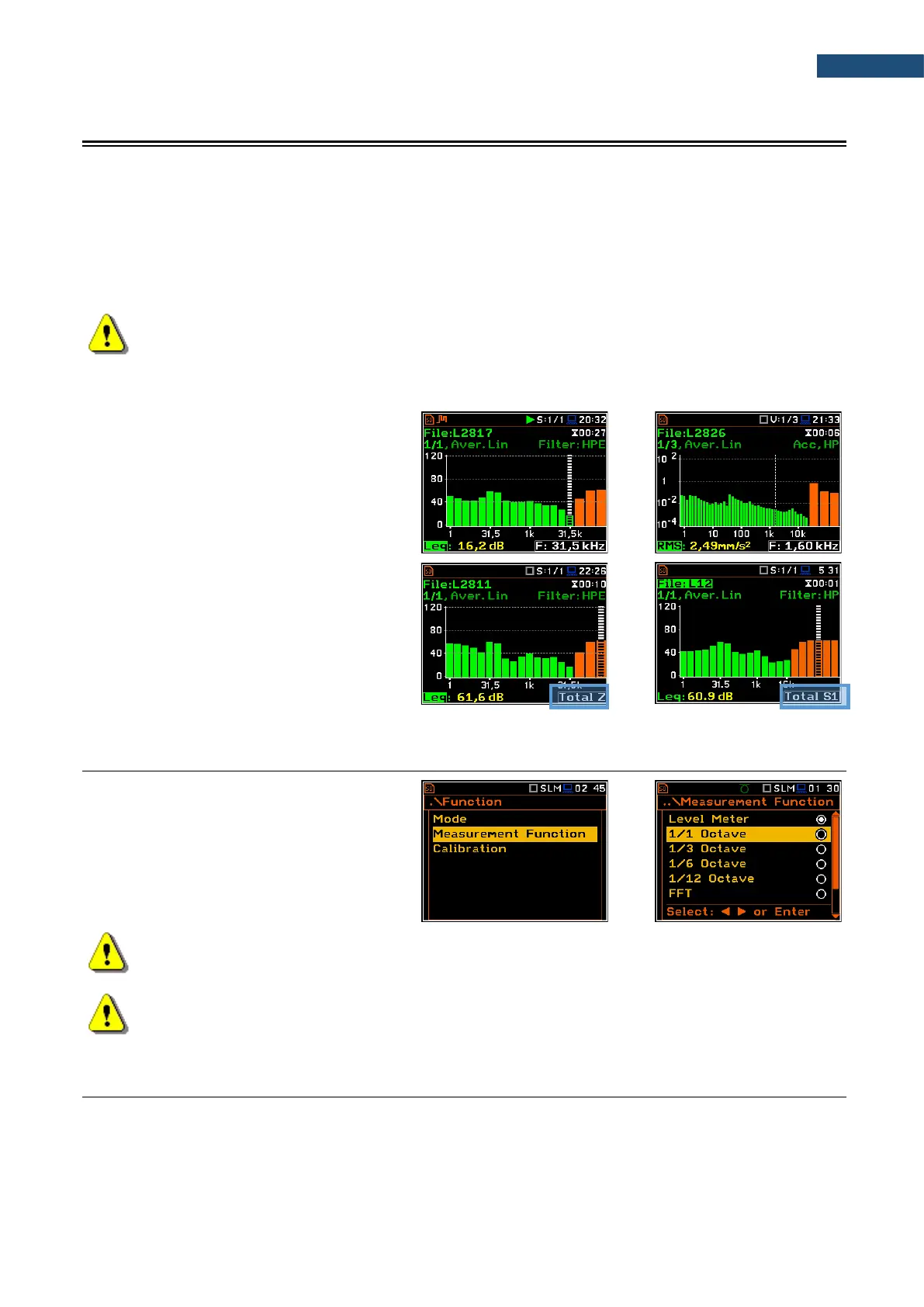
For each 1/1-octave - 1/12-octave band, the
Leq/RMS result is calculated and presented
as a bar on the spectrum plot. Spectra can
be examined on a display in the Spectrum
view.
The read-out of spectrum values can be
done using a vertical cursor.
Besides results for bands three Total values
are measured and displayed as additional
three bars on the spectrum plot. Parameters
for Total values (e.g. filters) are set by
default and cannot be changed.
Besides three Total values you can define
up to three additional User Total values with
filters: S1, S2, S3, S4 and S5.
10.1 SELECTING THE 1/1 OCTAVE – 1/12 OCTAVE FUNCTION
To select the 1/1-octave - 1/12-octave
analysis function, open the
Measurement Function screen, select the
1/1 Octave - 1/12 Octave position and
press <ENTER>.
Note: The 1/6 Octave and 1/12 Octave functions are optional and should be unlocked by entering
an activation code in the text editor screen, which is opened after first attempt to select one of this
option. Once unlocked the option will be ready to use permanently.
Note: It is not possible to change the current function during a running measurement.
In this case, the instrument displays for about 2 seconds the message: “Measurement in Progress”.
To change the current function, the measurement must be stopped!
10.2 CONFIGURING 1/1-OCTAVE – 1/12-OCTAVE ANALYSER
Execution of the 1/1-octave - 1/12-octave analysis depends on a certain set of parameters, configured in the
Measurement section.



 To Next Page