Selecting Lin is required for obtaining the true RMS value of the measured signal according to IEC 61672-
1:2013. When this option is selected the value of the Leq, SEL, LEPd and L(den) results do not depend on
the detector time constant: Fast, Slow or Impulse (the results are displayed without the indicator of the
detectors selected in the profiles). In this case, the indicator Linear (or L) is displayed during the result
presentation.
Selecting Exp enables fulfilling the requirements of other standards for time averaged Leq measurements.
When this option is selected the value of the Leq, SEL, LEPd and L(den) results depend on the detector time
constant (Slow, Fast, Impulse). Results are displayed with the indicator of the detector type selected in the
profiles (path: <Menu> / Measurement / Profiles).
Detector for statistics
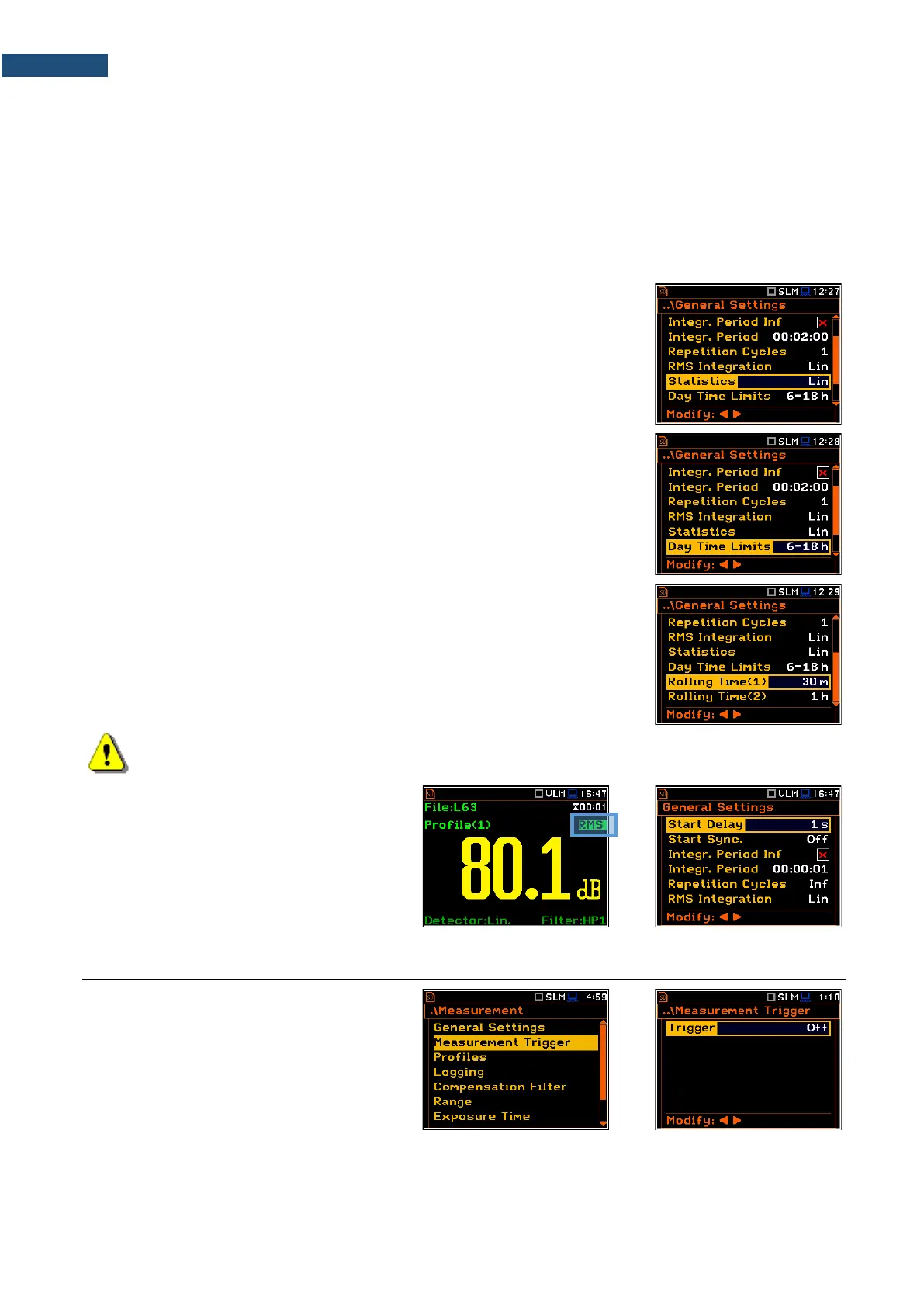
The Statistics parameter defines the method for calculation of statistical results
Ln. Statistics for profiles will be calculated based on RMS results with linear
detector (Lin) or exponential detector (Exp), e.g. Impulse, Fast or Slow,
defined in the Profiles list, regardless of how main results are measured. Default
value: Lin.
Day time limits
The Day Time Limits parameter defines the day and night time limits required
by the local standards. These limits are used for the calculation of the Lden
function (see Appendix D for definition). Two options are available: 6h-18h and
7h-19h. By default, it is set to 6h-18h.
The Rolling Time(x) parameter defines „time window” for the "Rolling Leq"
calculation. The Rolling Leq are presented as LR+<time window>. For example,
if the Rolling Time is equal to 30 minutes, the appropriate result will be named
as LR30 and will be calculated each second as Leq of last 30 minutes. If the
Rolling Time is in seconds, for example is equal to 50s, the result name will
have letter "s" (LR50s), to make it different from 50 minutes LR result (LR50).
Note: In case of vibration measurements, positions Statistics, Day Time Limits and
Rolling Time(x) are not presented in the General Settings list.
You can easily access the
General Settings screen during the
measurement performance from the result
view. It is necessary to enter some result
field (for example, RMS) with the ▲ / ▼ or
◄ / ► key and press <ENTER>.
4.2 SETTING MEASUREMENT TRIGGER – MEASUREMENT TRIGGER
The Measurement Trigger list allows you
to set up parameters of the measurement
trigger, that switches the measurement
process in case the trigger condition is met.
The Measurement Trigger can be switched
Off or On by selecting its type in the Trigger
position.
Trigger is switched on if one of its six available modes is selected in the Trigger position: Slope +, Slope –,
Level +, Level –, Grad + or External. When the trigger is selected, additional parameters can be defined: the
measurement result that is checked for a trigger condition (Source), its threshold value (Level) and the rate of
its changing (Gradient).



 To Next Page