Note: The calibration factor is always added to measurement results and measurement range limits
of the Level Meter, 1/1 Octave, 1/3 Octave and other functions.
Note: The calibration level and the calibration result are expressed in different units depending on
the settings of the instrument. The metric or non-metric Vibration units are set in the Vibration Units
screen (path: <Menu> / Auxiliary Setup / Vibration Units). Additionally, the linear or logarithmic units
are set in the Display Scale screen (path: <Menu> / Display / Display Scale).
Note: It is not possible to check and calibrate the instrument during the execution of live
measurements. It is possible to open different lists and sub-lists but the positions in these lists are
displayed greyed out inversely and so - not accessible. The flashing „measurement” icon on the top
line indicates that the instrument is in the measurement process. To check or calibrate the
instrument, the current measurement in progress must be finished!
ISO 8041-1:2017 standard advises users to perform in-situ checks of measuring
instruments. Checking should be carried out immediately before and after the
measurement.
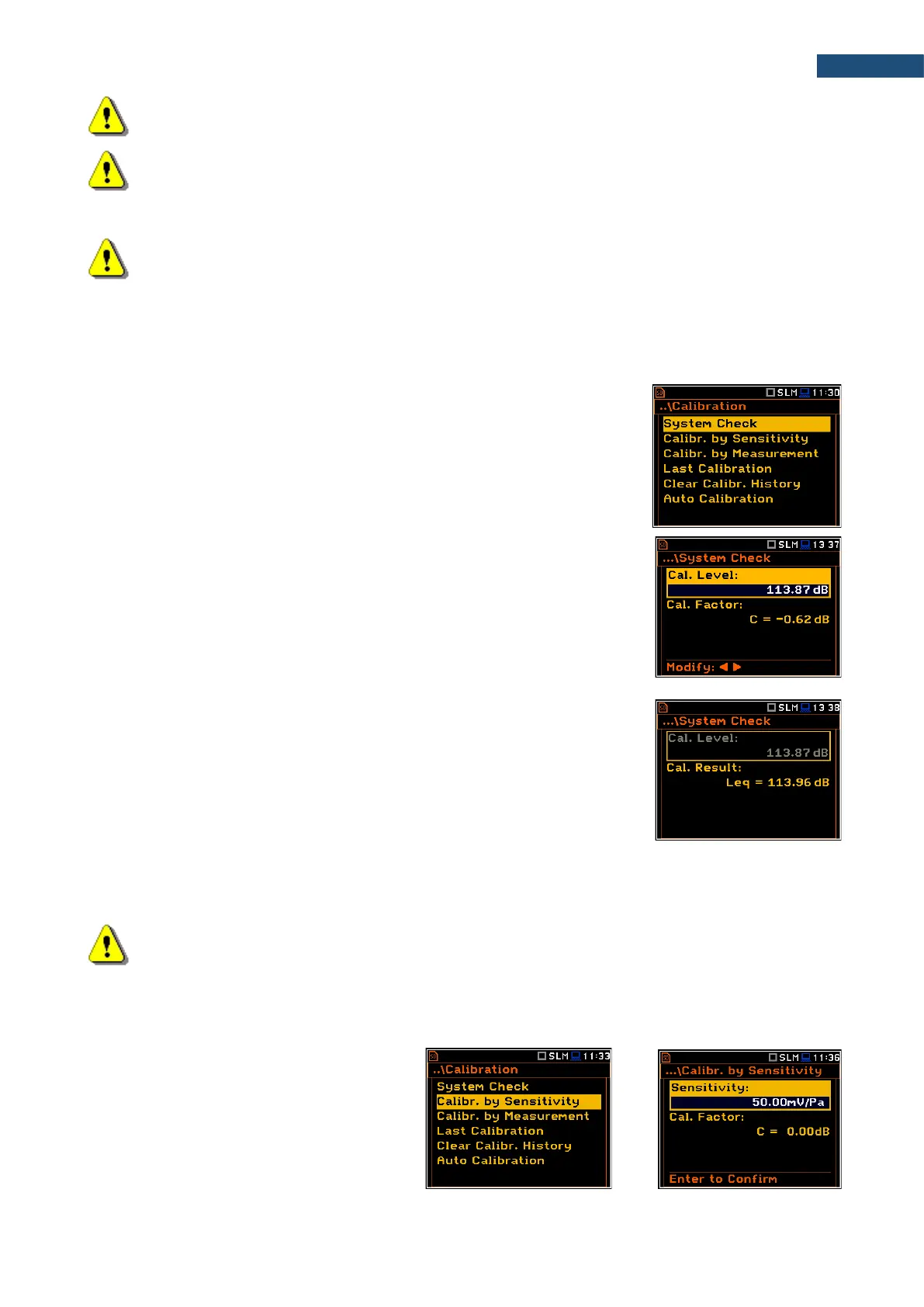
1. Select System Check in the Calibration sub-list and press <ENTER>.
2. Set the reference calibration level (Cal. Level) – see Appendix C,
Chapter C.1, par. Calibration.
3. Attach the sound calibrator to the instrument’s microphone or accelerometer
to the vibration calibrator.
4. Switch on the calibrator and wait approximately 30 seconds before starting
the system check measurement.
5. Start the calibration measurement with the <Start> key.
The measurement starts without delay. If maximal difference between three 1-
second consecutive results (Leq(C) or RMS) is less than 0.05dB, the
measurement will be stopped. Otherwise the user should stop it manually.
During the system check measurement, the <ESC> and <Pause> keys do not
operate but it is possible to stop the measurement using the <Start/Stop> key.
System check is considered as successful if its result (Cal. Result) does not
differ from the calibration level by more than 0.5 dB.
If system check measurement shows bigger difference than 0.5 dB you should
perform Calibration by Measurement.
6. Press <ENTER> to exit System Check.
Note: It is advised to perform the system check of the instrument each time before the
measurements begin. If system check gives negative result, then it is necessary to perform
calibration.
3.3.2 Calibration by Sensitivity (Acoustic signal)
Calibration on the base of the microphone’s
published sensitivity information can be
performed the following way:
1. Select the Calibr. by Sensitivity
position in the Calibration list and press
<ENTER>.



 To Next Page