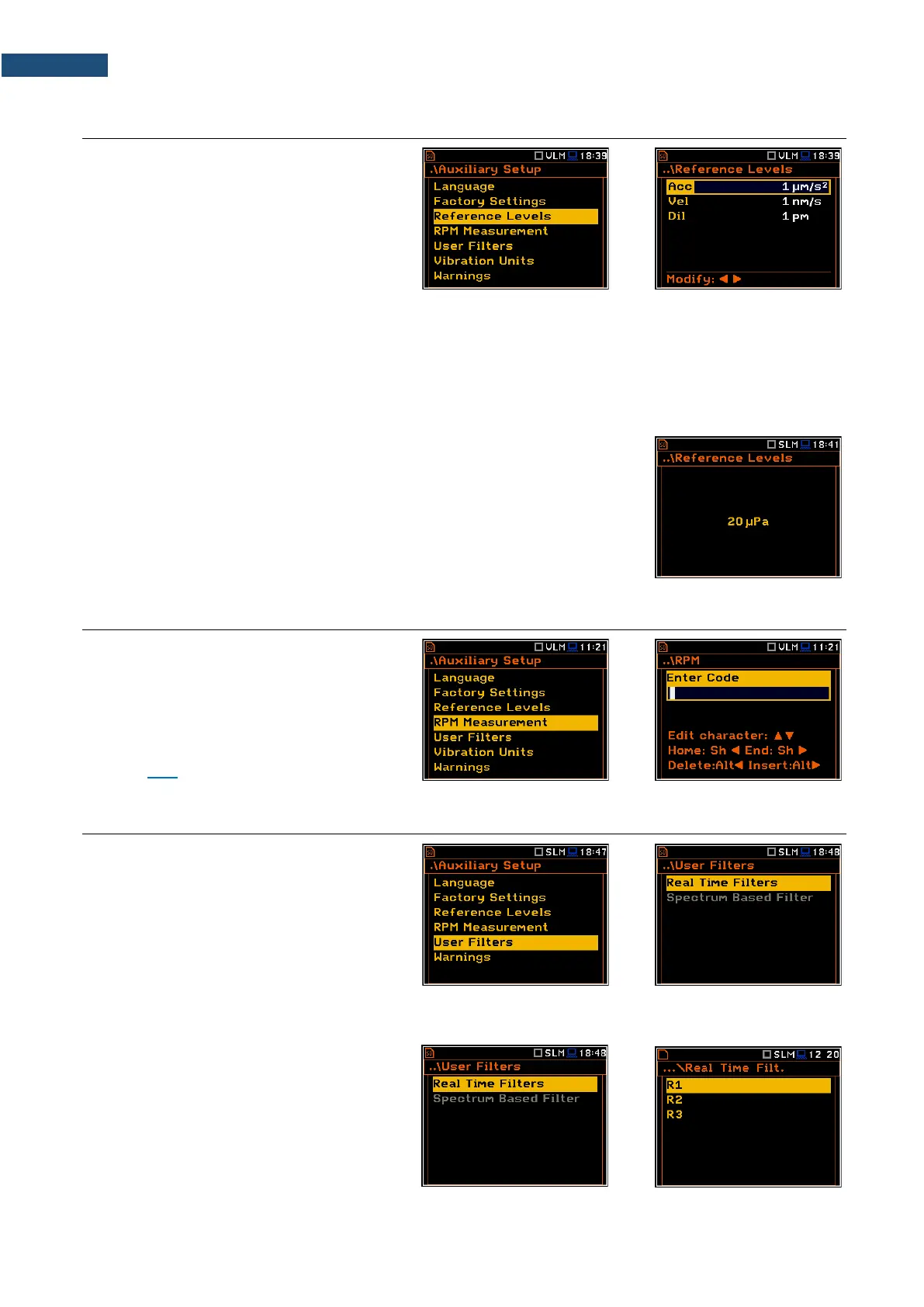
8.3 SETTING THE REFERENCE LEVELS – REFERENCE LEVELS
The Reference Levels position allows you
to set reference levels for the measured
acceleration (Acc), velocity (Vel) and
displacement (Dil) results. For sound
measurements it only informs about the
default reference sound level. The selected
values will be considered during calculations
of measurement results expressed in dB
(Logarithmic scale).
Reference levels for vibration measurements
In the Acc position you can set the reference level of the acceleration signal in the range: 1 µms
-2
- 100 µms
-2
.
In the Vel position you can set the reference level of the velocity signal in the range: 1 nms
-1
- 100 nms
-1
.
In the Dil position you can set the reference level of the displacement signal in the range: 1 pm - 100 pm.
Reference level for sound measurements
For sound measurements, the Reference Levels sub-lists is used to inform only
the user that the reference level of the acoustic signal is equal to 20 µPa.
8.4 UNLOCKING RPM FUNCTION – RPM MEASUREMENT
The RPM Measurement position allows you
to unlock the RPM function which is usually
an optional.
After unlocking this position is automatically
transferred from the Auxiliary Setup
section to the Measurement section (see
Chapter 4.10).
8.5 SETTING COEFFICIENTS OF THE USER FILTERS – USER FILTERS
The User Filters position allows you to
introduce the values of the coefficients of the
user defined weighting filters.
8.5.1 Parameters of the real time filters – Real Time Filters
The Real Time Filters list allows you to
introduce the values of the correcting
coefficients considered in the real time
measurements. You can define three real-
time user filters: R1, R2, R3.



 To Next Page