To display a different result, it is necessary
to move to field 3 with the ▲/▼ button, and
then select the appropriate result with the
◄/► button pressed together with <Alt>.
The Spectrum position is accessible only in
the active 1/1 Octave - 1/12 Octave or FFT
functions.
The spectra views are described in
Chapters 10 and 11.
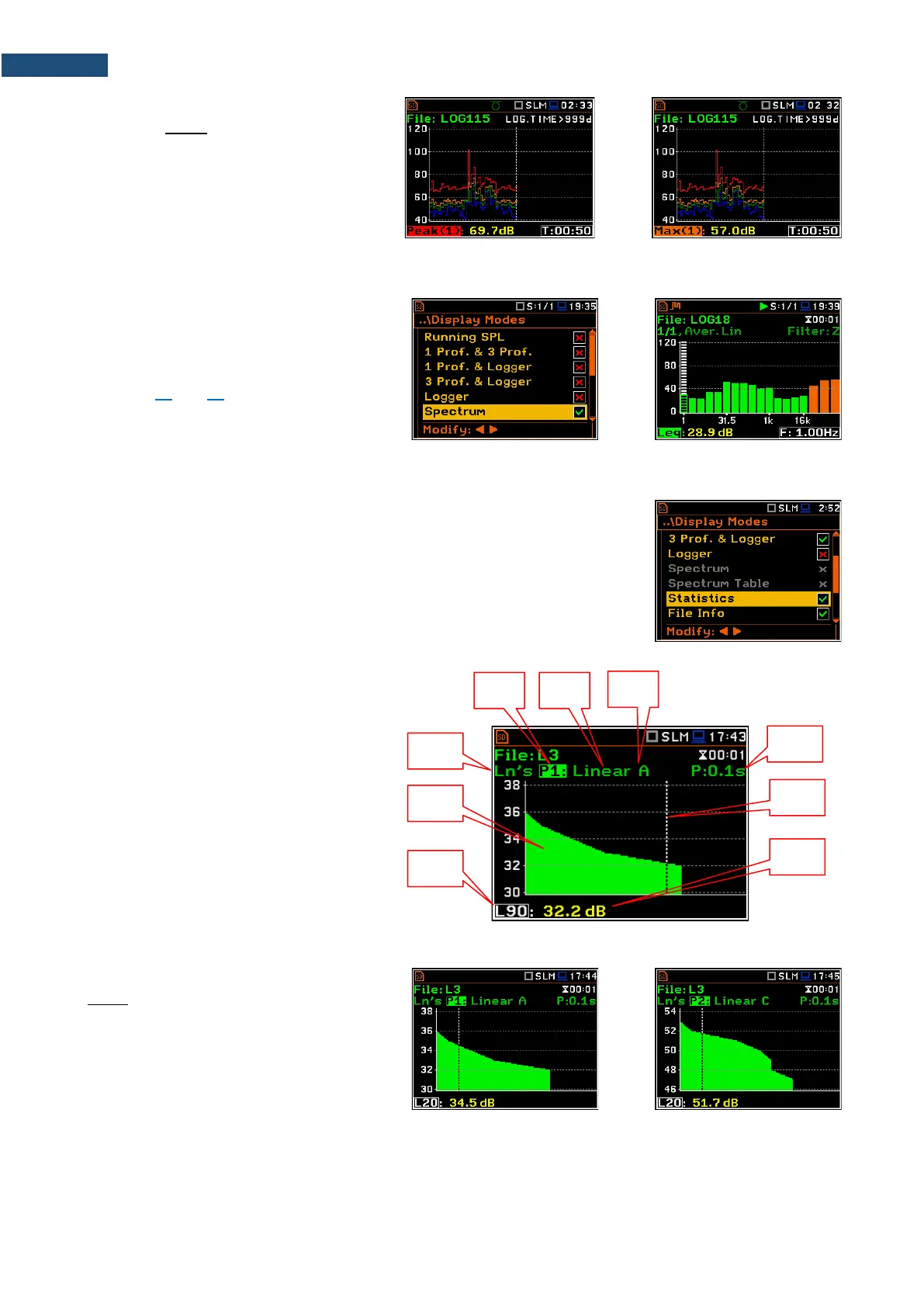
The Statistics position is accessible only for Sound measurements.
Statistics is the cumulative probability density function of exceeding the noise
level during the measurement period. The X axis defines the probability of
exceeding the noise level, statistical level Lnn, and the axis Y defines the
calculated noise level in dB.
Statistics view fields
1. Result name
2. Statistics plot
3. Statistical level (Lnn percentile value)
for the active cursor position
4. Active profile (P1, P2 or P3)
5. RMS detector (Lin. or Fast, Slow,
Imp.)
6. Weighting filter (A, B, C, Z, or G)
7. Sampling interval for the Lnn values
calculated by the instrument (0.1 s)
8. Cursor position
9. Value of the selected statistical level
Lnn and units (dB)
To change the profile, you should select the
field 4 and press the ◄ / ► key together with
<Alt>.



 To Next Page