The default statistical levels have following settings: 10, 20, 30, 40, 50, 60, 70, 80, 90 and 95. All values should
be within the integer range [1, 99]. Each individual value can be set independently from others.
4.10 SETTING RPM MEASUREMENT – RPM MEASUREMENT
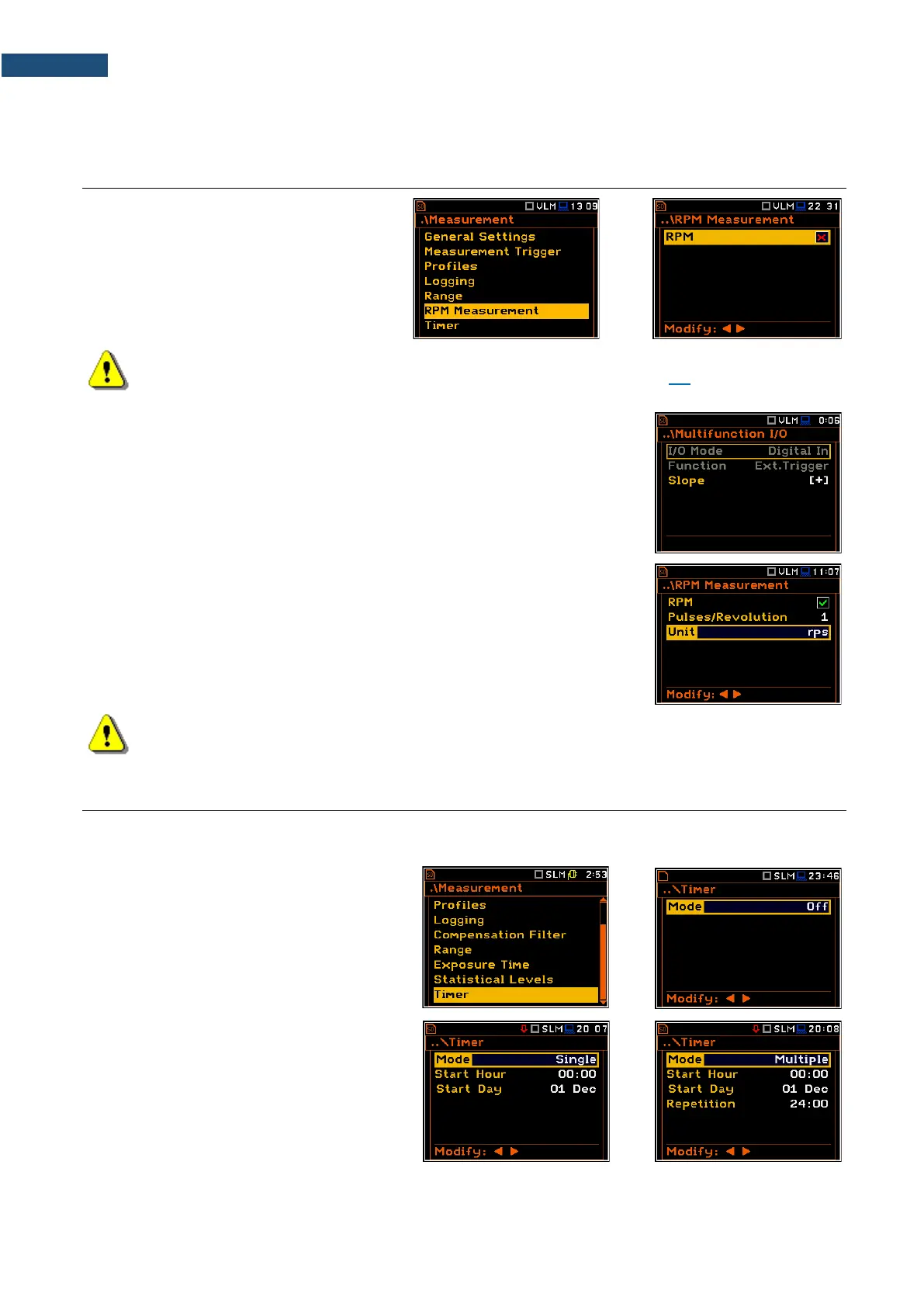
The RPM Measurement position allows you
to switch on and set measurements of
rotational speed, measured by tacho probe.
Note: The RPM function is optional and should be activated in the RPM Measurement
Auxiliary Setup menu during first attempt to switch it on (see Chapter 8.4). After activation this
position is transferred to the Measurement menu.
To perform the RPM measurement the RPM probe should be connected to the
I/O socket and the RPM position in the RPM Measurement screen should be
switched on.
When you switch the RPM on the instrument automatically switches the
I/O Mode to Digital In (path: <Menu> / Instrument / Multifunction I/O / I/O Mode)
and makes it inactive.
The Pulses/Revolution parameter defines the number of pulses per one
rotation. Available values are in the range: 1..360.
The Unit parameter defines units of measure. Two options are available:
revolutions per minute (rpm) and revolutions per second (rps).
Note: The RPM results are always registered in the logger file as logger results (with the logger
step) and as summary results (with the integration period step).
4.11 PROGRAMMING THE INSTRUMENT’S INTERNAL TIMER – TIMER
The Timer function is used for automatic measurement start at a given time and day and with the parameters
set in the Measurement section.
The Timer position allows you to
programme the internal real-time clock to act
as a delayed start and stop timer. The
instrument will be switched on automatically
at the programmed time and will perform the
measurement with the same settings used
before the instrument was turned off.
Modes of the timer function
The timer can be switched off (Off),
switched on only once (Single), or switched
on many times regularly (Multiple) with the
period between two consecutive
measurements (Repetition).
In case the timer is active (Single or Multiple) and the instrument is switched on, the “clock” icon appears until
finishing the programmed measurements.



 To Next Page