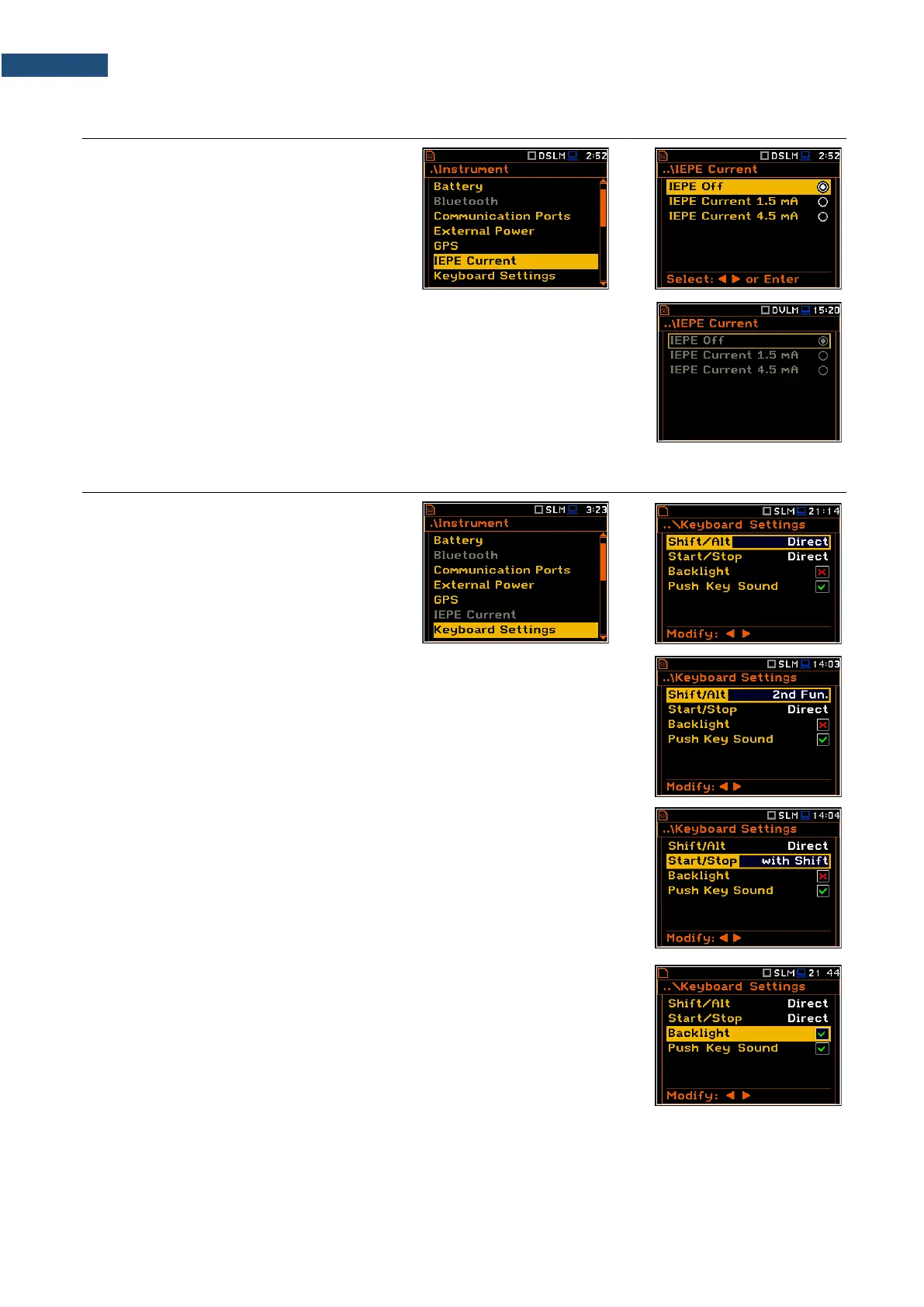
7.7 SELECTING IEPE CURRENT SUPPLY – IEPE CURRENT
The IEPE Current position allows you to
disable IEPE (IEPE Off) or to choose the
correct IEPE supply current for the used
microphone or accelerometer in the
Direct Sound mode: IEPE Current 1.5 mA
or IEPE Current 4.5 mA.
In the Vibration Meter mode, you cannot switch off IEPE.
In the Sound Meter and Direct Vibration modes, all positions in the
IEPE Current screen are unavailable and IEPE is switched off.
7.8 PROGRAMMING KEYBOARD – KEYBOARD SETTINGS
The Keyboard Settings position allows you
to programme the functionality of the
<Shift>, <Alt> and <Start/Stop> keys and
switch backlight and sound options on or off.
The default settings are as on the right-hand
display screen.
<Shift> / <Alt> key mode
In the Shift/Alt position, you can choose between 2nd Fun. or Direct. When the
Direct option is selected, the <Shift> and <Alt> keys operate as in a computer
keyboard – to achieve the desired result, the second key should be pressed at
the same time with <Shift>/<Alt>. When the 2nd Fun. option is selected the
<Shift>/<Alt> key operates in sequence with the other one - as in smartphones.
Due to this you can operate the instrument with one hand.
<Start/Stop> key mode
In the Start/Stop position, you can choose between Direct and With Shift.
When the Direct option is selected, the instrument reacts on each of the
<Start/Stop> keystroke, starting or stopping the measurement.
When the With Shift option is selected the <Start/Stop> key will operate with
the <Shift> key pressed simultaneously or in sequence. The measurements are
started or stopped after pressing both keys.
Backlight mode selection
In the Backlight position you can switch the keyboard backlight on or off.
Sound mode selection
In the Push Key Sound position you can switch the keyboard sound on or off.
During the actual measurement the key sound is not active even if it was
switched on in the Keyboard Settings screen.



 To Next Page