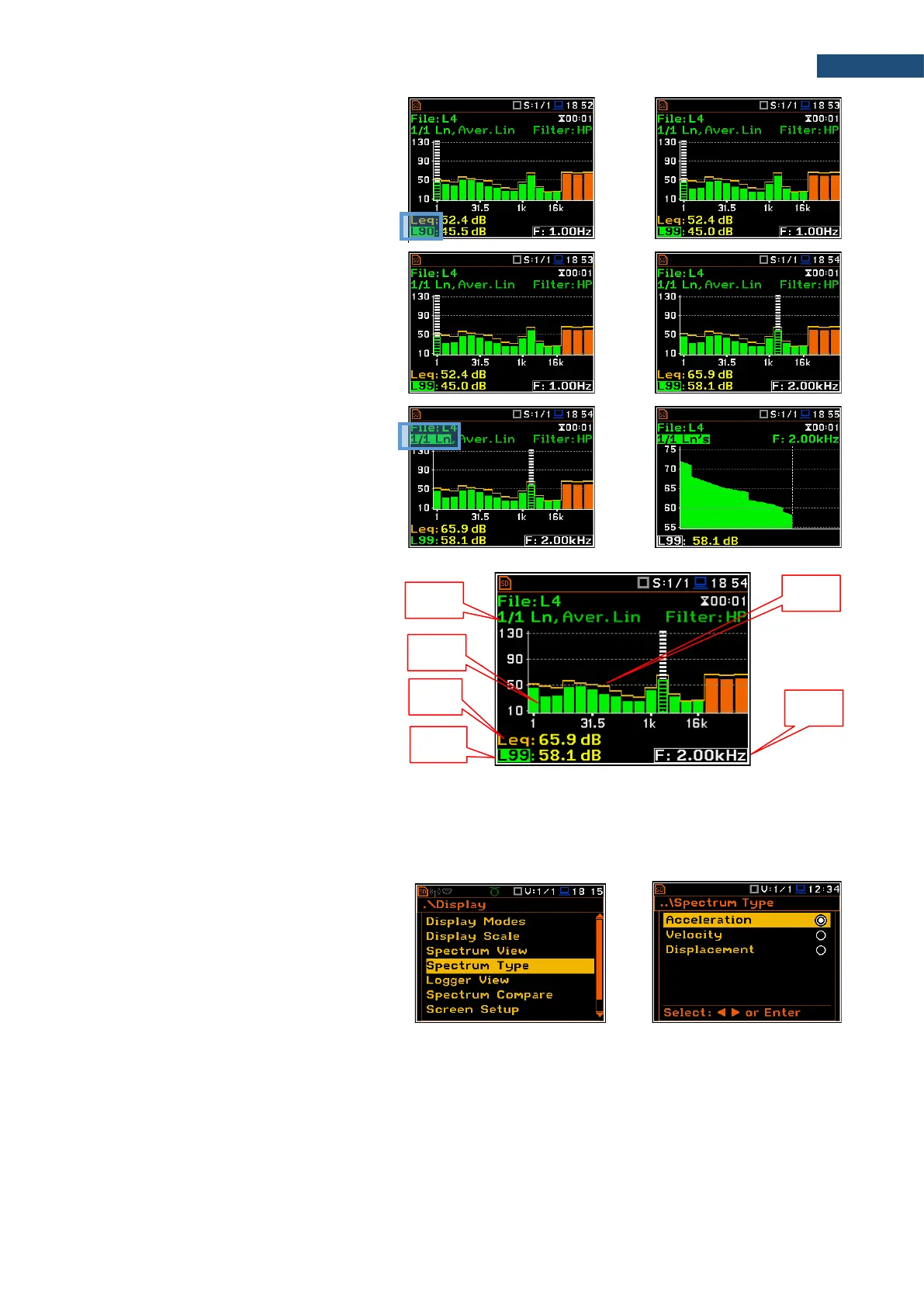
3. Select the Lnn field in the Ln spectrum
view with the ▲ / ▼ key.
4. Select the required Lnn result with the
◄ / ► key pressed together with <Alt>.
5. Shift the cursor on the required band or
the Total value with the ◄ / ► key.
6. Select the 1/1 Ln - 1/12 Ln field with
the ▲ / ▼ key.
7. Activate the statistics view for the
selected band, changing the field
content to the 1/1 Ln’s - 1/12 Ln’s with
the ◄ / ► key pressed together with
<Alt>.
Ln spectrum view fields
1. Ln spectrum name
2. Ln spectrum bar plot
3. Leq value for the cursor position
4. Lnn value for the cursor position
5. Leq spectrum curve plot
6. Central frequency for the cursor
position
10.3.5 Changing spectrum type in Vibration modes – Spectrum Type
In the Spectrum Type screen, which is
available only in Vibration modes, you can
select the different types of vibration spectra
to be presented in the Spectrum view:
Acceleration, Velocity or Displacement.



 To Next Page