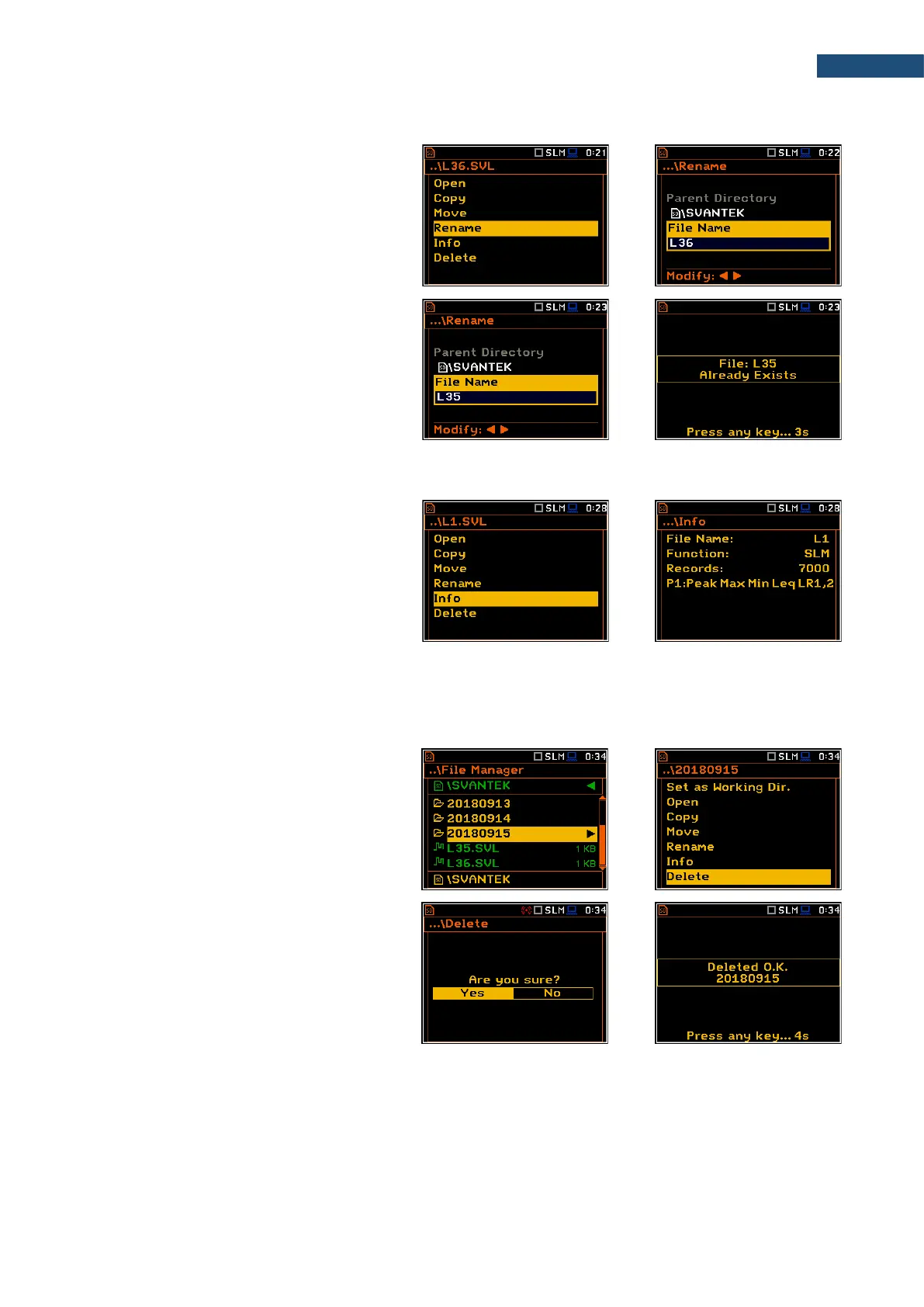
6.1.5 Renaming files/directories – Rename
You can rename files or directories. To do
this, select the desired file or directory and
press <ENTER>. Select the Rename
position in the command list and press
<ENTER>. The special screen with editor
function will be opened.
If a file with the new name is already in the
directory, the warning will be generated and
rename command will not be performed.
After pressing any key, the instrument will
return to the editor screen.
6.1.6 Viewing information about files/directories – Info
You can view information about a file or a
directory. To do this, select the desired
file/directory and press <ENTER>. Select
the Info position in the command list and
press <ENTER>. The information screen will
be opened.
The file Info screen contains information about: file size, measurement function, number of records with
summary results and results saved with the logger step for three profiles.
6.1.7 Deleting files/directories – Delete
You can delete a file or a directory. To do
this, select the file/directory and press
<ENTER>. Select the Delete position in the
command list and press <ENTER>.
The instrument will ask for confirmation of
this action since it cannot be undone once a
file/directory has been deleted.
The delete directory command erases all
files in this directory and files in all sub-
directories.



 To Next Page