Note: LXY is an abbreviation for the L (or Spl) result measured with X filter and Y detector time
constant – see Appendix D.
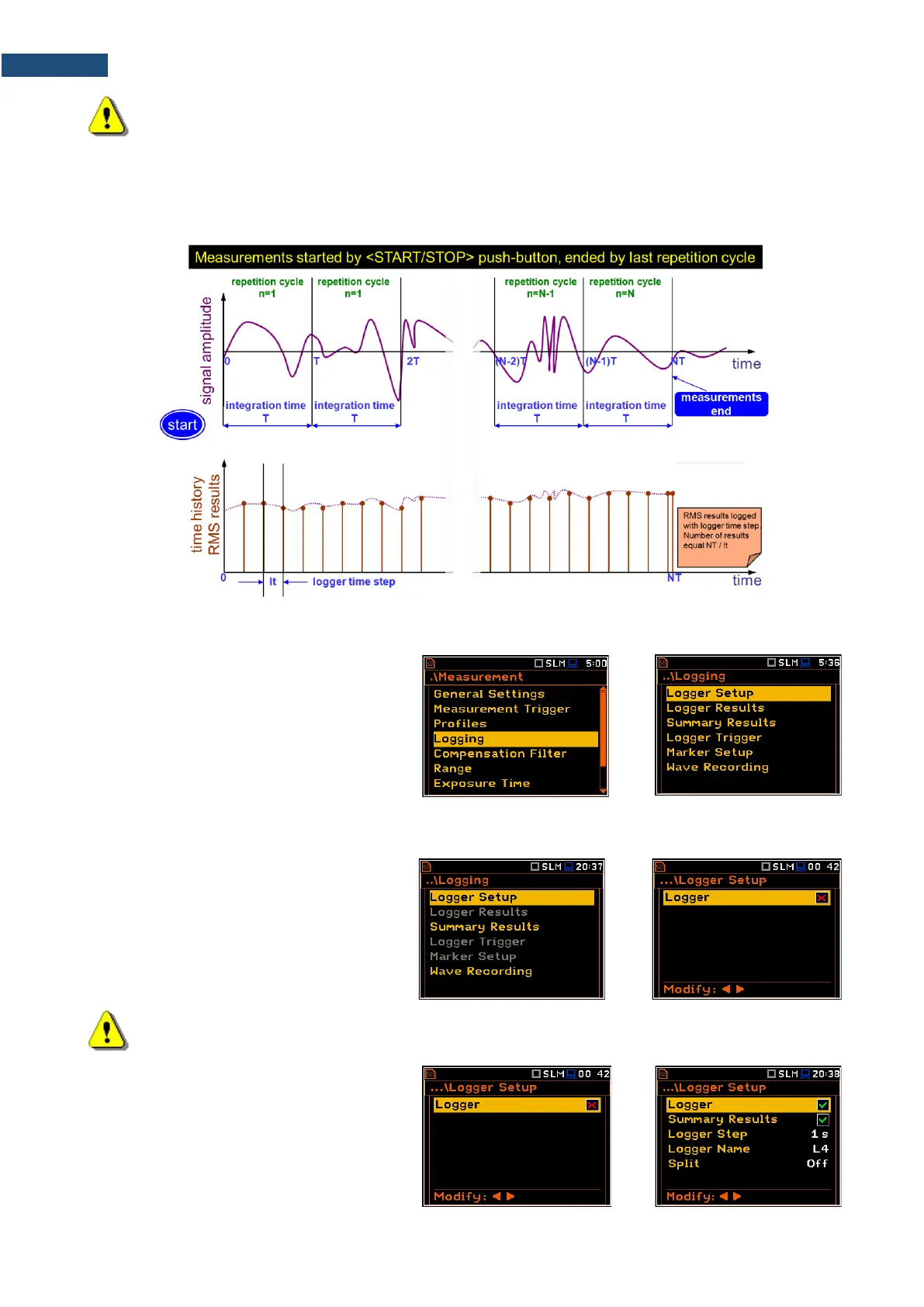
Summary results are saved in the same file with logger results. Blocks of summary results are recorded in the
file in the end of every measurement cycle.
The figure below illustrates principles of saving measurement results.
Summary Results and Logger Results logging
The Logging list enables programming of
the logging functions: recording of summary
and logger results (measurement history) in
a logger file and recording of audio signal in
a wave file.
4.4.1 Setting logger general parameters – Logger Setup
The Logger Setup list enables activating
the logger function and programming
logging general parameters.
If Logger is disabled only
Summary Results and Wave Recording
positions are accessible in the Logging list.
Note: If Logger is disabled, result files will not be created automatically, and only general results
from the last measurement cycle can be saved manually!
The Logger position switches on saving
logger results, markers, spectra as well as
results, obtained from the weather station
(Meteo), with the interval defined by the
Logger Step parameter as well as
Summary results with the interval defined by
the Integration Period parameter. Default
mode: enabled.



 To Next Page