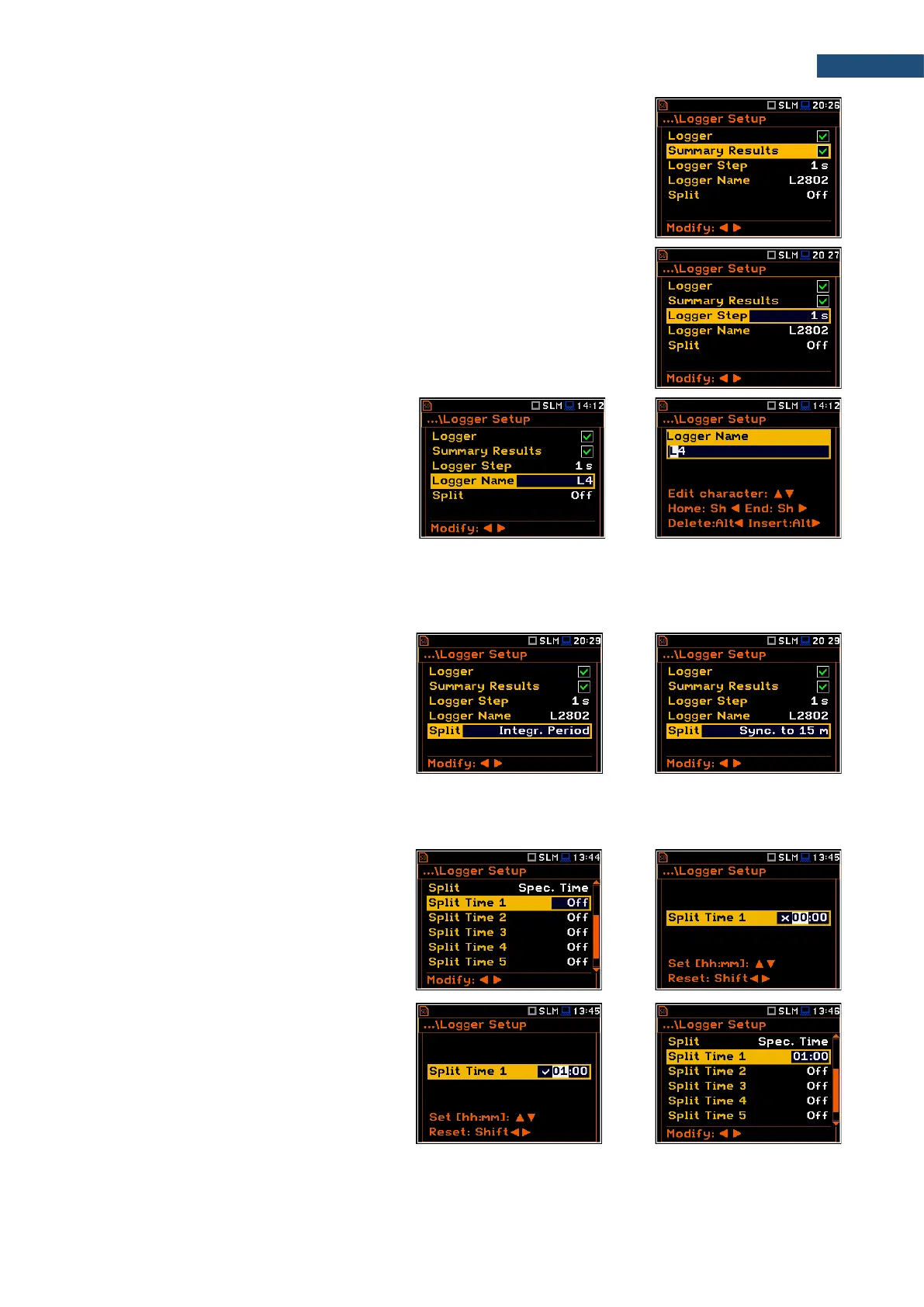
Summary Results saving
The Summary Results position enables saving of summary results for each
measurement cycle including results obtained from the weather station (Meteo
results), statistics and spectra. Default value: enabled.
Logger step
Logger Step defines a period of the logger results measuring and logging in a
file. It can be selected from the set: 2 ms, 5 ms, 10 ms, 20 ms, 50 ms, 100 ms,
200 ms, 500 ms or from 1 s to 59 s with 1-second step or from 1 m to 59 m with
1-minute step and up to 1 h. Default value: 1 s.
Logger file name
The Logger Name position allows you to
define the logger file name, which consists
of a prefix and a number. The default logger
file prefix is L. The name can be up to eight
characters long. After pressing the ◄ / ►
key, the special screen with text editor
function is opened.
Splitting logger file
The Split position enables splitting the data logging into separate files. If the Split parameter is Off the data
will be logged in one logger file with the name defined in the Logger Name position. Default value: Off.
In other cases, registration will be carried out
in separate files and the registration in the
new file will start after expiration of
integration period (Integr. Period), or at
every quarter of the RTC (Sync. to 15m), or
at every half an hour of the RTC
(Sync. to 30m), or at every hour of the RTC
(Sync. to 1h), or at specified by the user
times (Spec. Time).
Whenever the split time is achieved the logger file is closed and the new file with the increased by one number
is opened for subsequent measurement data.
If Spec. Time is selected, 6 additional
positions appear in the end of the
Logger Setup list (Split Time X).
After opening each line, you can define the
time of the day when splitting should occur.
The special screen with time editor is
opened after pressing the ► key.
In the time edition line, you may define hour
and minute of the split operation and switch
on () or off () the current split.
After pressing <ENTER> the Split Time X
list will show the active times of the day when
the logger will be split.



 To Next Page