fulfilment. The icon appears alternately with
the „measurement”, „logging” or „wave” icons.
fulfilment. The icon appears alternately
with the „measurement”, „logging” or
„wave” icons.
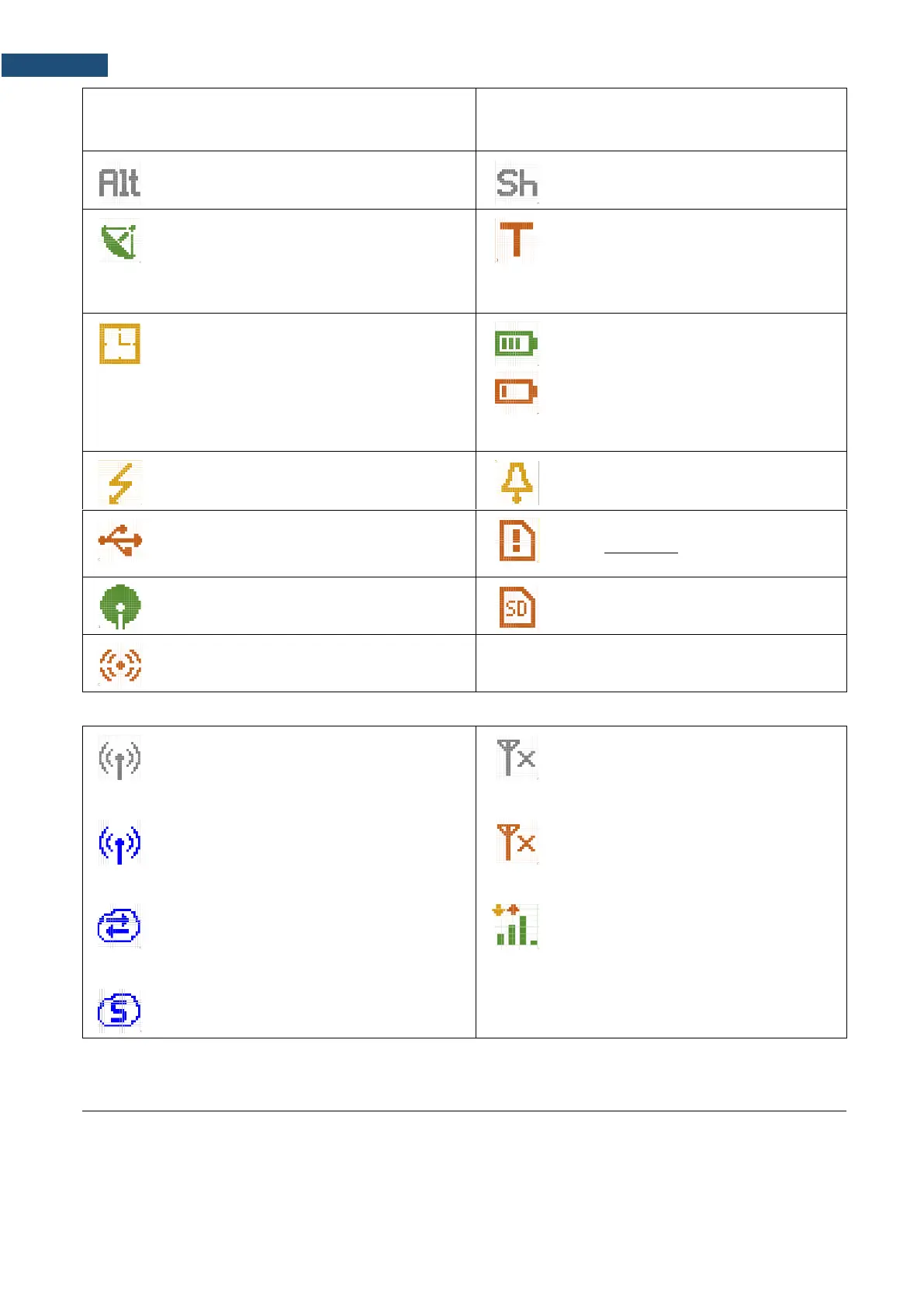
“alt” icon is displayed when the <Alt> key is
pressed.
“shift” icon is displayed when the
<Shift> key is pressed.
„GPS” icon is displayed when GPS is active.
Colours of the icon define the state of the
GPS: green – active, blue – searching, grey –
disconnected.
“trigger” icon is displayed when other
than Level or Slope trigger is waiting for
a condition fulfilment. The icon appears
alternately with the „measurement”,
„logging” or „wave” icons.
“clock” icon is displayed when the timer is
On. It is active when the instrument is waiting
for the measurement start-up to occur. When
the measurement start up is close, the icon
changes its colour to green and starts
blinking.
“battery” icon is displayed when the
instrument is powered from the internal
batteries. The icon corresponds to the
status of the batteries (three, two, one or
none vertical bars inside the icon). When
voltage of batteries is too low, the icon
becomes red.
„polarisation” icon is displayed when
polarisation voltage is 200V.
„alarm” icon is displayed when an alarm
appears.
“USB disk” icon is displayed when USB disc
is connected, activated and assigned for file
saving.
“memory warning” icon is displayed
when there is no inserted micro SD card
and USB disc.
“windscreen” icon is displayed when
windscreen is applied.
“SD card” icon is displayed when the
micro SD card memory is inserted.
“self-vibration” icon is displayed when self-
vibration level is exceeded.
Icons connected with modem functionality:
“no wireless” icon is displayed when the
GPRS function is switched on and there is no
cable connection with the modem
“no range” icon is displayed when the
GPRS function is switched on and there
is no cable connection with the modem
and therefore no range
“wireless” icon is displayed when the
wireless transmission (GPRS modem) is
active, but there is no connection with Host or
SvanNET
“no range” icon is displayed when the
wireless transmission (GPRS modem) is
active, but the modem is out of range
“host” icon is displayed if there is connection
with Host
“range” icon is displayed if there is
GPRS connection and shows the level of
the GPRS signal and ways of data
transmission.
“SvanNET” icon is displayed if there is
connection with SvanNET.
Memory type
All available measurement results and settings can be stored in the memory (micro SD Card or USB Disk) as
files in the predefined or assigned directories. The measurement files are stored by default in the predefined
SVANTEK directory. The setup files are stored in the predefined directory SETUP. Other special files (logs,



 To Next Page