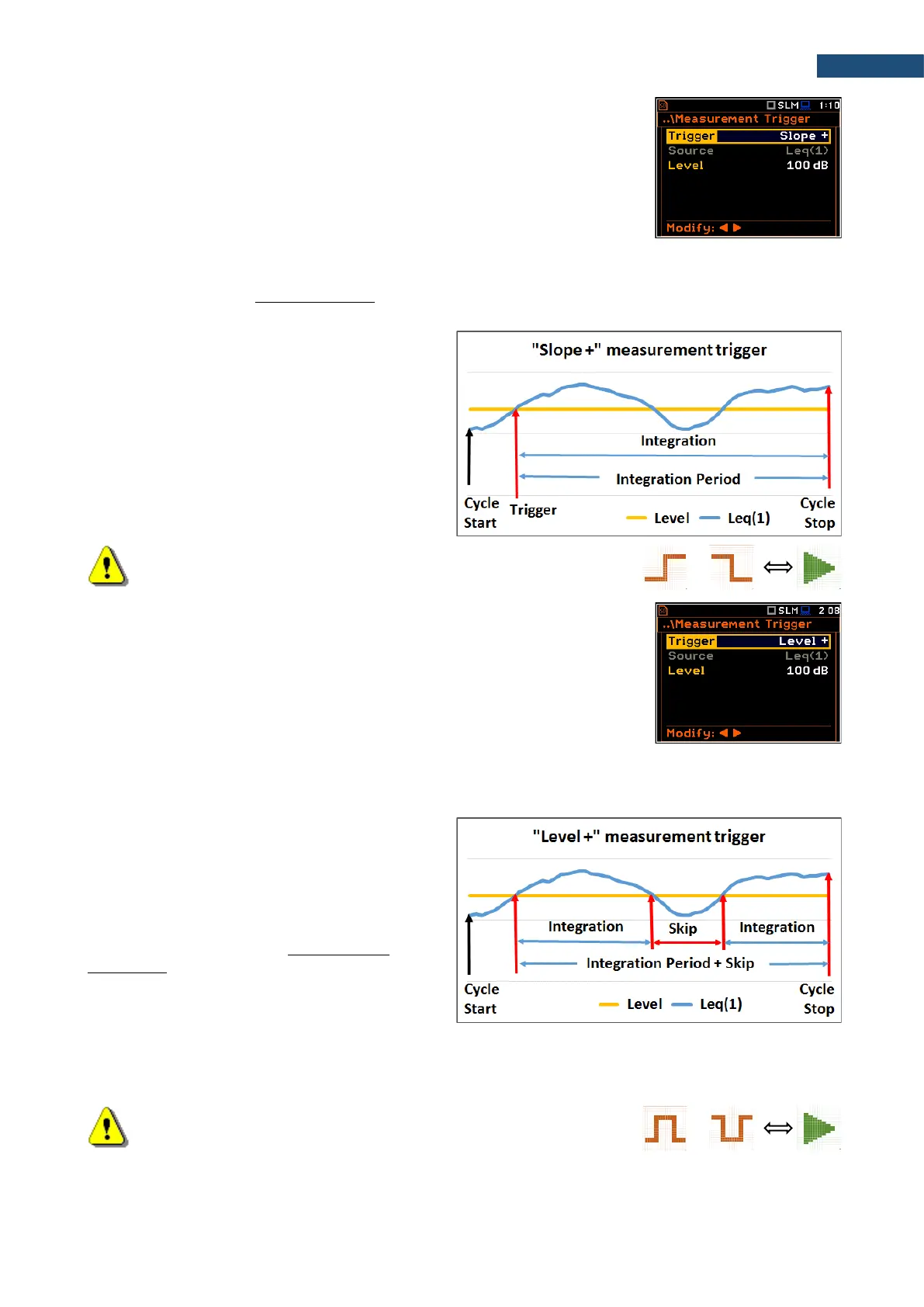
Slope trigger
The Slope + / Slope - trigger starts the measurement/integration with the
duration of the Integration Period on condition: rising value of the measured
result (Source) averaged by 0.5 ms passes above/below the threshold value
(Level).
When the new measurement cycle begins (after pressing the <Start> key or automatically after the stop of the
previous measurement cycle) the instrument checks the trigger condition every 0.5 ms and if condition is met
the instrument starts the continuous series of 1-second integrations, the number of which is equal to the number
of seconds in the Integration Period.
After ending the Integration Period, the
new measurement cycle can start with
above logic.
The measurement can be stopped manually
at any moment with the <Stop> key.
Note: When a measurement is waiting for the slope trigger, the
“slope” icon appears alternatively with the „measurement” icon.
Level trigger
The Level + / Level - trigger starts the 1-second measurement/integration on
condition: value of the measured result (Source) averaged by 0.5 ms is
greater/lower than the threshold value (Level). In other cases, the instrument
continues checking the trigger condition every 0.5 ms.
When a new measurement cycle begins (after pressing <Start> key or automatically after previous
measurement cycle stop) the instrument checks the trigger condition every 0.5 ms and starts 1-second
integration if condition is met.
After 1-second integration, the instrument
repeats the trigger condition checking every
0.5 ms and starts next 1-second integration
if condition is met. Instrument does it as
many times as many seconds are within the
Integration Period and stops the
measurement cycle. Therefore, the series of
1-second measurements may not be
continuous, and the duration of the
measurement cycle may be longer than the
Integration Period.
The measurement can be stopped manually at any moment with the <Stop> key. Summary Results are
calculated on the base of series of 1-second results measured during each measurement cycle and saved in a
logger file.
Note: When a measurement is waiting for the level trigger the “level”
icon appears alternatively with the „measurement” icon.



 To Next Page