100
DISPLAYING TOMOGRAMS
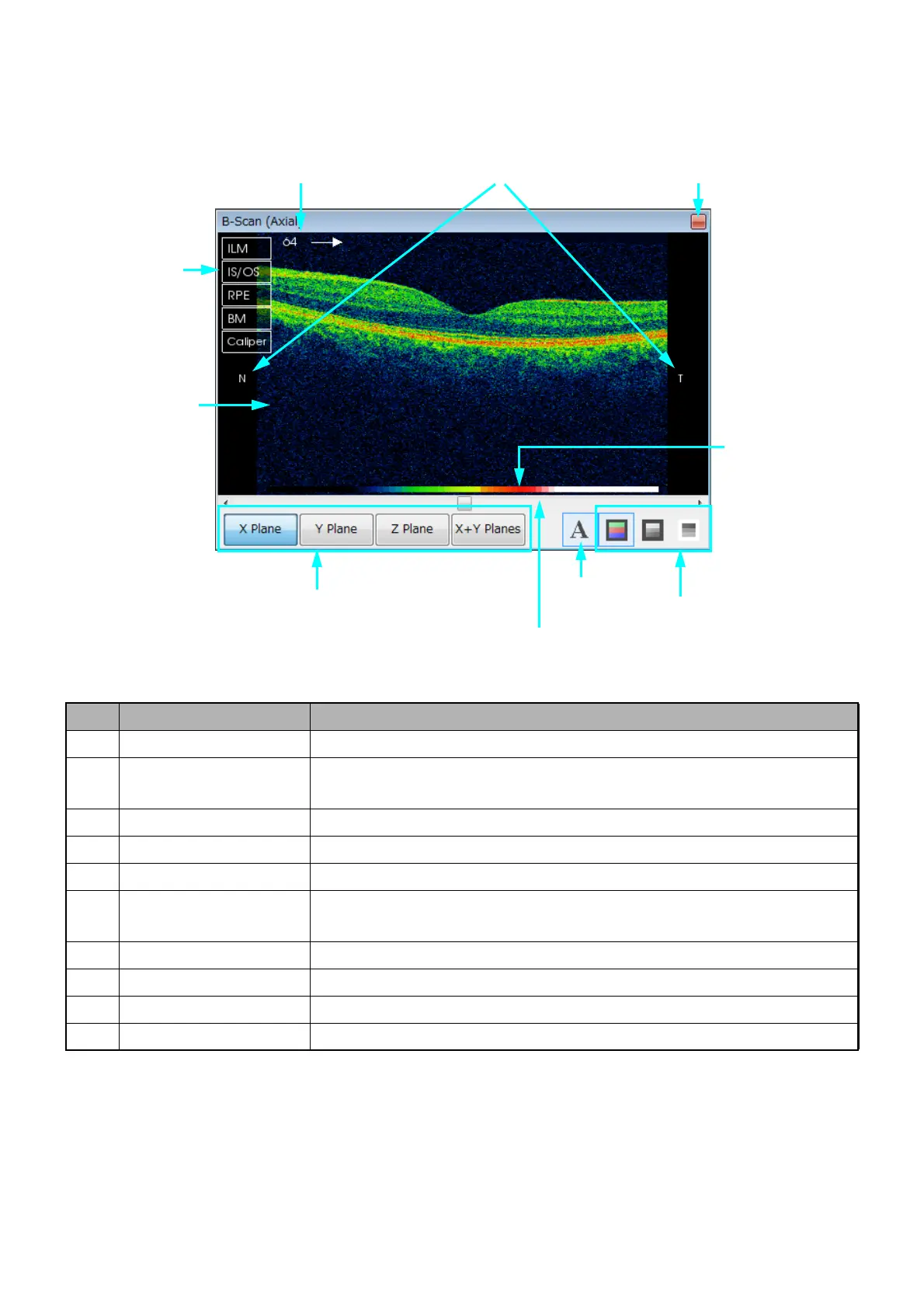
[Auxiliary tomogram display area]
The auxiliary tomogram display area indicates the 2D scan tomogram in 3D mode.
ID Name Description
F-1 Tomogram Same as E-1.
F-2 Scan Position Number/
Scan direction
Same as E-2.
F-3 Orientation Markers Same as E-3.
F-4 Slider bar Same as E-4.
F-5 Colormap Same as E-5.
F-6 Annotation Show/Hide annotations (F-2: Scan Position Number, F-3: Orientation
Markers, F-5: Colormap, F-10: Menu).
F-7 Color change Changes "Color", "B/W" and "Reverse of B/W".
F-8 Plane options Select a plane. (X Plane, Y Plane, Z Plane and "X+Y" Plane)
F-9 Maximize Maximize Window A to the whole screen or return to its original size.
F-10 Menu Menu (It will be explained in "How to use the menu" on P. 101.)
F-10:
Menu
F-3:
Orientation Markers
F-9:
Maximize
F-7:
Color change
F-6:
Annotation
F-5:
Colormap
F-4:
Slide Scroll
F-8:
Plane Options
F-1:
Tomogram
F-2:
Scan Position Number/Scan direction












 To Next Page