Profile Configuration Workspace Modem Profiles Management Model
Profile Configuration Workspace
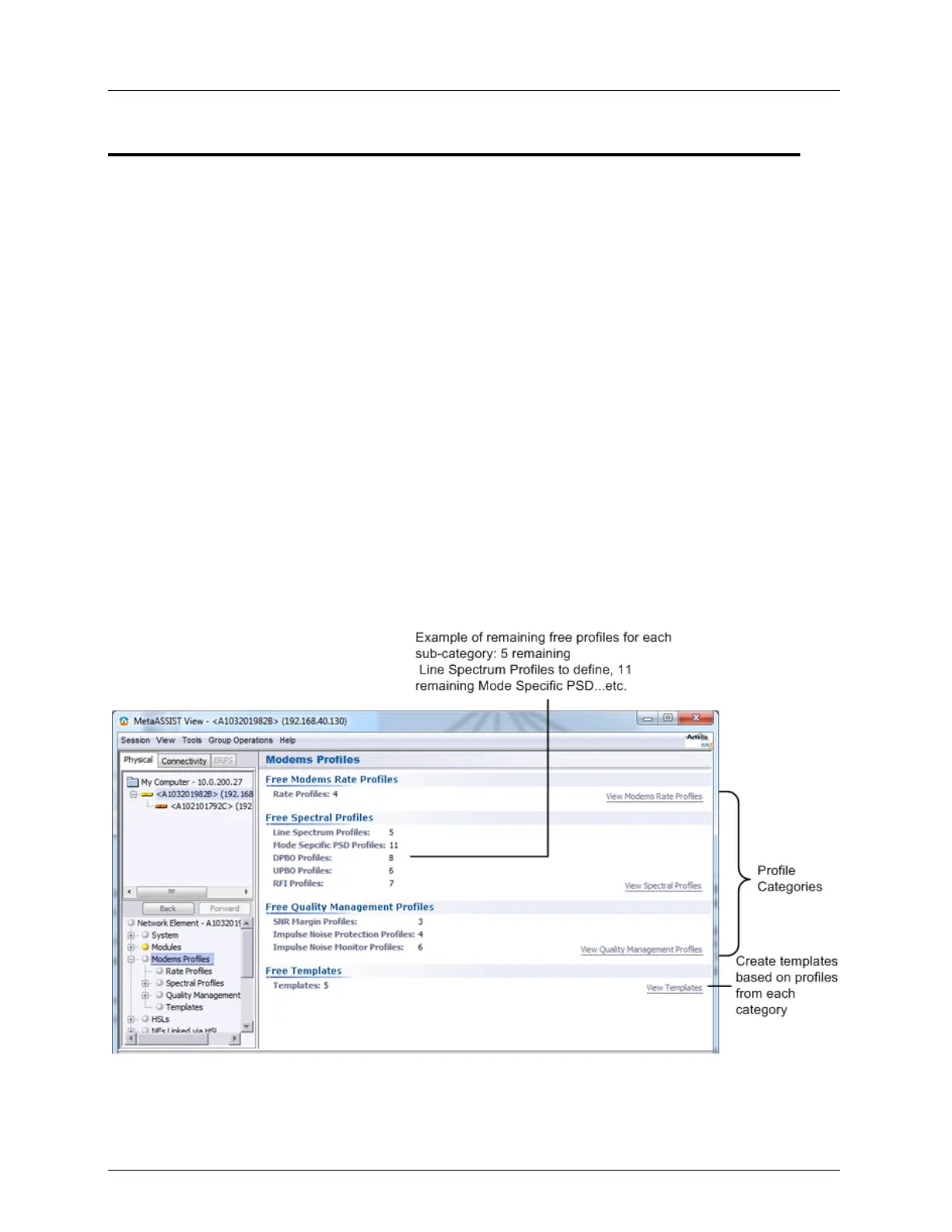
The Modem Profile templates consist of three categories of profiles:
Rate related profiles - used to configure the upstream and downstream data rate that will
be required for various services.
Spectral Profiles - used to configure the line upstream and downstream power spectral
density according to regional requirements and required DSL operation modes.
Quality Management Profiles - used to configure the SNR settings, the Impulse Noise
Protection and monitoring options to identify Impulse Noises.
To access the Modem Profiles configuration options
1. Click Modem Profiles in the Network Elements tree.
2. Under Modem Profiles (and in the displayed pane), four groups of items are displayed:
three types of modem profile categories (as detailed above) and Templates, where
templates based on profiles selected from the pool are created.
For each category, the number of profiles that may be configured is limited (the number
varies according to the sub-category), where a default profile is always predefined.
Profiles can be configured by setting each attribute or by uploading a predefined profile
and modifying any required parameters and the number of remaining (free) for
definitions is indicated.



 To Next Page