Equipment and Port Configuration High Speed Link (HSL)
HSL Configuration
No configuration is required for the ML700 HSL operation. However, you may optionally
configure the Low Bandwidth threshold (for upstream and downstream) and some
identification parameters. These serve to further optimize the link operation and determine
how the calibration procedure is performed.
NOTE: The HSL parameters can be saved to or retrieved from a (previously saved) configuration
template file and only the relevant parameters (i.e. Mode and Topology options) can be modified.
To configure the HSL
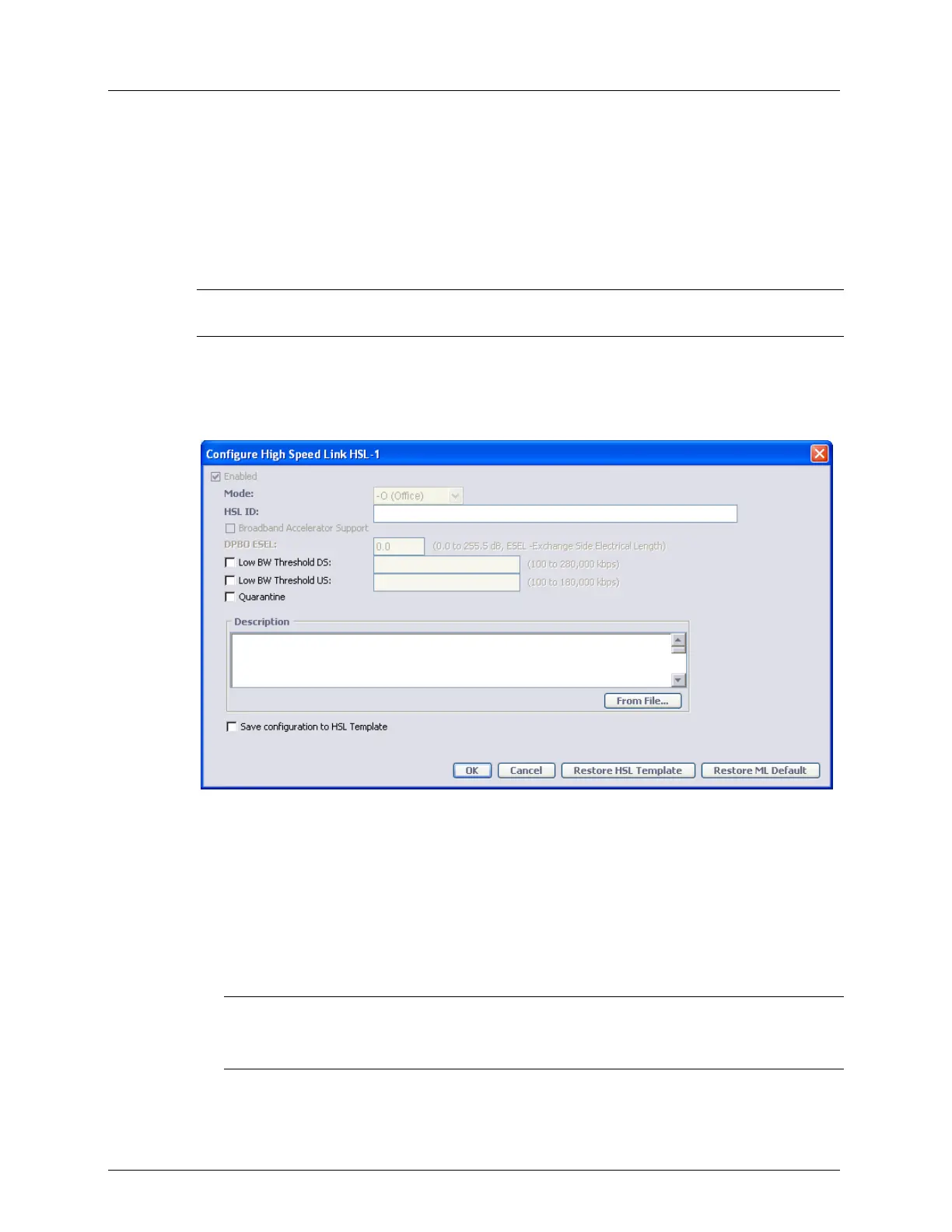
1. In the Network Element tree, select the HSLs item and at the bottom of the displayed
pane, click the Configure button. The following pane appears
2. In the HSL ID field, enter an identifiable name for the HSL link (up to 64 characters. i.e.
Martin Industrial Zone Building A). The ID configured here will also be used in SNMP
as HSL interface alias name.
3. Check the “Broadband Accelerator support” in case of link with BBA units (BBA do not
support VDSL2, in case that the BBA support is enabled the DBPO is not editable (used
only for VDSL2).
4. Only for VDSL2 installed at street cabinet:
Set the DPBO Exchange Side Electrical Length (ESEL)
NOTE: When editing HSL, some parameters may be grayed-out because HSL
operational status (In Service) does not allow changing them. To edit such parameters,
cancel HSL calibration in advance.



 To Next Page