Management Configuration L2 (MGMT VLAN) Connectivity
L2 (MGMT VLAN) Connectivity
ML700 provides Management LAN access according to 802.1Q bridge mode (VLAN aware)
- accessible via COLAN (MGMT) for untagged management traffic.
L3 (IP) Connectivity
ML systems are assigned the default IP address and Gateway of 0.0.0.0 (unusable) and a
Subnet Mask of 255.255.0.0 (Class IP Addresses).
To set IP connectivity parameters on monitored units
1. In the Network Element tree, open Management Interfaces. The Configure
Management IP Interfaces pane opens.
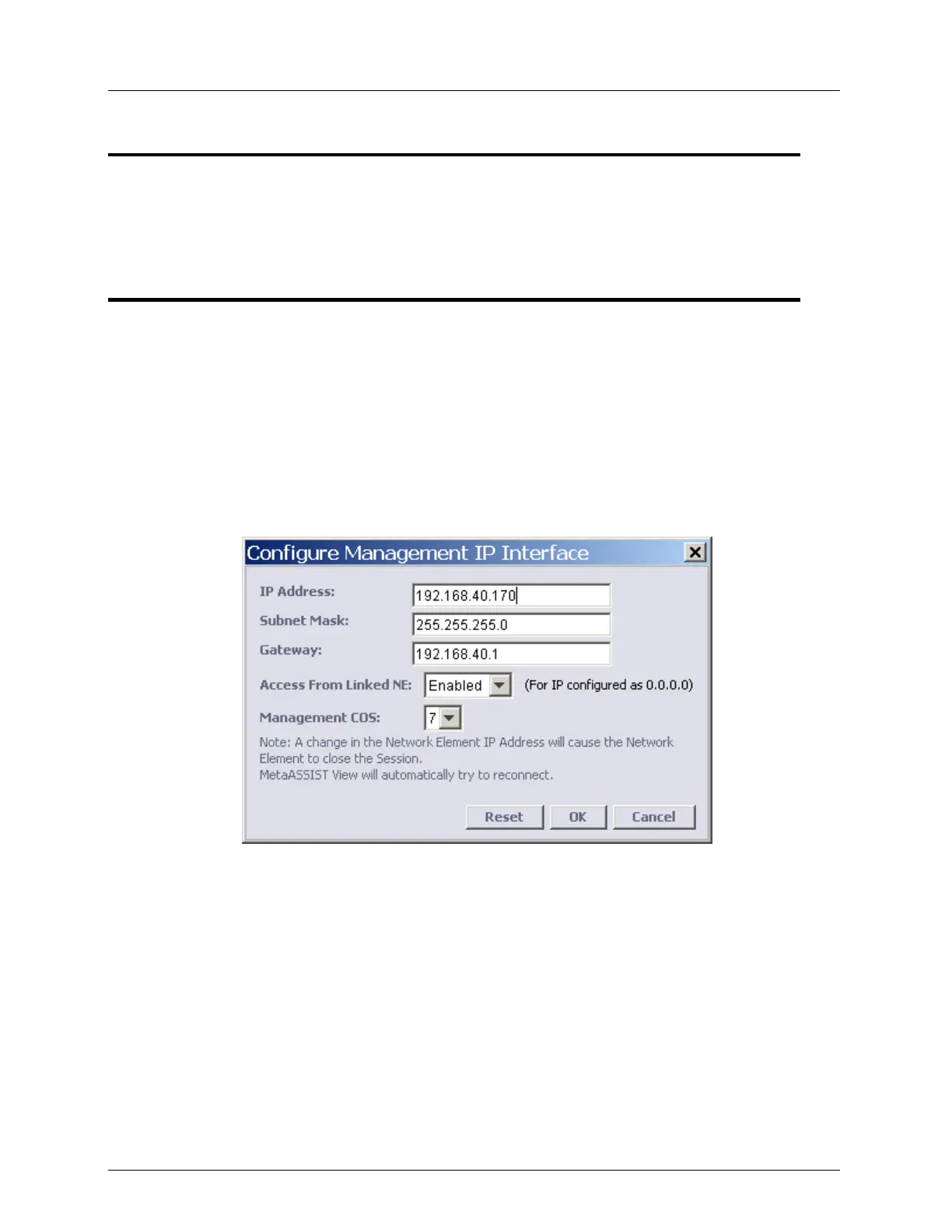
2. In the IP Interface area, click the Configure button. The Configure Management IP
Interface dialog appears.
3. Enter the IP management interface parameters as provided by your network
administrator.
4. To block remote IP configuration on monitored NE via a linked NE (not relevant to
ML530) - set Access From Linked NE to Disabled. By Factory Setup this option is
enabled on any ML system.
5. COS (Class of Service) of Management VLAN flow is configurable (set to 7) by default.
All Management frames created by CPU will be originated with COS bits as configured.
6. To reset all parameters to factory setup values, click Reset.
7. Click OK.



 To Next Page