Introduction ML700 Front and Rear Panel Descriptions
ML700 Front and Rear Panel Descriptions
This section describes the ML700 front and rear panel connections and LEDs.
ML700 Front Panel Description
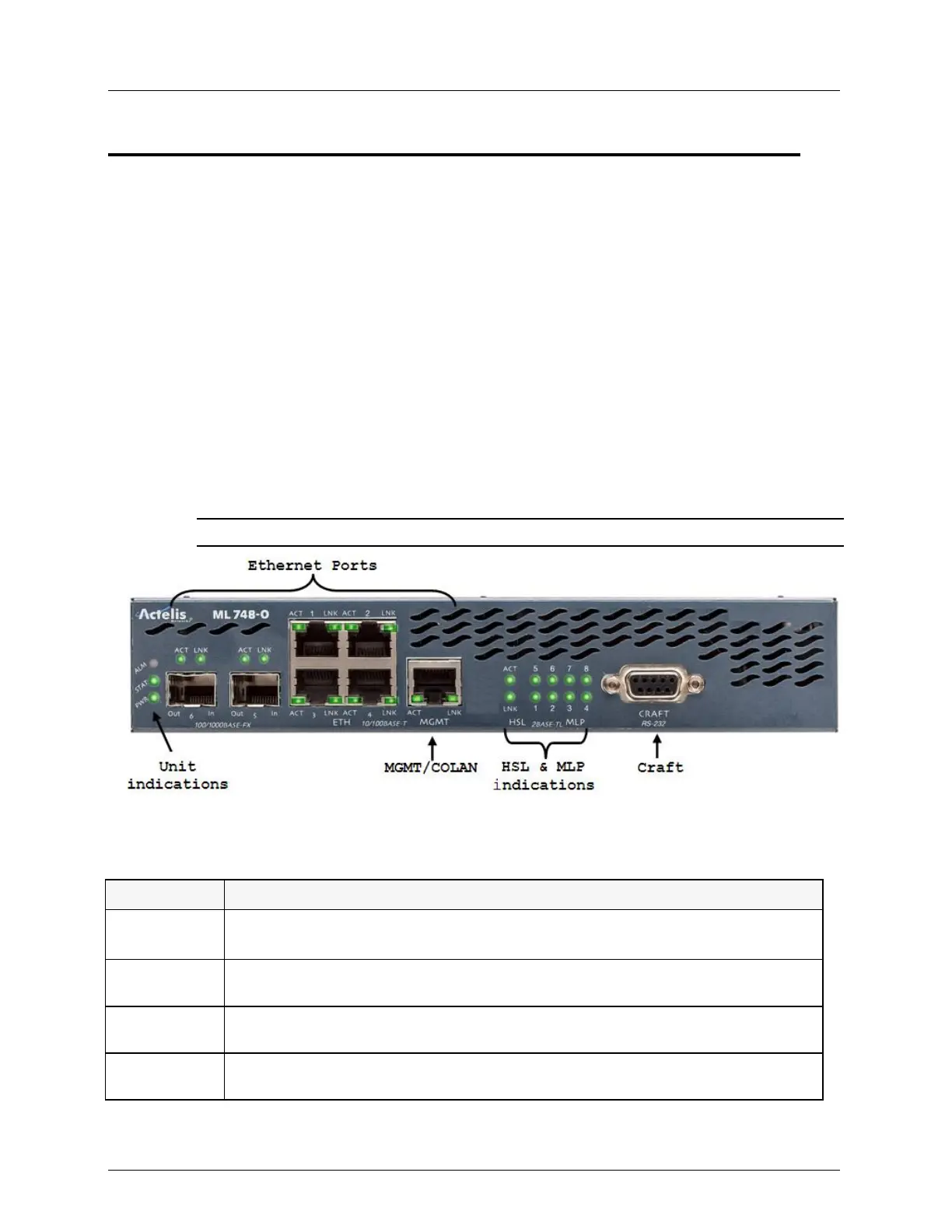
ML700 front panel contains the Ethernet service ports and the management connection ports.
The following example shows the ML700 interfaces.
Note the following:
The front panel contains all the LED indicators including those of the rear panel (copper
pair) ports
All the Ethernet ports (10/100 BaseT, SFPs, MGMT and HSL) have dedicated ACT and
LNK LEDs
Unit level LEDs are at the side of the panel
NOTE: Refer to ML700 Quick Installation Guide for the installation procedure.
Figure 7: Front Panel Connections
Table 2: Front Panel Port Description
Four 10Base-T/100Base-TX FULL/HALF/AUTO Ethernet service ports (RJ-45).
Ports 3 and 4 do not support 10Base-T FULL/HALF option
Two 100Base-FX/1000Base-X FULL/AUTO Ethernet service ports with sockets for
various SFP modules.
10Base-T/100Base-TX FULL/HALF/AUTO Ethernet port (RJ-45) dedicated for IP-
based management. Referred in GUI/TL1and CLI as COLAN AID
RS232 port dedicated for IP-less management, used for initial setup and local
monitoring



 To Next Page