Rate Profiles Modem Profiles Management Model
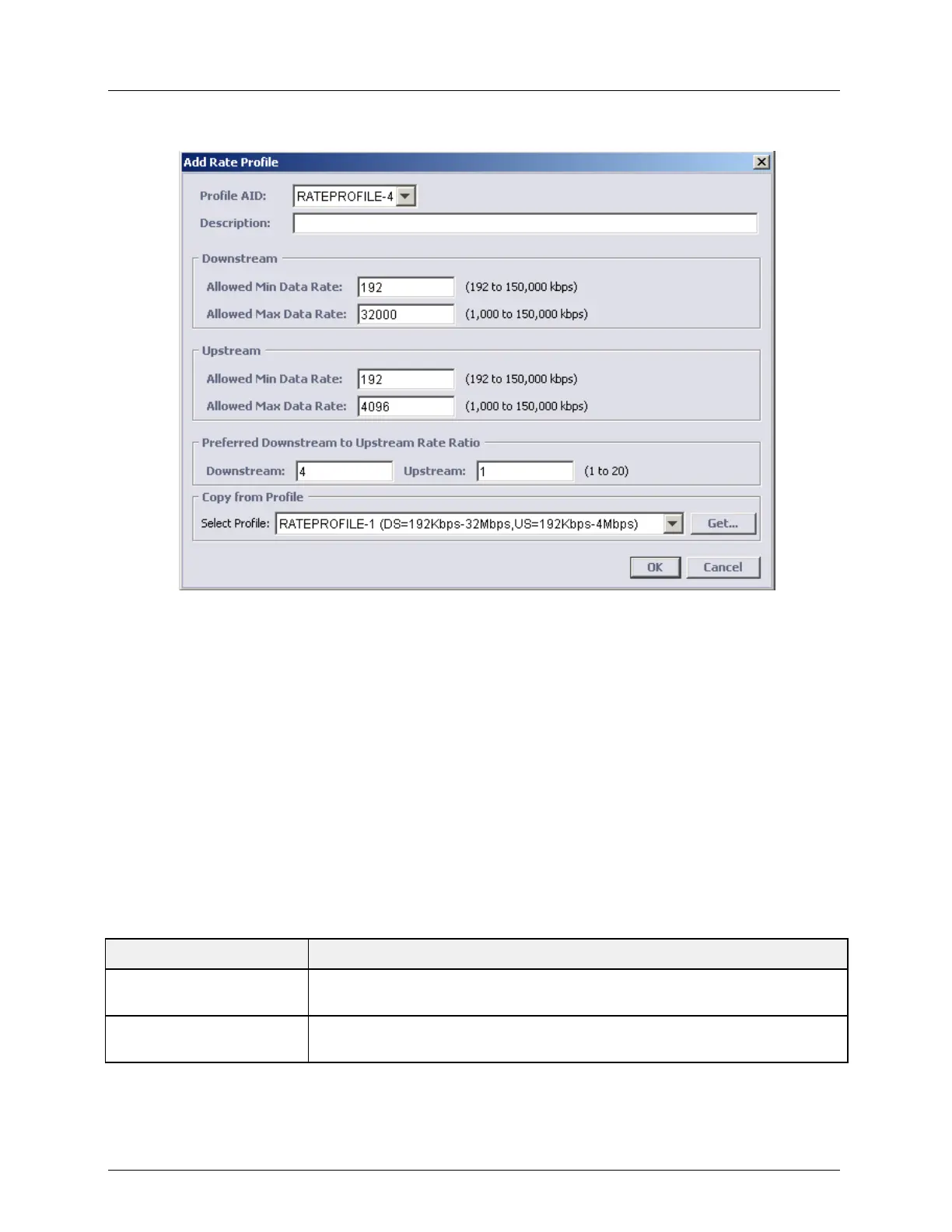
2. In the displayed pane, click Add Profile. The Add Rate profile definition dialog appears.
3. Under Profile AID, choose from the available AIDs (RATEPROFILE-x). After the
profile is defined, it will no longer be available on the available profile list; however, it is
modifiable from the Rate Profiles glance pane (shown under Step-1 above) using the Edit
button.
4. In the Description field, enter an identifiable description of the profile such as the DS
and US values (e.g. DS=64Kbps-32Mbps, US=32Kbps-4Mbps). This description will be
very helpful when viewing profile lists.
5. You may either define all the remaining parameters or use the Select Profile field (under
Copy from Profile at the bottom of the pane) to choose an existing profile that is very
close to your needs and then modify the parameters. (If a description has not been
entered, only the Profile AID will be displayed).
To load the requested profile parameters, click Get.
6. Modify any of the parameters according to the descriptions below and click OK.
Table 23: Rate Profiles Parameter Descriptions
Lists the available (free) profile AIDs. Defined AIDs are not listed. They
are available under Copy from Profile for reference or as templates.
Assign a recognizable description. It will be displayed along with the saved
profiles list under Select Profile (see above illustration).



 To Next Page