802.1ag CFM Ethernet Operation, Administration and Management
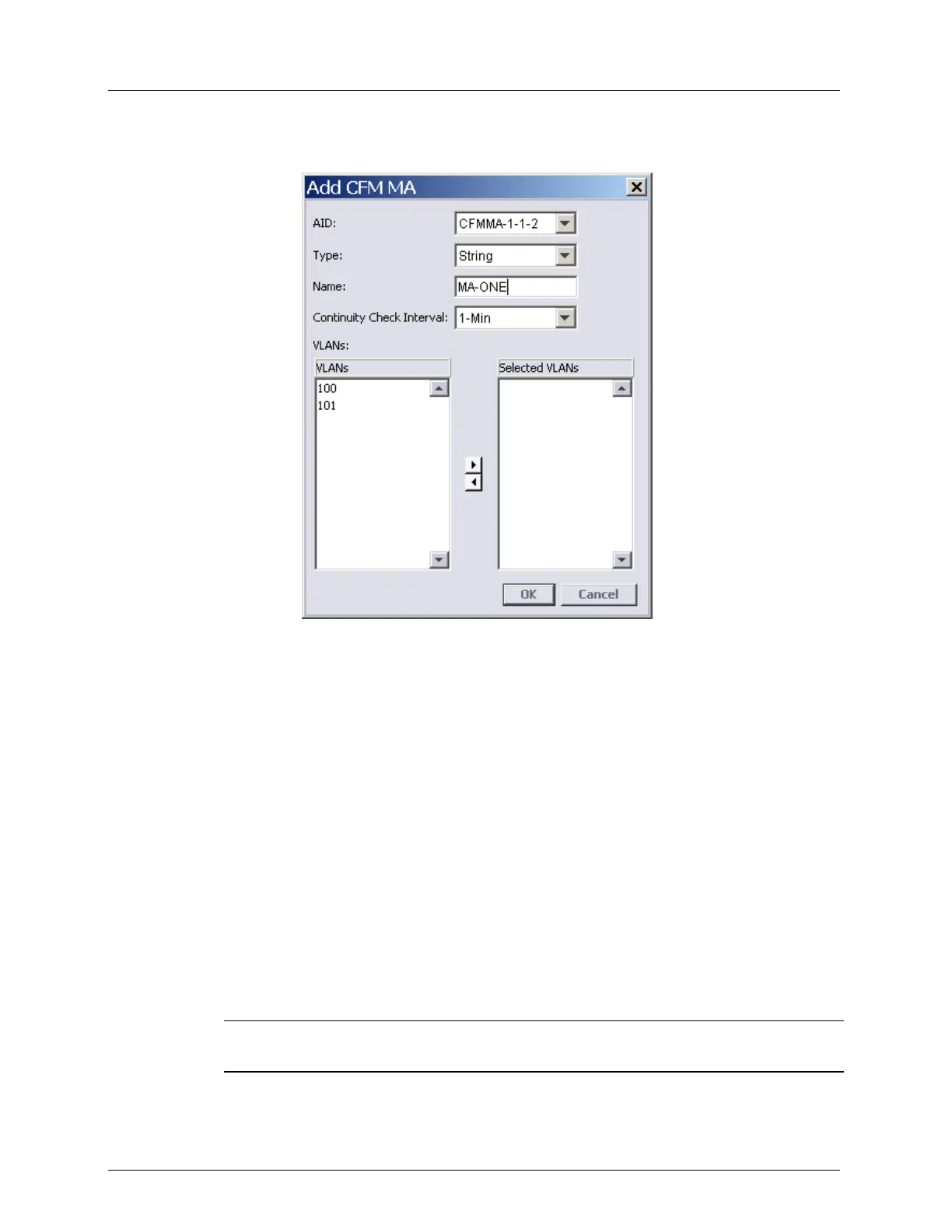
2. In the CFM Domain pane, Associated MAs area, click Add MA. The following dialog
appears.
3. Select the Type as one of the following:
String - and assign a user defined name
PVID - enter the VLAN ID
4. In the Name field, enter a recognizable CFM MA name. The MA name is a VLAN
number that should represent the group of services (VLANs).
5. Select the Continuity Check Interval from the drop-down list. CCM is multicast
heartbeat messages exchanged periodically between MEPs that allow MEPs to discover
other MEPs within a domain and allow MIPs to discover MEPs.
Choose the interval according to the following criteria:
A lower interval takes up more bandwidth resources on one hand and reduces
monitoring feedback on the other. Choose a value that will not overload your band
while providing the required monitoring.
Up to 64 MA can be configured with 1 sec interval, the remaining MAs (up to 256
MAs per domain) can be configured with 10 or 60 sec intervals.
6. Assign the NEs by selecting an NE from the Available NEs list and clicking the > (right
arrow) button. The NE will be displayed under the Participating NEs list.
NOTE: To remove an NE from the Participating NEs list, select the NE and click the <
(left-arrow) button.
7. Click OK. The CFM MA will be displayed under the applicable Domain in the CFM
Navigation tree.



 To Next Page