802.1ag CFM Ethernet Operation, Administration and Management
ML700 specific: CFM Traffic of a layer lower than the lowest CFM Domain defined on
NE is not dropped (as required by the standard) but behaves as a regular service traffic
(dropped or passed as is or passed with VLAN encapsulation) depending on Port VLAN
membership where CFM traffic appears.
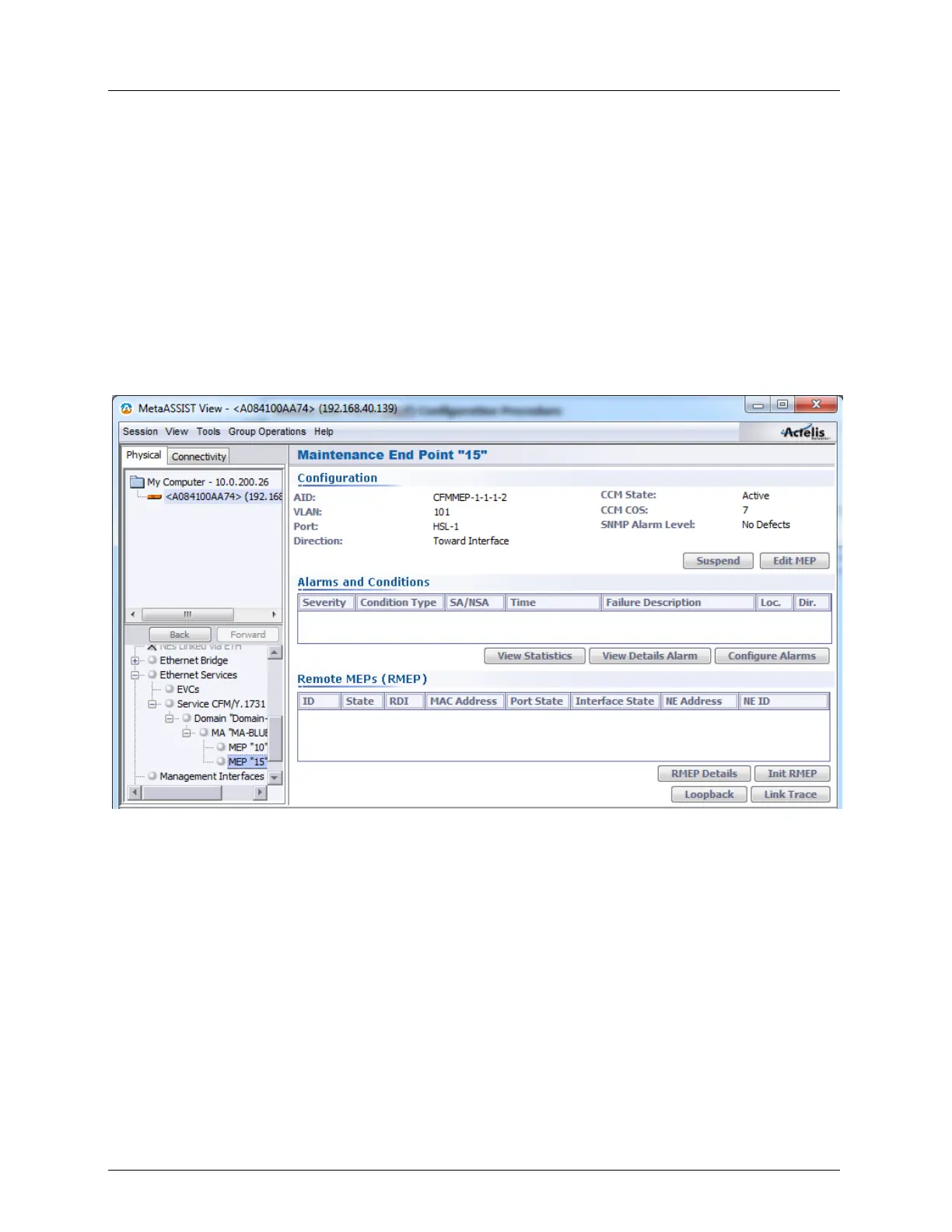
CFM MEP Pane
The MEP pane provides general information, analysis and troubleshooting options relevant
for the selected MEP.
To invoke the MEP Pane
In the Network Element tree, under Service CFM, select the relevant MEP. The MEP pane
is invoked. The MEP pane provides the MEP configuration and analysis options.
The pane is divided and pane contains the following areas:
Configuration - shows the current parameter definitions and provides access to
suspending the MEP operation (Suspend) and editing the MEP Configuration dialog
(Edit MEP) (on page 11-22).
Alarms and Conditions - shows the current alarms for the MEP and provides access to the
following options:
View Statistics - displays the PDU Tx and Rx frame statistics.
View Details Alarm - displays information on alarms if such appear.
Configure Alarms (on page 13-9) - used to modify severity levels of individual
alarms or to disable alarms.



 To Next Page