Security Management IP Access Control List (ACL)
NOTE: For group operations of Adding or configuring the IP Access Control, open the IP Access
Control dialog box via the menu bar: Group Operations, IP Access Control, Add or Configure.
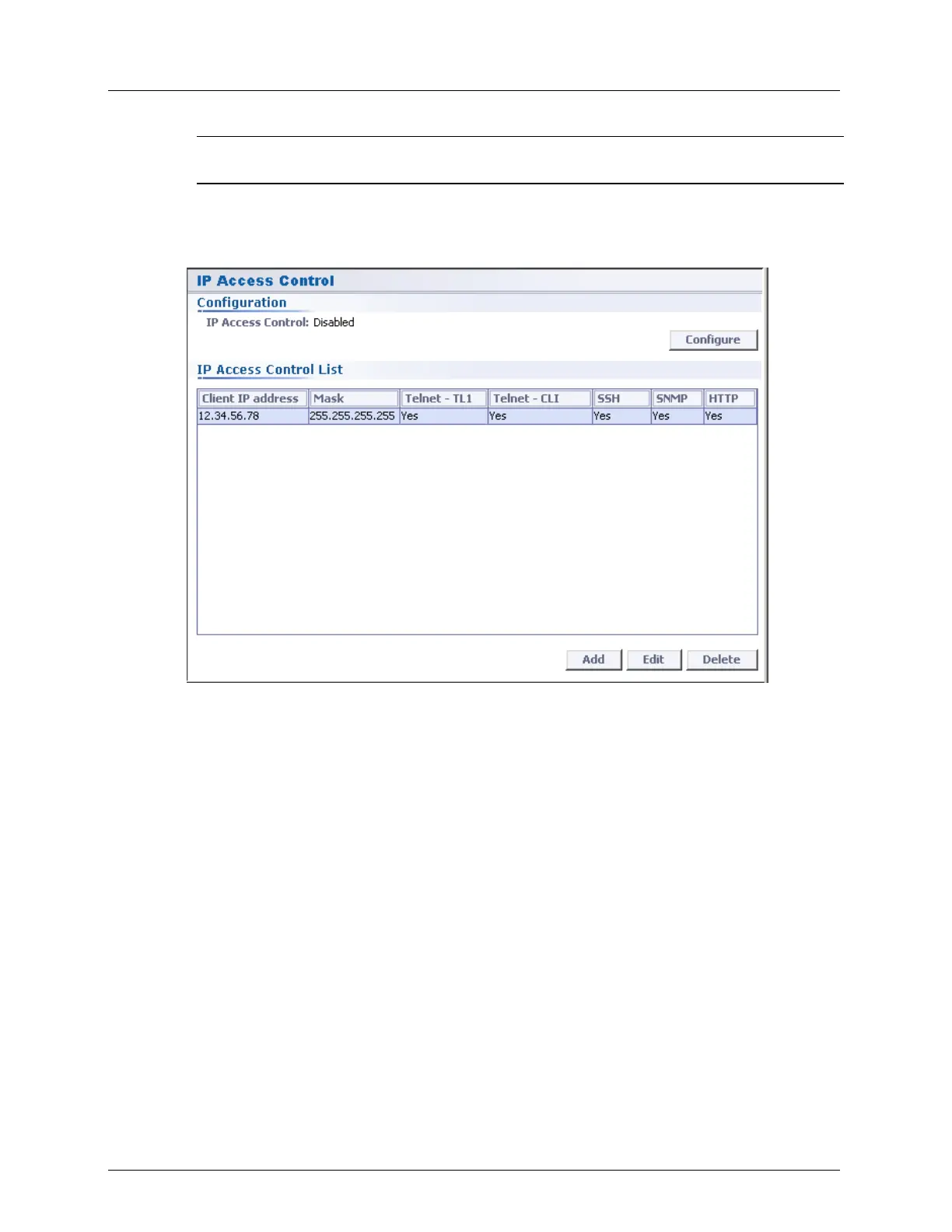
To open the IP Access Control pane:
1. In the Network Element tree, expand the Management Access and choose IP Access
Control. The IP Access Control pane opens in the work area.
The screen provides a table listing the allowed IP addresses and configured attributes:
Subnet Mask IP address
Allowed/Blocked protocols for each IP entry (CLI, TL1, SSH, SNMP, HTTP)
2. The following operation buttons are available:
Configure - enable/disable the IP Access Control mechanism. When IP Access
Control is enabled, all open management sessions running on IP addresses that are
not listed in the IP ACL are disconnected.
Add - add an IP Address to the IP Access Control List, specifying the permitted
connection protocols.
Edit - edit the permitted protocol list for an existing IP entry. For each removed
protocol, all ongoing sessions from the specified IP address of that protocol are
aborted (if IP Access Control is enabled).
Delete - delete a client from the IP Access Control list. For each deleted client, all
ongoing sessions from that client are aborted (if IP Access Control is enabled).
NOTE: The last client IP address cannot be deleted while IP Access Control is
enabled.



 To Next Page