SFP Pluggable Modules Equipment and Port Configuration
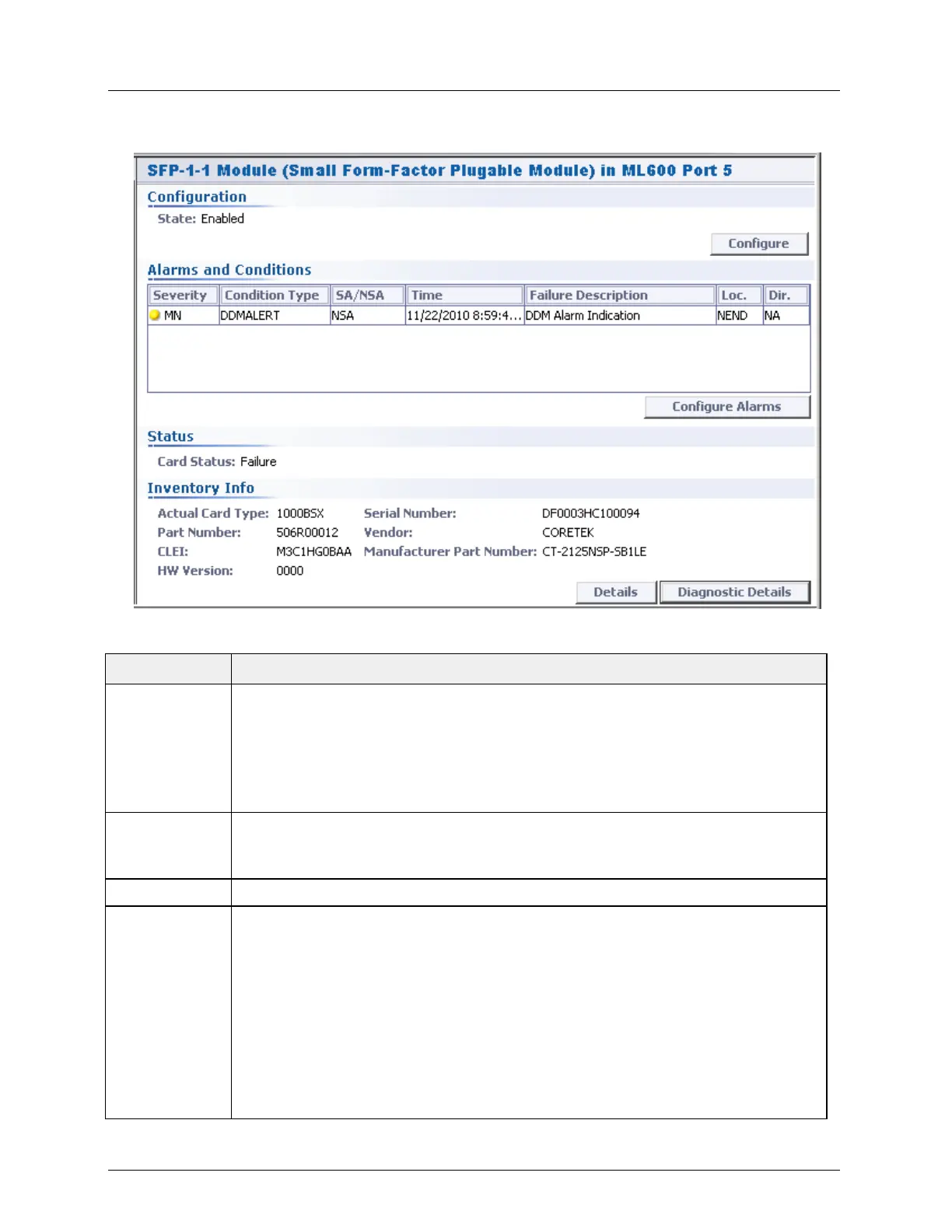
The relevant, dedicated SFP pane appears.
Table 11: SFP Pane Areas
Displays status and provides access to module enable option (Configure button).
The option is relevant only for manual provisioning.
(If the System Configurable Attributes, Pluggable Cards Configuration
parameter is set to Automatic, the SFP module is auto-provisioned; if the parameter
is set to Manual, provision the SFP module by clicking the Configure button and
check-marking the Enable option).
Shows any SFP alarms with the relevant information. The Configure Alarms
button provides access to the SFP alarm management pane - used to disable alarms
and modify their severity.
Shows hardware and software information on the SFP module, in addition to two
buttons that access more detailed information:
Details button - displays the SFP manufacturer details such as rate, wave length, reach,
etc.
Diagnostic Details - This button provides access to the DDM (digital diagnostic memory)
data of SFPs supporting DDM with Alarm report option. The invoked pane shows the
current values, thresholds of alarms values and alarms (in raised).ML integrates a single
DDMALERT alarm raised over all possible (10) threshold cross events which may be
reported by SFP.
Note that SFP alarm thresholds are provided by the manufacturer and cannot be
modified via the ML.



 To Next Page