Testing in Single Payload Mode Running a Script in Single Payload Mode
8-2 PN: 13000-00205 Rev. N MT8852B Operation Manual
8-3 Testing in Single Payload Mode
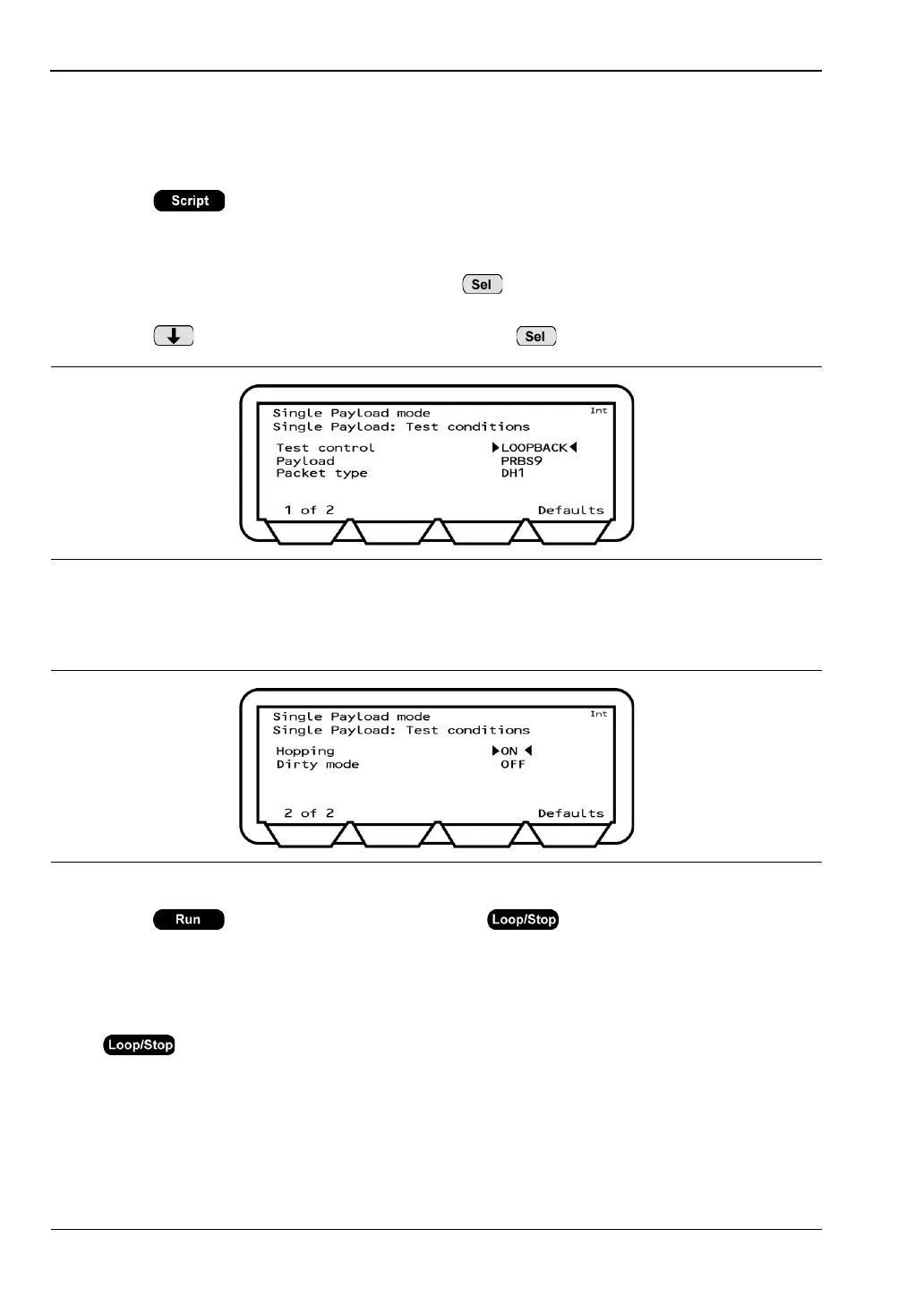
In single payload mode, the user can define the packet length and payload, select loopback or
TX mode, and turn hopping and dirty modes on or off.
1. Press to display the script entry page.
2. Move the cursor to the script number and press the [Setup] soft key to display the setup
pages.
3. Move the cursor to ”Script mode” and press to toggle the script mode setting to
"SINGLE PAYLOAD”.
4. Press to move the cursor to “edit” and press to display the test conditions.
5. Make the required settings and press [1 of 2] to display page 2. Refer to Appendix B for
definitions of each item.
6. Press to run the script once, or press to run the test script in
accordance with the instrument-wide script parameters outlined in chapter 5.
On pressing run, the MT8852B sends a single test control to the EUT to trigger it to
transmit the packets defined under the single payload test conditions.
7. If required, press the [Abort] soft key to terminate the script immediately. Press
again to stop a continuous script.
8. Press the [Results] soft key to view the test results.
Figure 8-1. Single Payload Mode Test Conditions
Figure 8-2.














 To Next Page