MT8852B Operation Manual PN: 13000-00205 Rev. N 6-1
Chapter 6 — Preparing the EUT for
Testing
6-1 Basic Rate and EDR Testing
For Basic Rate and EDR testing, it is necessary to acquire the Bluetooth address and enable
EUT test mode and page scanning. The Bluetooth address can be acquired using any of the
four methods outlined below.
Entering the Bluetooth Address Manually
If the Bluetooth address of the EUT is known, it can be entered directly by the operator.
When “MANUAL” is selected, the operator is responsible for enabling EUT test mode and
turning page scanning on. The procedure for this will vary depending on the EUT.
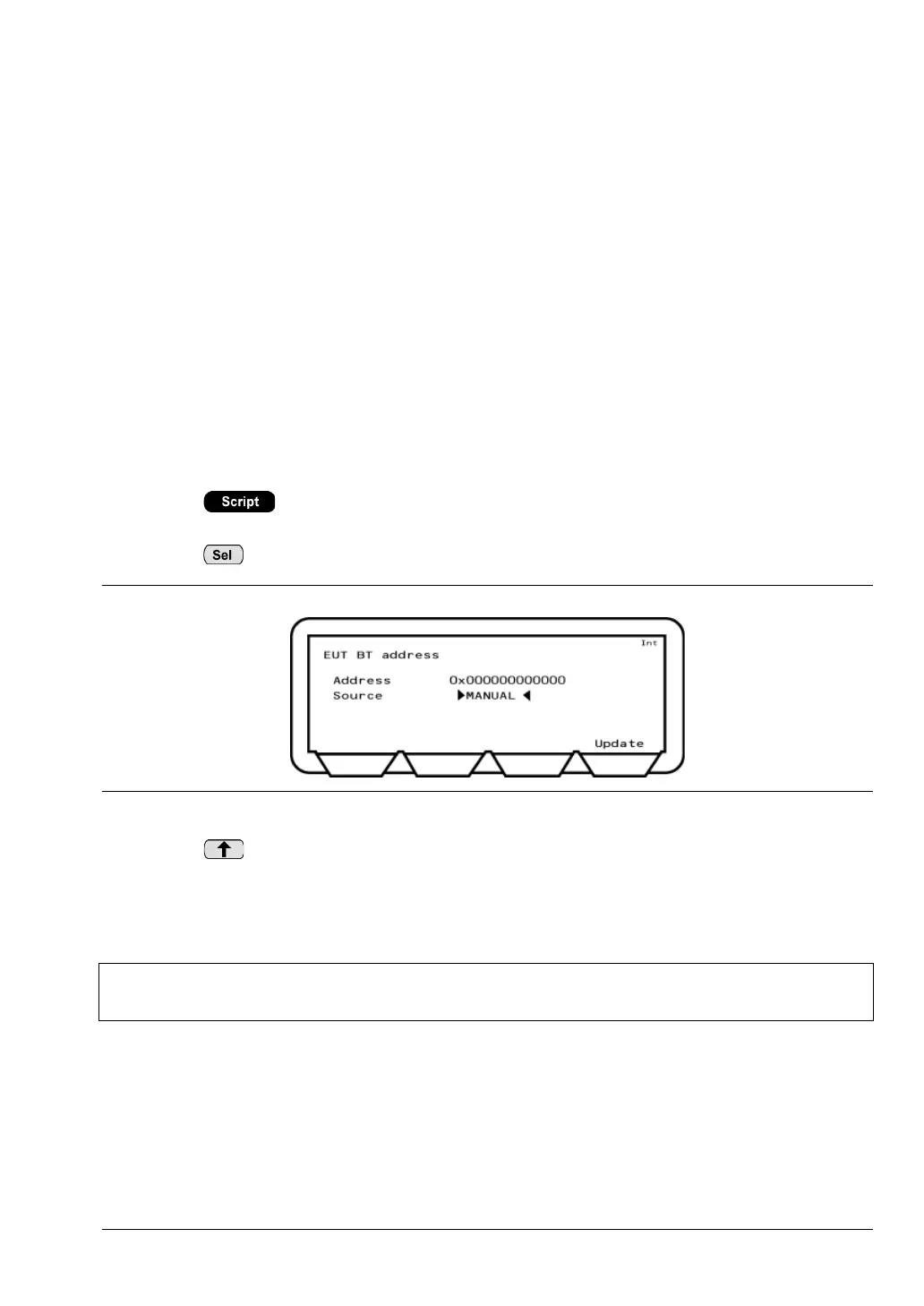
1. Press > [EUT addr] to display the page at which the Bluetooth connection
settings are made.
2. Press to toggle the “Source” setting to “MANUAL”.
3. Press or [Update] to move the cursor to “Address” and enter the address from the
keypad in the manner outlined in chapter 4.
4. Enable EUT test mode and page scanning.
5. Press [Enter] to complete data entry.
Figure 6-1. Entering the Bluetooth Address Manually
Note
The “MANUAL” setting is not suitable for low energy testing. Refer to section 6.2
for details.














 To Next Page