MT8852B Operation Manual PN: 13000-00205 Rev. N 12-1
Chapter 12 — Signal Generator
12-1 Setting Up the Bluetooth Interferer
The MT8852B can be set up to perform the functionality of a Bluetooth interferer as defined
in the Bluetooth RF test specification. This functionality allows the user to reduce overheads
by removing the need to purchase expensive digital signal generators.
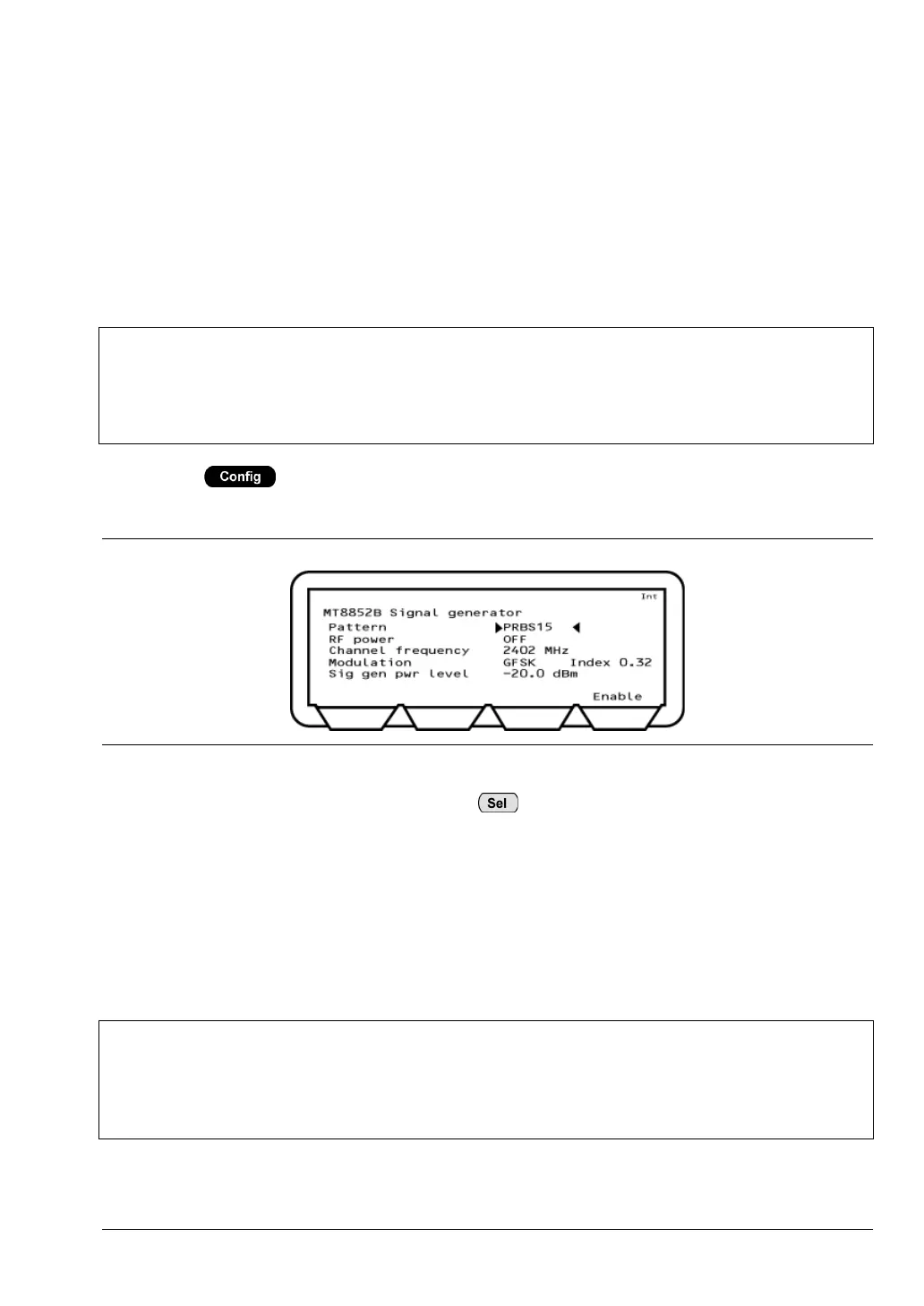
1. Press > "MT8852B" > "Signal generator".
The MT8852B Signal generator page displays.
2. Move the cursor to “Pattern” and press to select the required bit pattern. There
are five options available: 1010101010, 11110000, PRBS9, PRBS15, and CW
(unmodulated carrier wave).
3. Use the arrow keys to navigate to the other items on the page and make settings as
required in the normal manner.
4. Press [Enable] to turn on the signal.
5. Press [Exit] to turn off the signal.
Note
An interfering Bluetooth signal source is required to perform the following test
cases:
• Basic Rate C/I performance and Intermodulation performance.
• EDR C/I performance.
Figure 12-1. MT8852B Signal Generator
Note
Path loss compensation settings (table or fixed offset) are not applied to the signal
generator output.
To compensate for path loss, adjust the signal generator power level setting.














 To Next Page