3-139
Confidential
11.14 Paper feed jam sensor PCB ASSY
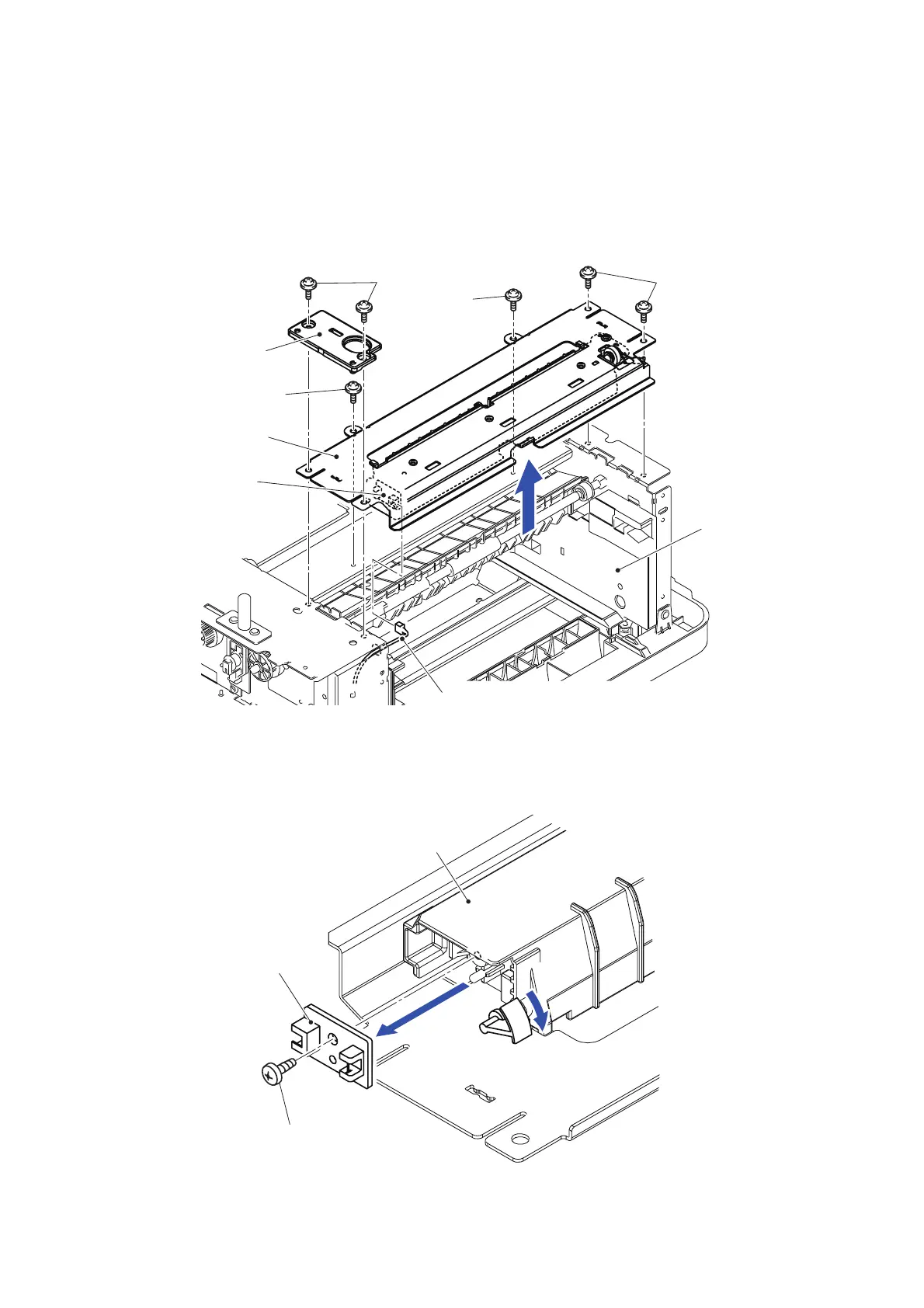
(1) Put the LT frame unit back to the original orientation.
(2) Remove the two Taptite cup S M3x6 SR screws to remove the LT guide plate.
(3) Remove the four Taptite cup S M3x6 SR screws to remove the LT beam F sub ASSY.
(4) As holding up the LT beam F sub ASSY, pull out the ID switch harness from the Paper
feed jam sensor PCB ASSY.
Fig. 3-173
(5) Remove the Taptite bind B M3x8 screw to remove the Paper feed jam sensor PCB ASSY
from the LT outer chute.
Fig. 3-174
LT beam F sub ASSY
LT guide plate
Taptite cup S M3x6 SR
Taptite cup S M3x6 SR
<Front>
LT frame unit
Paper feed jam
ID switch harness
sensor PCB ASSY
Taptite cup S M3x6 SR
Taptite cup S
M3x6 SR
Taptite bind B M3x8
Paper feed jam sensor PCB ASSY
5a
5b
LT outer chute



 To Next Page
 Loading...












