4-14
Confidential
2.6 Printing of All Check Patterns
(1) Connect the machine to the computer using a USB cable in the initial state of the
maintenance mode.
(2) Start "filedg32.exe" on the computer.
(3) Drag and drop the all patterns data (pattern01.prn) file to Brother Maintenance USB
Printer in the [filedg32] window. The all patterns data is printed.
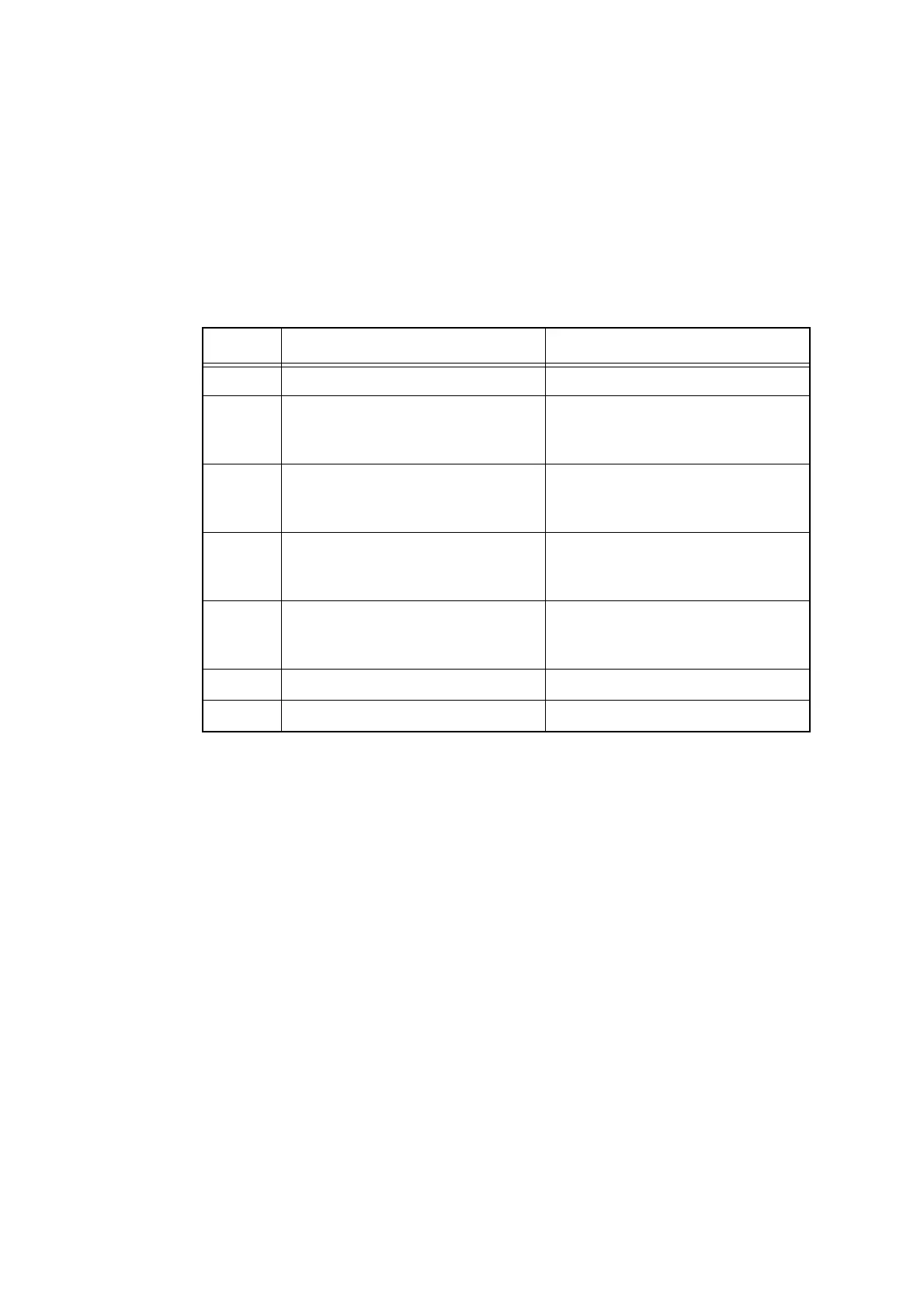
(4) Check the printed patterns, and if there is a problem, go to the corresponding item and
make an adjustment again.
Check item Check method
A Missing dot check No dot missing
B Front edge margin in single-sided
printing
Inclination
5±1.5mm or less
Difference between right and left:
1.0mm or less
C Left-end margin in single-sided
printing
Inclination
13±2.0mm or less
Difference between top and bottom:
1.3mm or less
D Front edge margin in 2-sided print-
ing
Inclination
5±1.5mm or less
Difference between right and left:
1.5mm or less
E Left-end margin in 2-sided printing
Inclination
13±2.5mm or less
Difference between top and bottom:
2.0mm or less
F Ghost No ghost found
G Vertical streak No vertical streak found



 To Next Page
 Loading...












