4
4
4-120
4-120
Disassembly/Assembly > Document Exposure/Feeder System > Removing the DADF Pickup Unit (L418S/L410/L190) > Procedure
Disassembly/Assembly > Document Exposure/Feeder System > Removing the DADF Pickup Unit (L418S/L410/L190) > Procedure
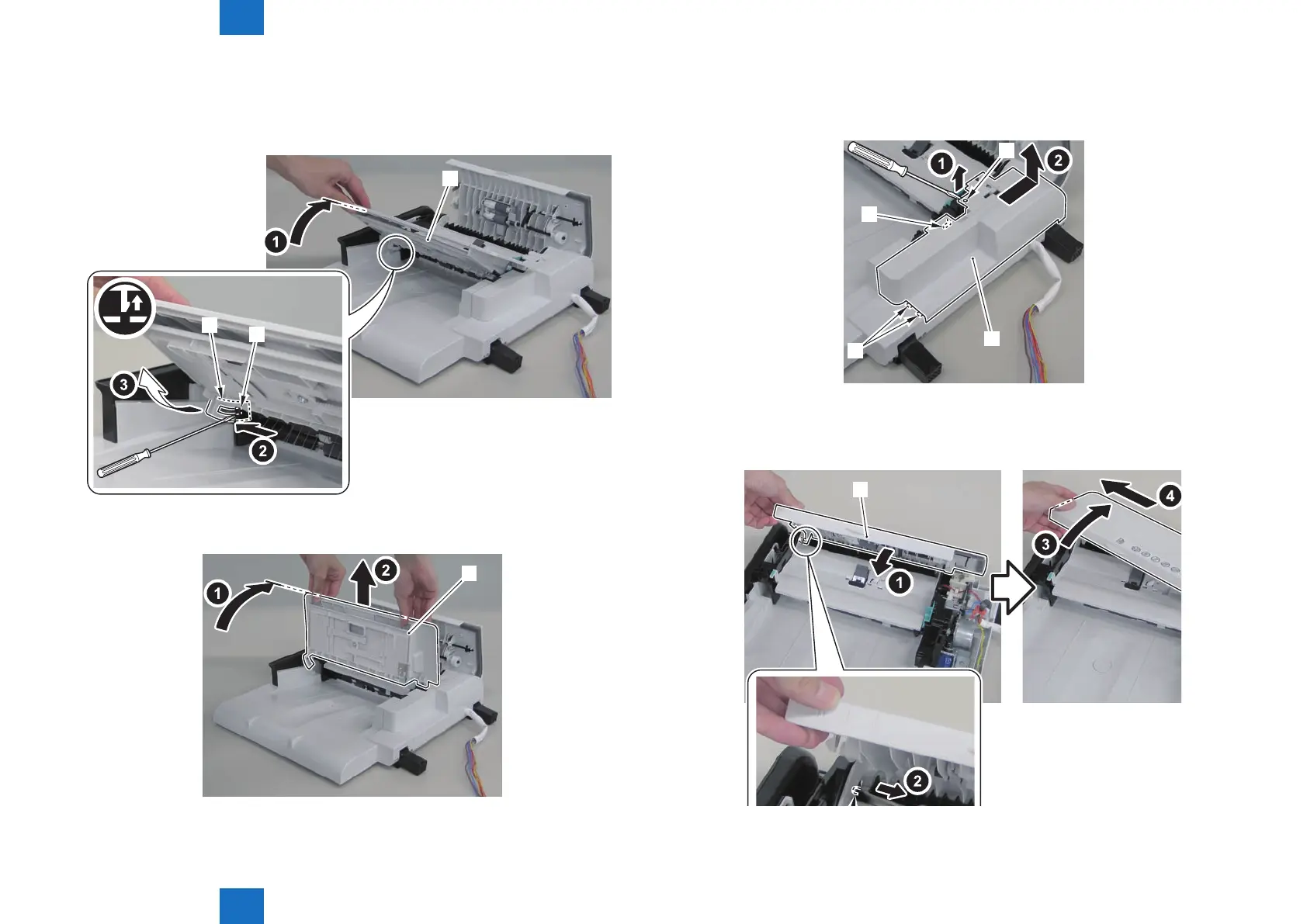
3)Open the DADF tray[1] until it stops. Then release the claw by pushing the hook[2] in the
direction of the arrow[A] with a at-blade screwdriver, and move the tray in the direction of
the arrow.
[1]
[2]
[3]
4)Open the DADF tray[1] to the position shown in the gure below, and remove it upward.
[1]
F-4-282
F-4-283
5)Remove the DADF upper rear cover[1].
• 1 boss[2]
• 3 hooks[3]
[1]
[2]
[3]
[3]
6)Remove the DADF upper cover[1].
• 2 shafts[2]
[1]
F-4-284
F-4-285















 To Next Page