2
2
2-73
2-73
Technology > MEAP > Setting the method to login to SMS > Outline
Technology > MEAP > Setting the method to login to SMS > Outline
●
Setting for login by RLS Authentication
The procedures for changing the RLS authentication Start/ Stop settings are as follows.
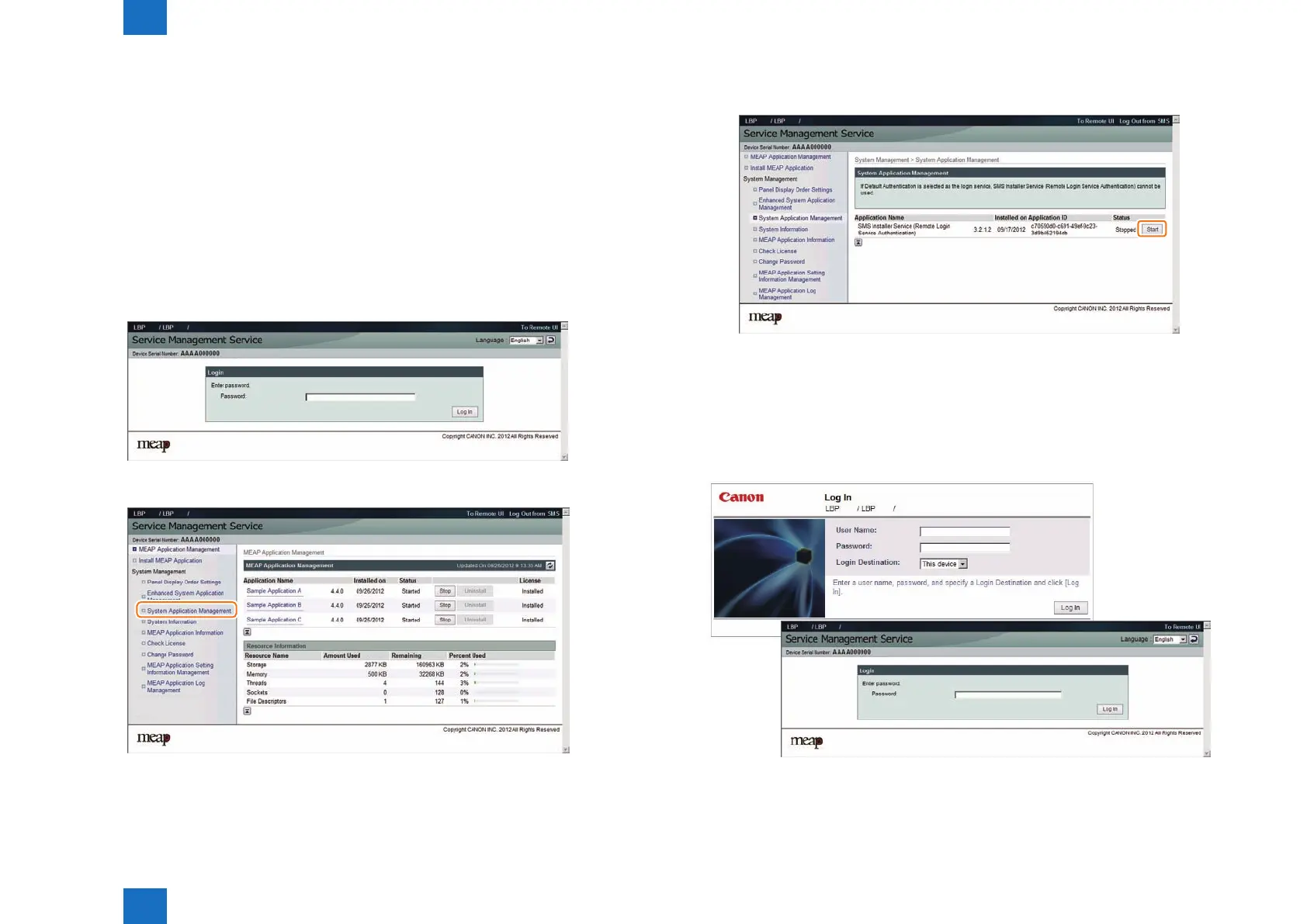
1) Access the SMS login screen using the normal method (password authentication). The
URL is shown below.
URL: https://<IP address of MEAP device>:8443/sms/rls/
Ex.) https://172.16.188.240:8443/sms/rls
2) Enter the password in the password entry eld, and click the [Log In] button. The default
password is "MeapSmsLogin". (Case sensitive)
Login screen by Password Authentication
3) Select [System Application Management] on System Management menu.
F-2-157
F-2-158
4) Click on [Start] or [Stop] button shown on Status eld of SMS Installer Service (Remote
Login Service Authentication) to check if the status is changed.
5) Log out and then log in again and access via the RLS authentication login window.
When RLS authentication is set to [Start], another RLS login screen is rstly shown. When
accessing to RLS status screen with the setting of [Stop], the user will be redirected to the
password authentication screen.
RLS authentication started screen and RLS authentication stopped screen
F-2-159
F-2-160











 To Next Page