3
3
3-39
3-39
Disassembly/Assembly > Controller System > Removing the Engine Controller PCB (LBP3580/6780x) > Procedure
Disassembly/Assembly > Controller System > Removing the Engine Controller PCB (LBP3580/6780x) > Procedure
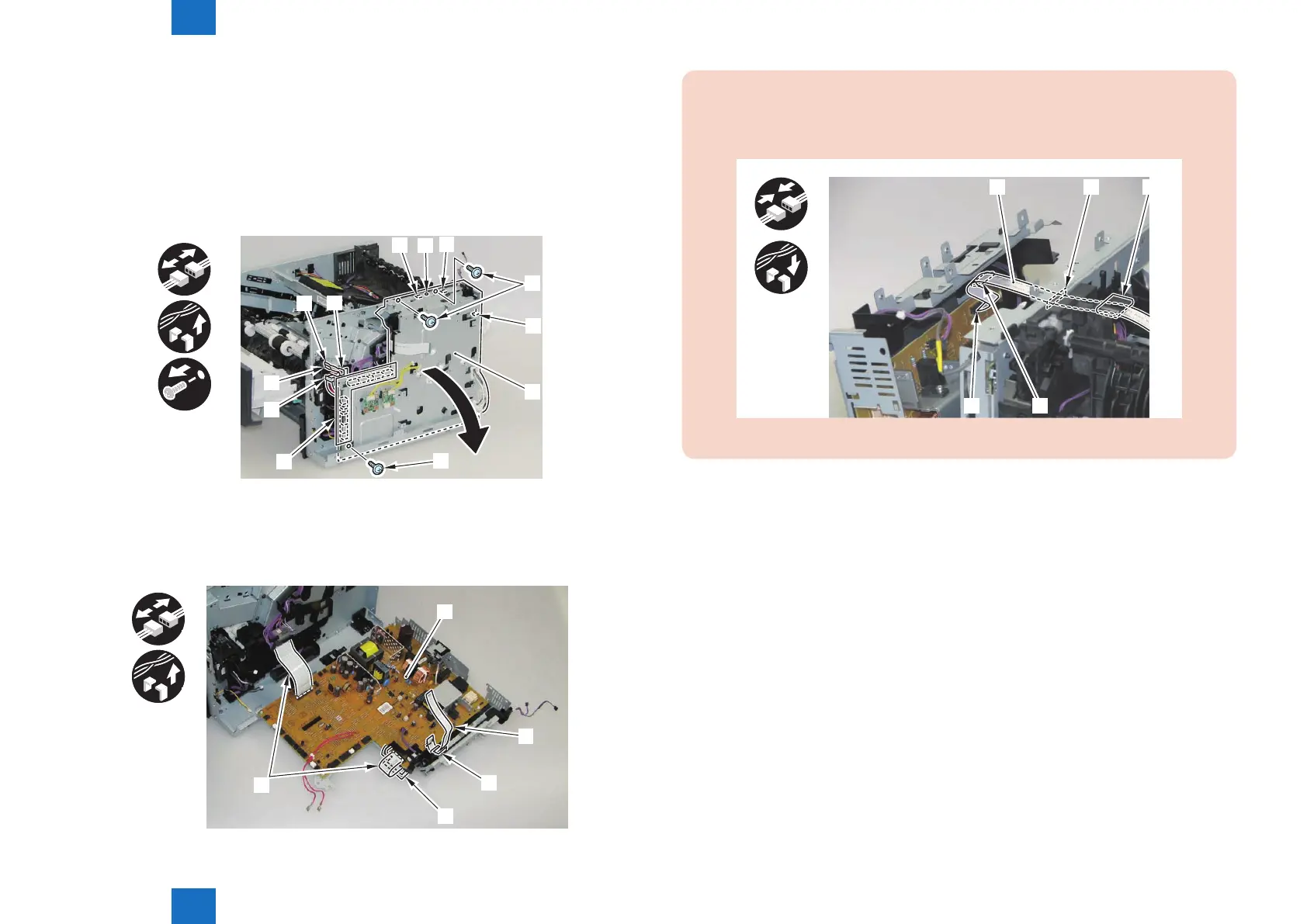
6) Open the Engine Controller PCB [1].
• 11 Connectors [2]
• 2 Faston [3]
• 1 Harness Guide [A]
• 1 Harness Guide [B]
• 3 Screws (black) [4]
• 1 Boss [5]
• 3 Hooks [6]
x3
x13
x2
[6]
[5]
[6]
[A]
[3]
[3]
[B]
[2]
[4]
[6]
[4]
[1]
7) Remove the Engine Controller PCB [1].
• 3 Flat Cables [2]
• 1 Harness Guide [A]
• 1 Harness Guide [B]
x3
[2]
[A]
[B]
[2]
[1]
x2
F-3-82
F-3-83
CAUTION:
When installing the Laser Scanner Flat Cable [1], be sure to install it to the connector [2],
Guide [3], hole [4] on the Right Side Plate, and Ferrite Core [5], in that order.
[1]
[2] [3]
[4] [5]
F-3-84














 To Next Page