3
3
3-44
3-44
Disassembly/Assembly > Controller System > Removing the High Voltage Power Supply Unit > Procedure
Disassembly/Assembly > Controller System > Removing the High Voltage Power Supply Unit > Procedure
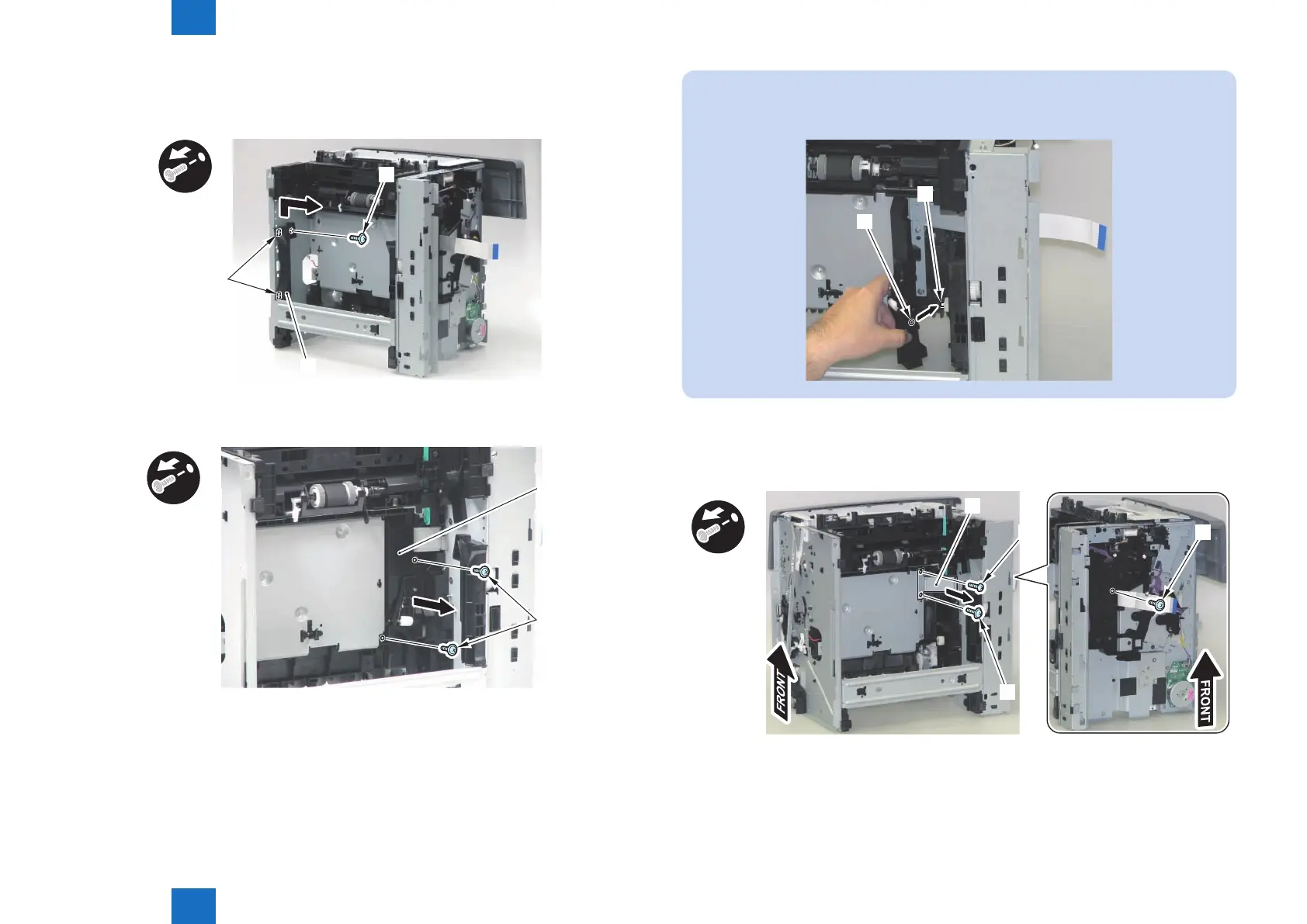
5) Remove the Cassette Guide [1].
• 1 Screw [2]
• 2 Hooks [3]
[1]
[2]
[3]
6) Remove the Reference Guide [1].
• 2 Screws [2]
[1]
[2]
x2
F-3-94
F-3-95
NOTE:
When installing the Reference Guide, be sure to align the shaft [1] with the Shaft Hole [2].
[1]
[2]
7) Remove the Cable Guide Plate [1].
• 2 Screws (black) [2]
• 1 Screw (silver) [3]
x3
[1]
[3]
[2]
[2]
F-3-96














 To Next Page