5
5
5-21
5-21
Troubleshooting > Error Codes > Error Code Details (LBP3580/6780x)
Troubleshooting > Error Codes > Error Code Details (LBP3580/6780x)
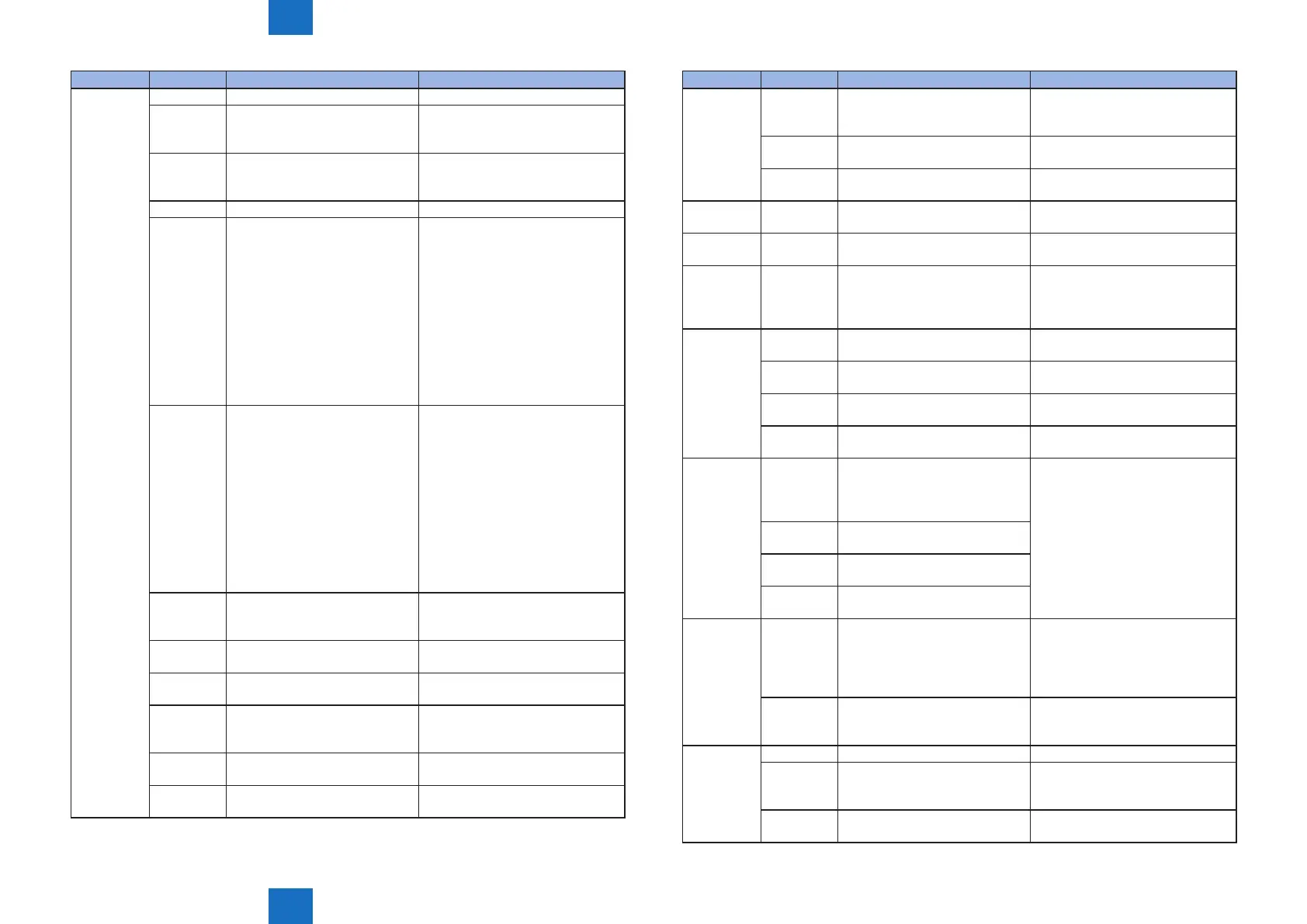
Error Code Detail Code Main Cause/Detection Content Condition/Countermeasure
E602 0001 Insufcient HDD capacity Replace the HDD.
0002 Bootable load failure
A Bootable CD was not contained.
A Bootable CD was damaged.
Burn the Bootable CD again.
0006 Bootable load failure
A Bootable CD was not contained.
A Bootable CD was damaged.
Burn the Bootable CD again.
0007 The contents cannot be detected. Create Bootable again.
0008 There is not enough free space
in the alternative block of NAND
Flash
1) Start service mode.
2) Clear the error from the service
mode menu.
3) Reboot the machine to stop the
error code.
4) Export the user information from
the old NAND Flash.
5) Replace the Controller Board.
(Change the NAND Flash.)
6) Import the user information to the
new NAND Flash.
0009 The power supply was interrupted
due to power failure or
disconnection of the power plug.
The MEAP area in the Flash ROM
(NAND ROM) became read-only
and cannot be written. MEAP
cannot be started.
Initialize the MEAP area in Flash
ROM (NAND ROM) by enabling
the MEAP recovery menu
from service mode or special
management mode and rebooting
the machine.
Since the installed MEAP
applications and their
management information are
all cleared, MEAP needs to be
reinstalled.
1102 /APL_MEAP error (The le
systemcannot be initialized
properly.)
1112 /APL_MEAP error (device access
error EROFS)
1113 /APL_MEAP error (device access
error EIO)
1302 /APL_KEEP error (The le
systemcannot be initialized
properly.)
1312 /APL_KEEP error (device access
error EROFS)
1313 /APL_KEEP error (device access
error EIO)
Error Code Detail Code Main Cause/Detection Content Condition/Countermeasure
E602 1602 /APL_CDS error (The le
systemcannot be initialized
properly.)
1612 /APL_CDS error (device access
error EROFS)
1613 /APL_CDS error (device access
error EIO)
E604 0000 Memory capacity
error
(
Lack of memory capacity
)
Check the memory capacity inserted
to each slot.
E616 0001 Installed MEAP applications have
been deleted.
E721 0001 Printer engine which is not
supported by the controller is
connected.Printer engine of a
different model is connected
.
Connect with the printer engine
appropriate to the model.
E730 C000 The memory cannot be obtained
at initialization.
Turn OFF and then ON the power.
C001 An error occurred when accessing
the HDD.
Turn OFF and then ON the power.
D000 The memory cannot be obtained
at initialization.
Turn OFF and then ON the power.
D001 An error occurred when accessing
the HDD.
Turn OFF and then ON the power.
E733 0001 Error in printer communication
(illegal communication after
establishing communication,
parity error)
1) Turn OFF and then ON the power.
2) Replace the Engine Controller
PCB.
0003 Error in printer communication
(mismatch of country setting)
0004 Error in printer communication
(undened command error)
0006
Error in printer communication
(unknown communication error)
E740 0002 An invalid MAC address has been
detected.
1) Check the Mac address.
2) Write the address to the Mac
address.
3) Replace the board.
0004 LAN Controller Chip access error 1) Check around the LAN Chip.
2) Replace the board.
E744 0900 Model code mismatch Change to proper bootable.
1000 Mismatch of the series or model
of the rmware sent at the time of
downloading
Check the supported series or model
of the rmware, and burn the correct
series or model of rmware.
1100 Falsication of the Main Controller
Board has been detected.
Replace the Main Controller Board.














 To Next Page