2
2
2-52
2-52
Technology > MEAP > MEAP Application Management > Managing the License File
Technology > MEAP > MEAP Application Management > Managing the License File
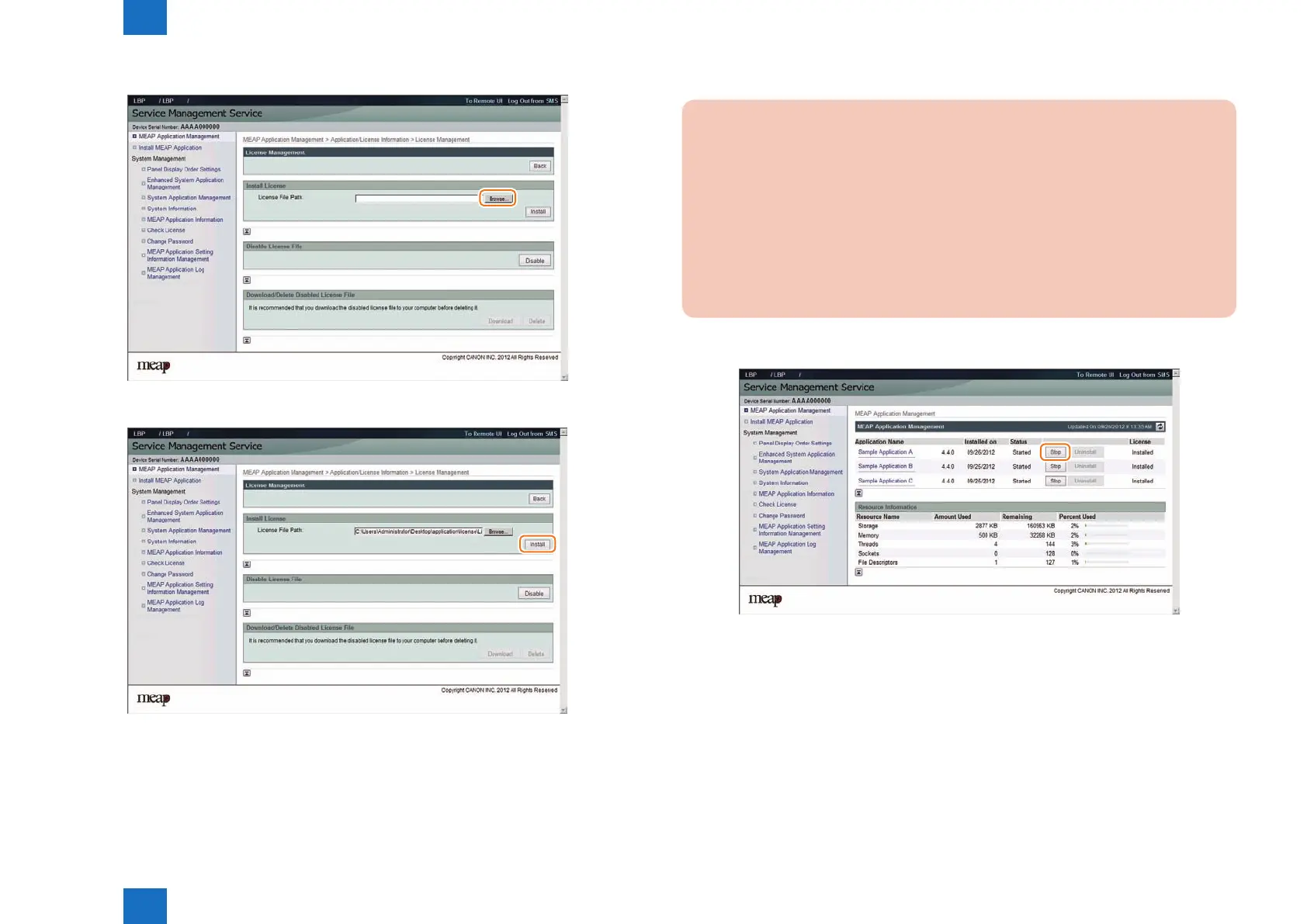
4) Click [ Browse ] button, and select the license le you want to install.
5) Click [ Install ] button.
6) Check the content of the conrmation page, and click [ OK ] button.
F-2-95
F-2-96
●
Procedure disabling a license le (suspending a license)
CAUTION:
• Since the license le cannot be disabled when the application is still running, the
application needs to be stopped before disabling the license le.
• Once suspended, the status of the license will be ‘Not Installed’, and its application
will no longer be available for use.
• You can later restore a suspended license le as long as you are doing so on the
same iR, the device with the same device serial number.
• If the machine needs to be replaced due to a device failure, use the transfer license
during the replacement. (See "License for forwarding")
1) Stop the application you want to uninstall on MEAP Application Management page.
F-2-97














 To Next Page