4. AIS OPERATION
4-15
4.14.2 How to set the conditions for association
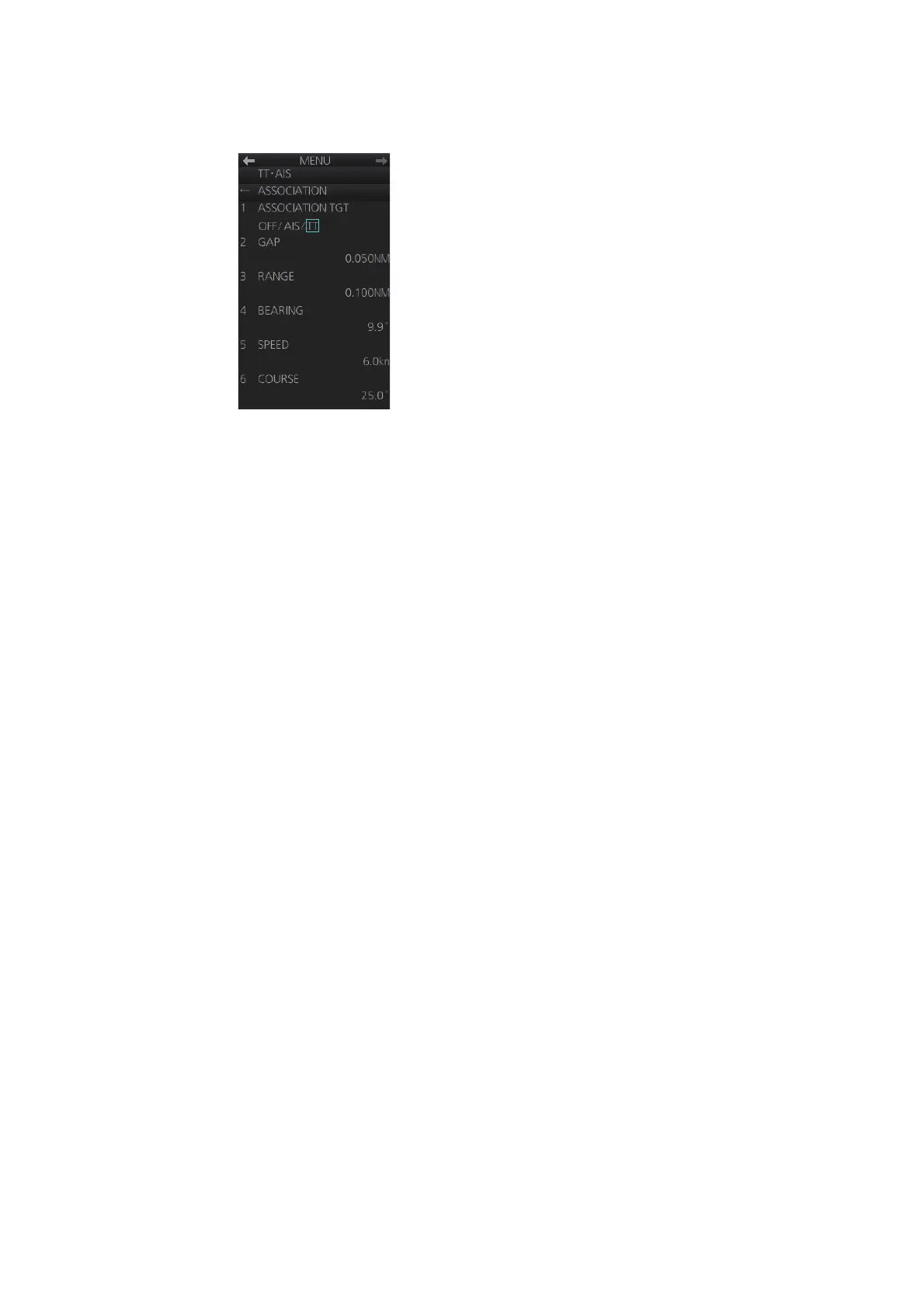
1. Open the menu then select the [2 TT•AIS] and [6 ASSOCIATION] menus.
2. Enter the association conditions, referring to the following:
[1 ASSOCIATION TGT]: Disable Association with [OFF], or select [AIS] or [TT].
[AIS] selects the AIS symbol for association target; [TT] selects the TT symbol for
the association target.
[2 GAP]: Range between AIS target and TT.
Setting range: 0.000-0.050(NM)
[3 RANGE]: Enter the range difference from own ship to AIS target and TT.
setting range: 0.000-0.100(NM)
[4 BEARING]: Enter the bearing difference from own ship to AIS target and TT.
Setting range: 0.0-9.9(°)
[5 SPEED]: Enter the speed difference between AIS target and TT.
Setting range: 0.0-6.0(kn)
[6 COURSE]: Enter the course difference between AIS target and TT.
Setting range: 0.0-25.0(°)
When the association criteria are met
• either the AIS or TT symbol is erased according to association made in
section 4.14.1.
• the Alert 560 (ALF format: 10560) "Association" appears in the [Alert] box.



 To Next Page