22. SETTINGS MENU
22-2
22.2 File Export
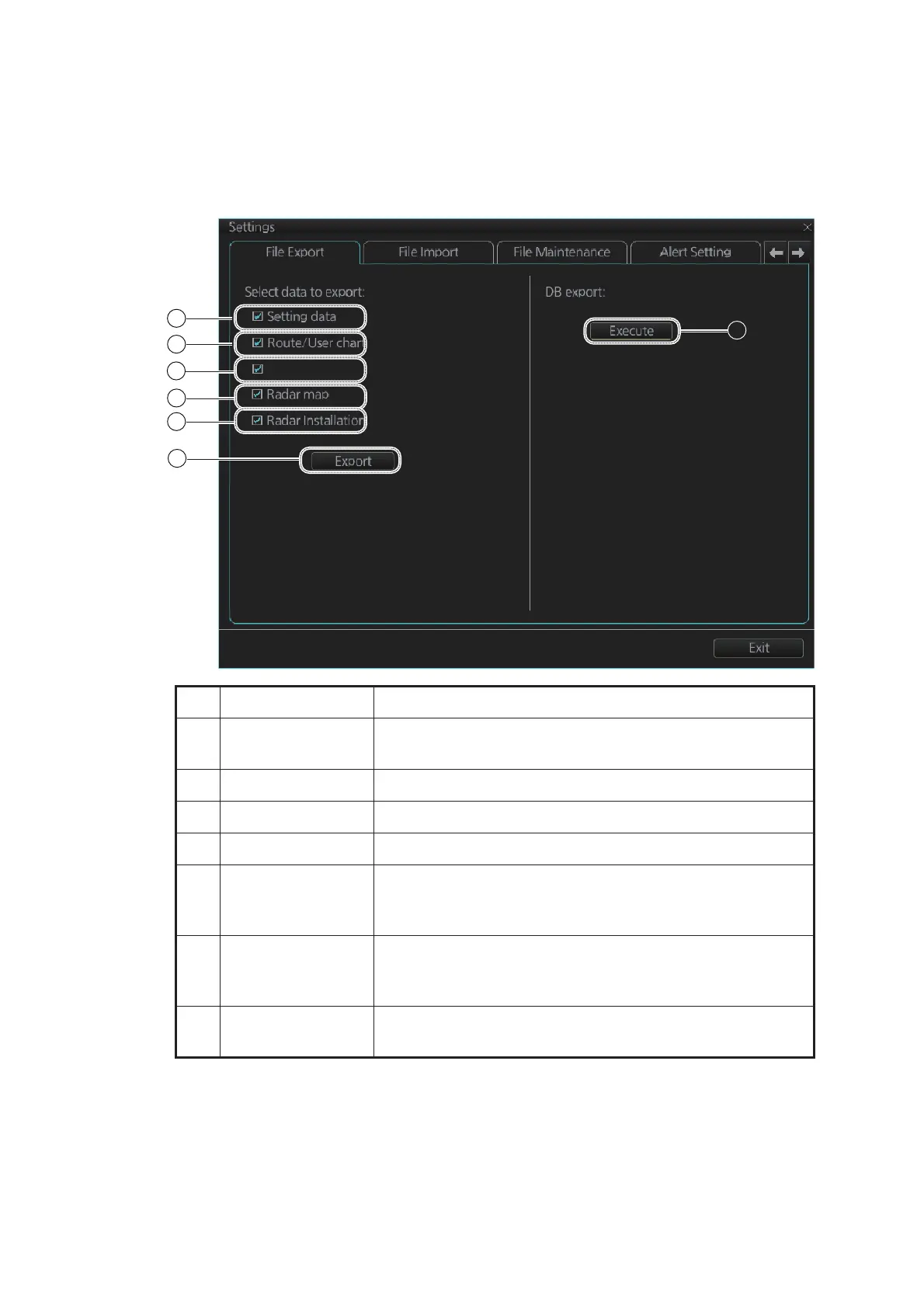
The [File Export] page lets you export setting data, routes, user charts, radar maps
and radar installation to a USB flash memory, in .zip file format, to share with other like
units.
Note 1: Item 5 does not appear until an object is selected.
Note 2: The message "Now processing" appears during the exporting. The message
"File export finished." appears upon completion of the exporting. Click the [OK] button.
No. Name Description
1 [Setting data] Check to export setting data (radar, chart, conning, com-
mon, performance monitor data) and ten user profile data.
2 [Route/User chart] Check to export all routes and user charts.
3 [Playback data] No use.
4 [Radar map] Check to export all radar maps.
5 [Radar Installation] Check to export all setting of the [RADAR INSTALLATION]
menu. The [RADAR INSTALLATION] menu is for a qualified
technician only.
6 [Export] button Click the button to open the [SAVE FILE] dialog box. Select
the destination to save then click the [Save] button to export
all selected objects.
7 [Execute] button Save the inside check data to SSD. Only a qualified techni-
cian can extract the check data.



 To Next Page