6. CHART OVERVIEW
6-18
6.6 Cursor Position Box
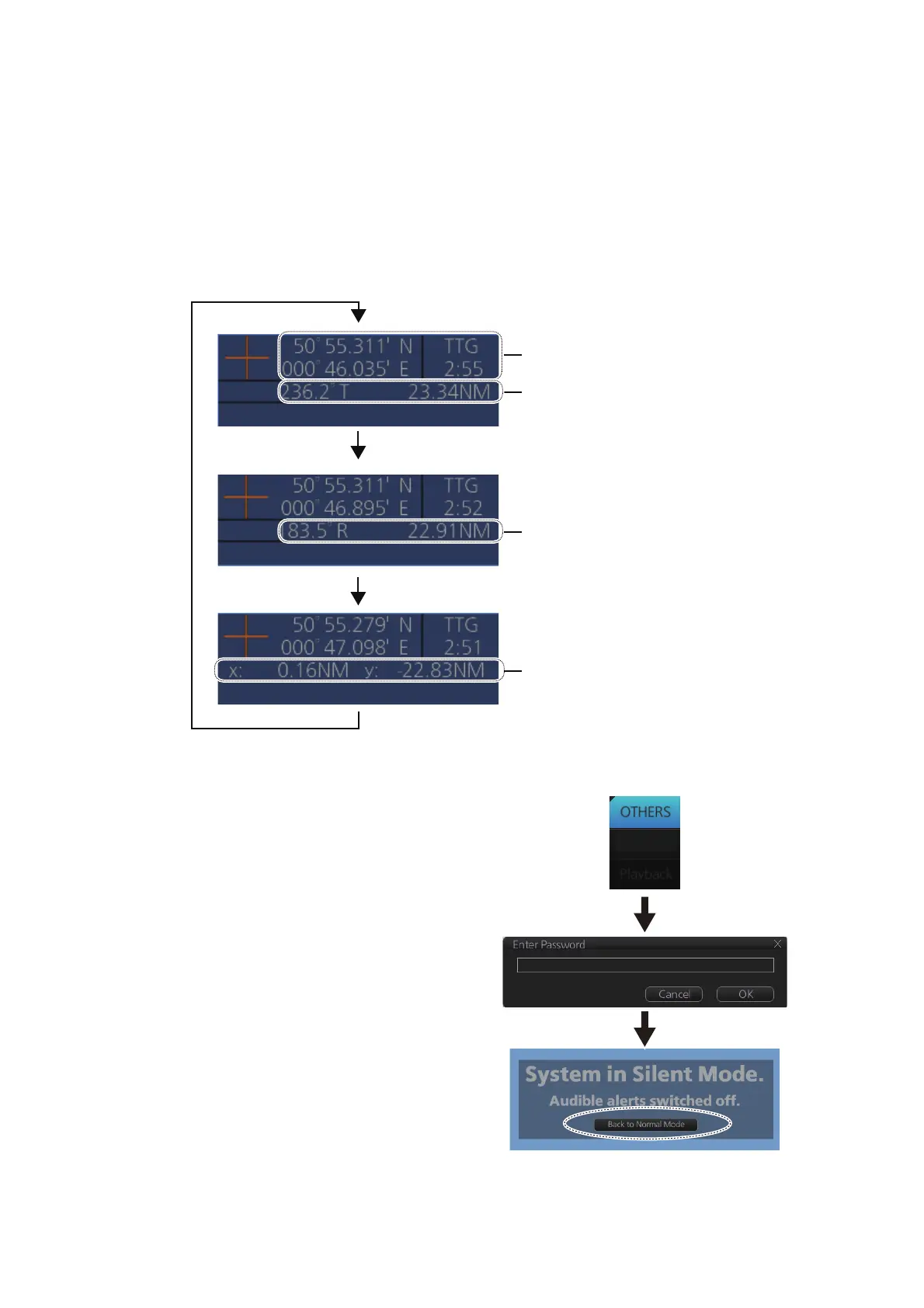
The Cursor position box shows
• Cursor position in latitude and longitude
• Time to go to the cursor position
• The bearing (True or Relative) and range to the cursor position, or x-y coordinates
of cursor position. Click the bearing and range indication or x-y coordinates indica-
tion to switch the indication, in the sequence shown below.
6.7 The Silent Mode
The silent mode, which requires a pass-
word to activate, deactivates the audio
alarms from the chart system. Use this
mode when the chart system is not re-
quired, like in a harbor. To go to the
standby mode, first click the [OTHERS]
button on the Status bar in the [CHART
for RADAR] mode then click [SILENT].
Have the holder of the password enter the
password then click the [OK] button.
To return to normal operation, click [Back
to Normal Mode].
Note: The silent mode is automatically re-
leased when switching the operating
mode (radar/chart radar/conning).
Cursor position, Time to go
to cursor position
Bearing(T) and range to cursor position
Bearing(R) and range to cursor position
x-y coordinates of cursor position
Enter password;
click [OK] button.
Click to return to normal operation.
Click [OTHERS],
[SILENT].
SILENT



 To Next Page