7. HOW TO MANAGE CHARTS
7-17
7.14 Catalog of Chart Cells
A catalog is used to view graphical coverage of the charts stored in your SSD. Avail-
able charts are displayed using their limits of charts. Note that sometimes the real cov-
erage of the charts may be considerably less than the declared limits of it.
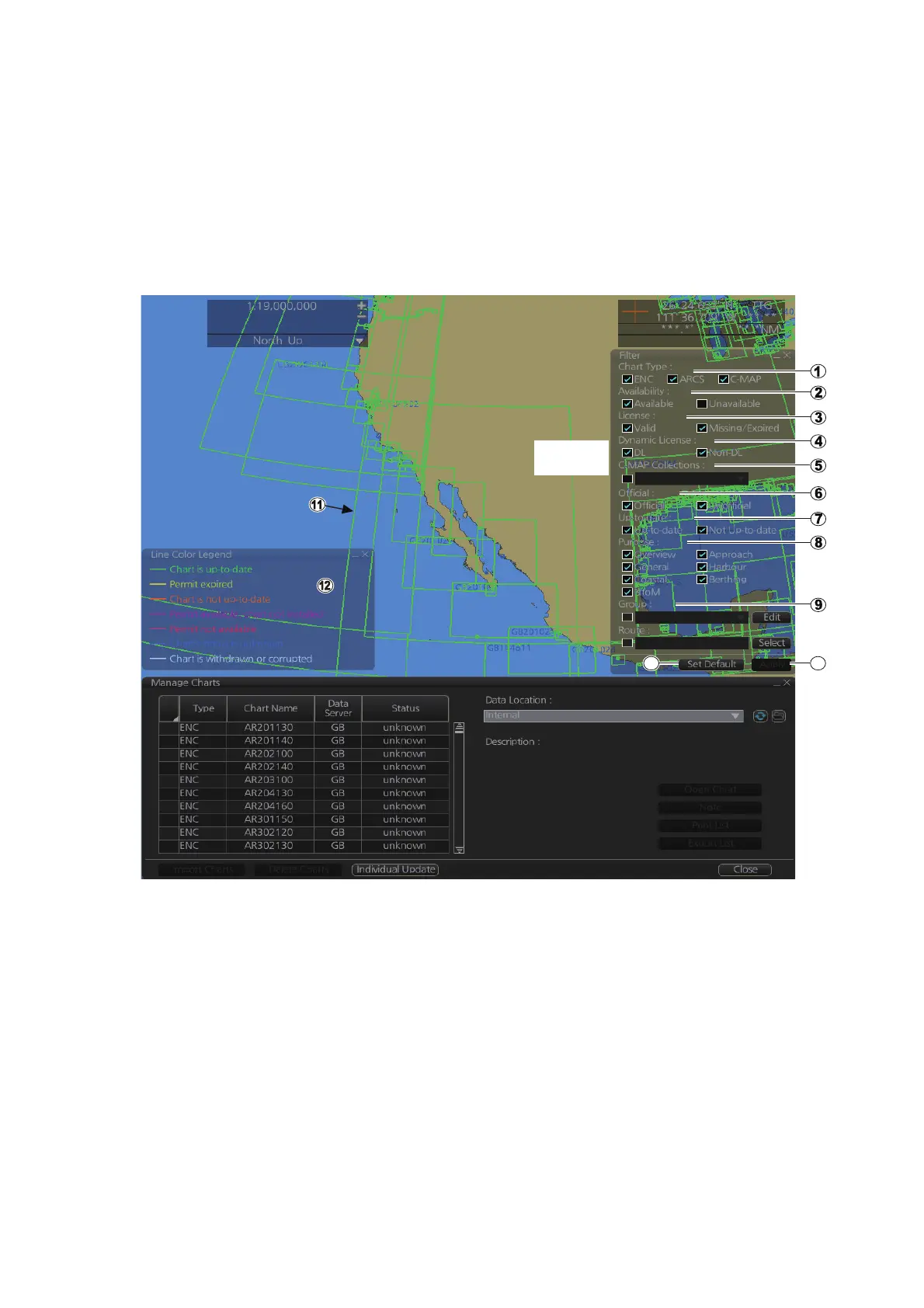
To display the catalog, get into the Chart maintenance mode then click the [Manage
Charts] button on the InstantAccess bar™. The [Filter] window lets you select what to
display. Check or uncheck items as appropriate.
1) [Chart Type]
[ENC]: Display ENC charts.
[ARCS]: Display ARCS charts (no use).
[C-MAP]: Display C-MAP charts.
2) [Availability]
Display available or unavailable charts.
3) [License]
[Valid]: Cell with valid license.
[Missing/Expired]: Cell with missing or expired license.
[Valid] + [Missing/Expired]: Display cell regardless of license.
Uncheck both: Hide all cells.
4) [Dynamic License]
Display DL or non-DL C-MAP charts.



 To Next Page