20. ALERTS
20-6
Category of alert and place of alert acknowledgement
The place of alert acknowledgement depends on the category of the alert.
20.5 Alert List
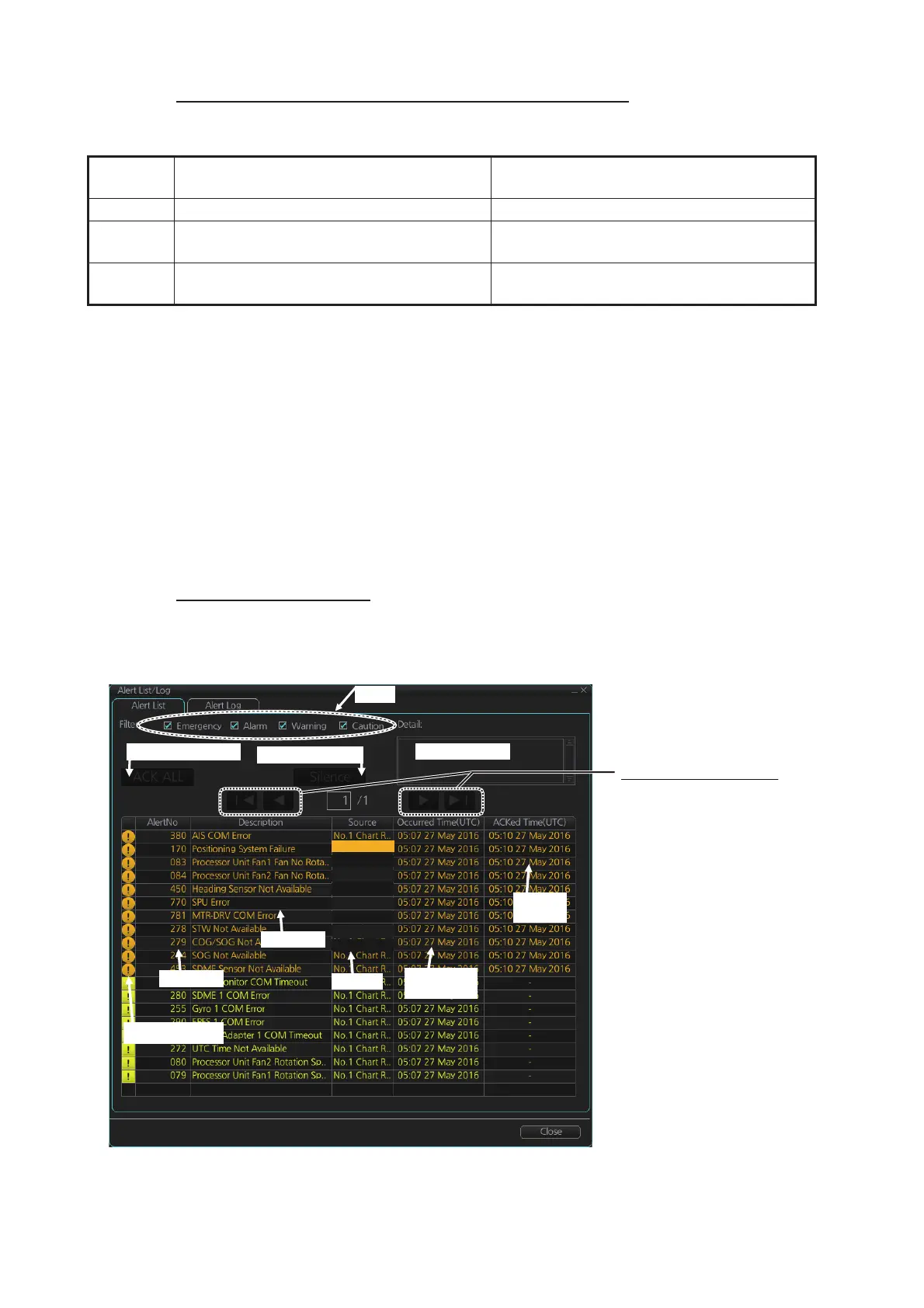
The [Alert List] displays all active alerts, with unacknowledged alerts at the top, in pri-
ority order. The ZDA sentence is required to display the time in the list.
Note: The [Alert List] cannot be opened while the radar is transmitting.
Alert list in radar mode
To show the alert list in radar mode, right-click the [Alert List/Alert Log] button in the
Alert box, click [Alert List/Alert Log] then click the [Alert List] tab.
Category Where the alert is generated
Place of alert
acknowledgement
A Equipment that generated the alert. Equipment that generated the alert.
B Equipment and AMS* (Alert Management
System) *No use
Equipment that generated the alert or AMS.
C IAS (Integrated Automation System) gen-
erated engine-related alert
–
The log shows the following information for each alert:
• Alert no.
• Alert text
• Source of alert
• Time (UTC) alert was generated
• Time (UTC) alert was acknowledged
• Details about the alert selected
• Quantity of unacknowledged alerts*
*: Chart mode only.
Alert text
Alert details
Time
ACKed
Alert info icon
Time
generated
Page selection buttons
Click to select page.
Available only when
multiple pages exist.
► : Show next page
►| : Jump to last page
◄ : Show previous page
|◄ : Jump to first page
Filter
Alert no.
Source
Silence buzzer
ACK ALL button
No.1 Chart R ..
No.1 Chart R ..
No.1 Chart R ..
No.1 Chart R ..
No.1 Chart R ..
No.1 Chart R ..
No.1 Chart R ..
No.1 Chart R ..



 To Next Page