EasyManua.ls Logo

Furuno FCR-2139S-BB - Page 406

Furuno FCR-2139S-BB
541 pages
Print Icon
To Next Page IconTo Next Page
To Previous Page IconTo Previous Page
Loading...
18. TT AND AIS DISPLAYS
18-8
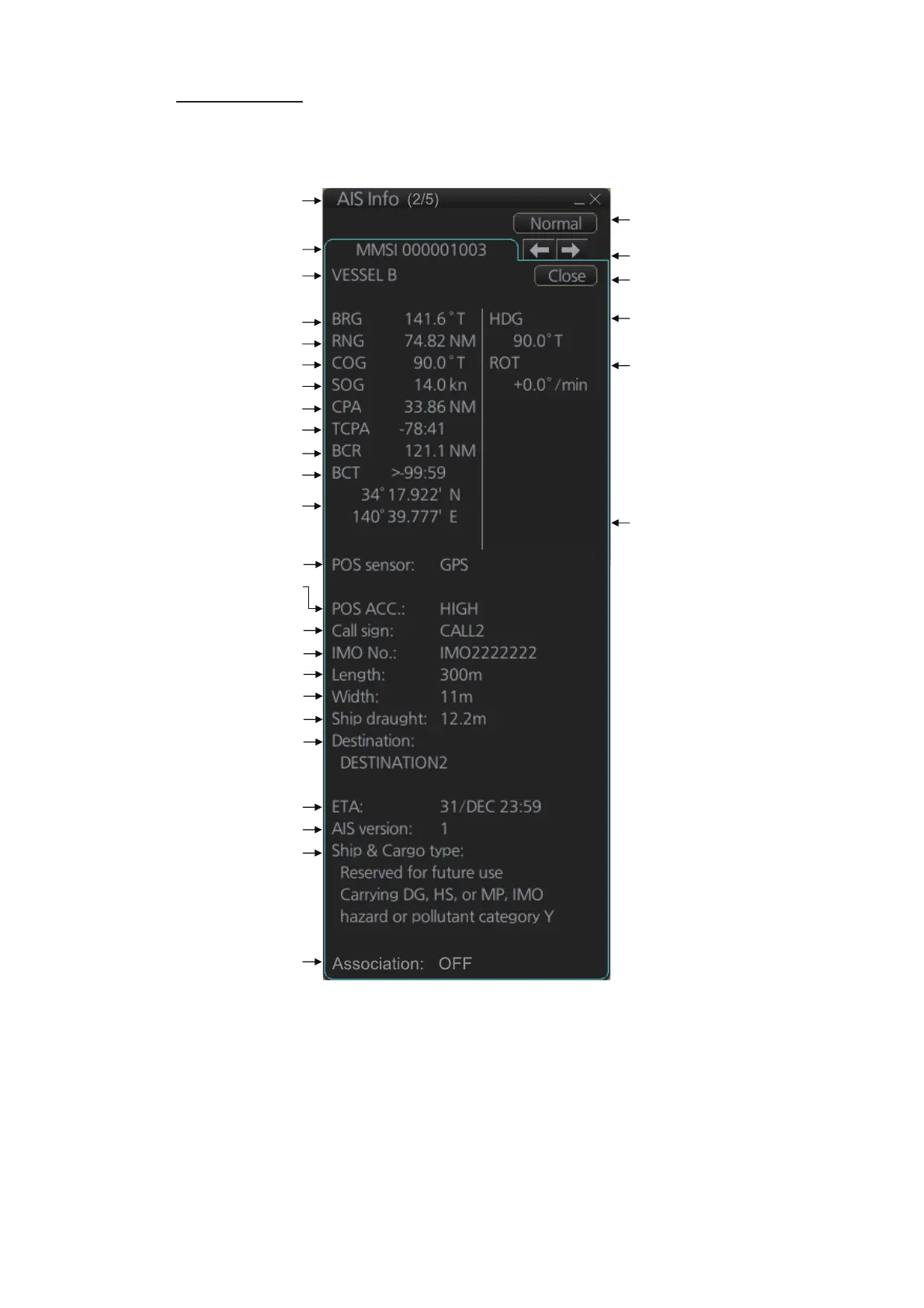
Expanded data
Put the cursor on a desired AIS target then push the left button. Click the [Expand] but-
ton (level of detail) on the [AIS Info] box to show expanded AIS data.
NAV status:
Underway
using
engine
Title bar
MMSI
Bearing
Range
Course over ground
Speed over ground
CPA
TCPA
Bow cross range
Bow cross time
Position
“Level of detail”
button
Heading
Navigation status*
2
Rate of turn
Scroll buttons*
1
Close button
Position sensor
Position sensor accuracy
(HIGH, LOW)
Call sign
IMO No.
Length
Width
Draught
Destination
ETA
AIS version no.
Ship & Cargo type
Vessel name
Association condition
*
1
: Scroll buttons appear when there are multiple AIS targets.
*
2
: Where the selected AIS target is an aircraft, the STATUS box
shows the aircraft’s altitude.

Table of Contents

Other manuals for Furuno FCR-2139S-BB

Related product manuals